
Cheapest AI Video Generators for Marketers (2026): Pricing & Cost Guide
Compare AI video generator prices, credits and cost per usable clip. Explore our 12-clip editorial test, pricing differences and hidden costs.
Compare AI video generator prices, credits and cost per usable clip. Explore our 12-clip editorial test, pricing differences and hidden costs.
Finding the cheapest AI video generator means looking beyond the monthly subscription price. For marketers creating TikTok ads, product videos and UGC-style content, the key question is: How much does one usable video actually cost?
For example, Pika 2.5's API lists a five-second, 720p text-to-video clip at US$0.20, excluding any membership fees. Other platforms, such as Adobe Firefly, use subscription-based pricing with monthly credit allowances.
These pricing models are not directly comparable. The actual cost also depends on video settings, unused credits and how many attempts it takes to produce a usable clip.
This guide compares published pricing, explains how to calculate cost per clip and covers hidden costs such as regenerations, expiring credits, watermarks and commercial-use limits. It also looks at BuzzVideo AI's pricing to help marketers understand what to check before choosing a tool.

About this comparison
This guide is published by BuzzVideo AI. Pricing information is based on official provider websites. Prices, plans and model availability may change, so please check each provider's website for the latest details.
How we compared cost
AI video generators use different pricing models. To make costs easier to compare, we look at the estimated cost per generation and explain where prices are not directly comparable.
How do we calculate cost per clip?
We use three main types of pricing information:
- Monthly subscription fees and included credits
- Credits required for each generation
- Official per-second or per-generation prices
For credit-based tools:
Cost per generation = Credits used per generation × Effective cost per credit
For tools that charge by video length:
Cost per generation = Price per second × Video length
For example, Pika 2.5 API pricing lists five-second, 1080p text-to-video generation at US$0.09 per second. That works out to US$0.45 per generation, excluding any membership fee.
These calculations estimate the cost of one generation. If several attempts are needed, the cost per usable clip may be higher.
Cost per usable clip = Total relevant spending ÷ Number of usable clips
Total relevant spending includes the subscription cost allocated to the period, additional credit purchases and any separately billed generation fees. Do not count the value of credits already included in your subscription as an additional expense.
Use the same cost basis when comparing different tools.
To compare generation costs alone, divide the total generation cost by the number of usable clips.
Why can't every platform be compared using the same settings?
AI video platforms do not always offer the same video lengths, resolutions or generation settings. Web subscriptions and API services may also use different pricing systems.
We use official published prices and calculate dollar costs only when the pricing information is clear. Where prices are not directly comparable, we show the original pricing details instead of forcing them into a ranking.
For subscription-based tools, the effective cost per credit depends on how much of the included allowance you use. Unused credits and additional generations can increase the actual cost per usable clip.
Comparing cost per usable clip across AI video models
Published pricing shows how much one generation costs, but it does not tell you how many attempts you may need to produce a usable video.
To explore this, our editorial team tested four AI video models available in BuzzVideo AI. We used the same product ad brief and generated three clips with each model, producing 12 clips in total.
Our editor recorded the credits used, generation times and number of usable clips.
This was a small, manual editorial test conducted within BuzzVideo AI, not an independent or large-scale benchmark.
Test setup
We used the following settings for the four models:
- Aspect ratio: 9:16
- Video length: 5 seconds
- Resolution: 720p
- Generations per model: 3
- Prompt: The same prompt for all four models
- Extra settings: No additional camera motion, style, seed or strength adjustments
Test prompt:
Create a 5-second vertical product ad for a skincare serum. Show one transparent glass serum bottle standing on a clean beige table. Use soft natural lighting and a simple neutral background. The camera slowly moves closer to the product. Keep the bottle shape, label area and proportions consistent throughout the video. No people, no extra objects, no text overlays, no dramatic effects. The final result should look clean, realistic and suitable for a social media ad.
How we assessed the clips
Our editor watched all 12 videos and assessed whether each clip followed the brief and could move into the editing stage without another generation.
A clip was considered usable if it broadly followed the prompt, maintained the product's shape and proportions, and avoided obvious visual problems.
Five clips were marked as unusable because garbled text appeared on the product labels, making them unsuitable for the intended product ad without another generation.
This was a manual editorial assessment, not an automated quality test.
Same-brief test results
| Model | Credits per generation | Average generation time | Usable clips | Average credits per usable clip | Minimum plan |
|---|---|---|---|---|---|
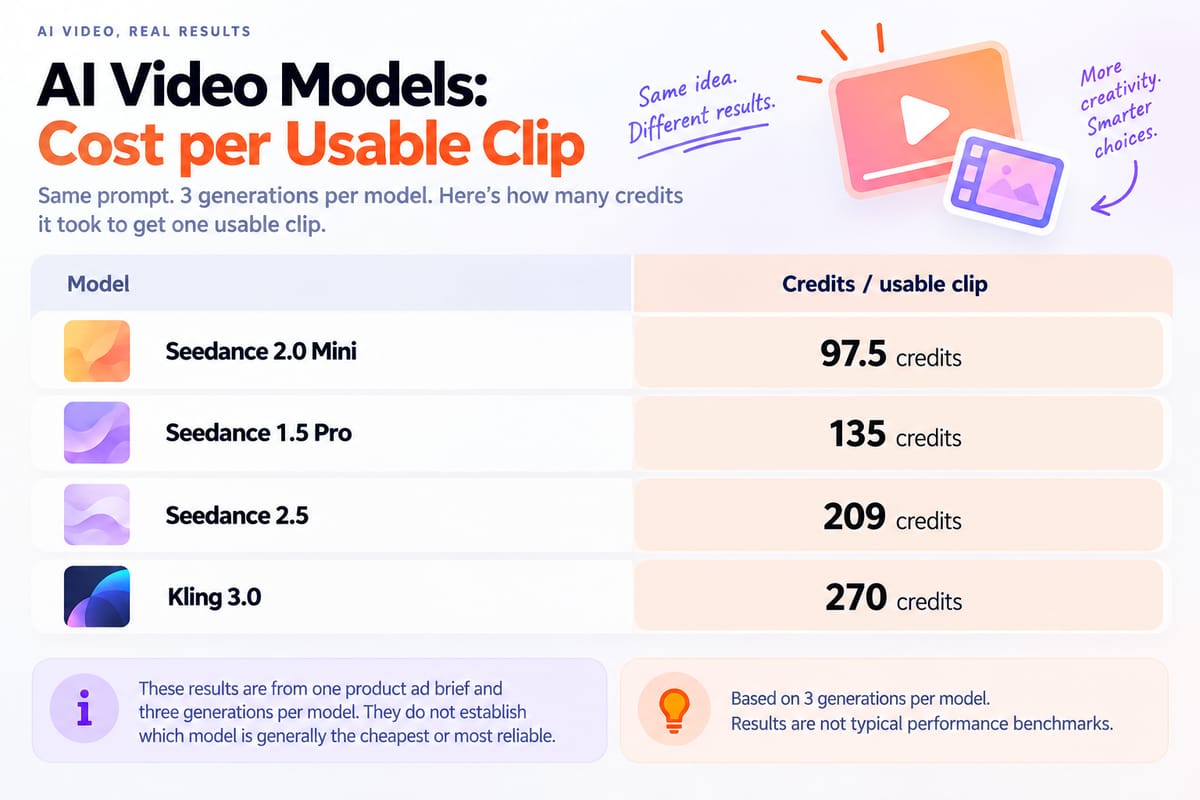
| Seedance 1.5 Pro | 45 | ~56 sec | 1/3 | 135 | Starter |
| Kling 3.0 | 90 | ~2 min 10 sec | 1/3 | 270 | Starter |
| Seedance 2.0 Mini | 65 | ~1 min 21 sec | 2/3 | 97.5 | Starter |
| eedance 2.5 | 209 | ~4 min 37 sec | 3/3 | 209 | Pro |
Calculation
Average credits per usable clip = Total credits used ÷ Number of usable clips
For example, Seedance 2.0 Mini used 65 credits per generation. Across three generations, it used 195 credits and produced two usable clips.
195 credits ÷ 2 usable clips = 97.5 credits per usable clip.
Generation times are included for reference only. Actual times may vary depending on queue length, server load and other conditions.




What did the test show?
The results show that a lower credit cost per generation does not always mean fewer credits per usable clip.
Seedance 1.5 Pro used 45 credits per generation, but only one of its three clips was usable. Its average was 135 credits per usable clip.
Seedance 2.0 Mini used 65 credits per generation and produced two usable clips, giving an average of 97.5 credits per usable clip.
Seedance 2.5 used 209 credits per generation, and all three clips were marked as usable. Kling 3.0 used 90 credits per generation and produced one usable clip, giving an average of 270 credits per usable clip.
These results are limited to one product ad brief and three generations per model. They do not establish which model is generally the cheapest or most reliable.
For marketers, the key question is: How many credits does it take to produce a usable clip?
Test limitations
All 12 generated videos were downloaded, but the full videos and original generation logs are not included in this article. Instead, we have included one screenshot from each model for reference.
The screenshots show selected outputs but cannot independently verify the recorded credits, generation times or video motion.
Results may vary depending on the prompt, model settings and generation conditions.
The figures are expressed in credits, not US dollars. Actual costs depend on the BuzzVideo AI subscription plan and the effective cost per credit.
These results should not be treated as typical performance benchmarks.
How do AI video generator prices compare?
Our editorial test compared four models within BuzzVideo AI using the same product ad brief. Comparing prices across different platforms is more complicated because providers use different subscription plans, video settings and billing methods.
The table below compares published prices. Where enough information is available, we show the estimated cost of one generation, not the cost of producing a usable video.
| Platform / model | Published pricing basis | Estimated cost per generation | Notes |
|---|---|---|---|
| Adobe Firefly Standard | Official pricing: US$9.99/month, 2,000 generative credits | Not calculated | Video credit usage depends on the model and settings. |
| Pika 2.5 API | Official pricing: US$0.04/sec at 720p or US$0.09/sec at 1080p for five-second text-to-video generation | US$0.20 at 720p or US$0.45 at 1080p | API generation costs exclude the US$10 monthly membership fee. |
| Runway Standard | Official pricing: US$12/month with annual billing, including 625 monthly credits | Not calculated | Credit usage depends on the model and settings. |
| BuzzVideo AI | Official pricing: Subscription plans include credits, with different models requiring different amounts | Not calculated | See the editorial test above for recorded credit usage. |
Important pricing notes
Adobe Firefly Standard includes 2,000 monthly credits, but video credit usage varies by model and settings. A fixed per-generation estimate is not included here.
Pika 2.5 API provides published per-second rates for specific video settings. The estimated generation costs exclude the monthly membership fee.
Runway and BuzzVideo AI use credit-based pricing. Their effective dollar costs depend on the selected plan, model and credit usage.
These prices are not directly comparable and do not include additional generations that may be needed to produce a usable clip.
To estimate your actual cost per usable clip, divide your total spending by the number of usable clips you produce.
Which pricing model should you choose?
For occasional video generation, compare the total cost of API usage, including membership fees, with the cost of a monthly subscription.
For regular production, estimate how many videos you need each month, how many generations each video may require, and how much of your credit allowance you are likely to use.
Compare the total spending required to produce the same number of usable clips at similar settings.
The cheapest option depends on your actual usage, not just the advertised price.
How to compare AI video costs by ad use case
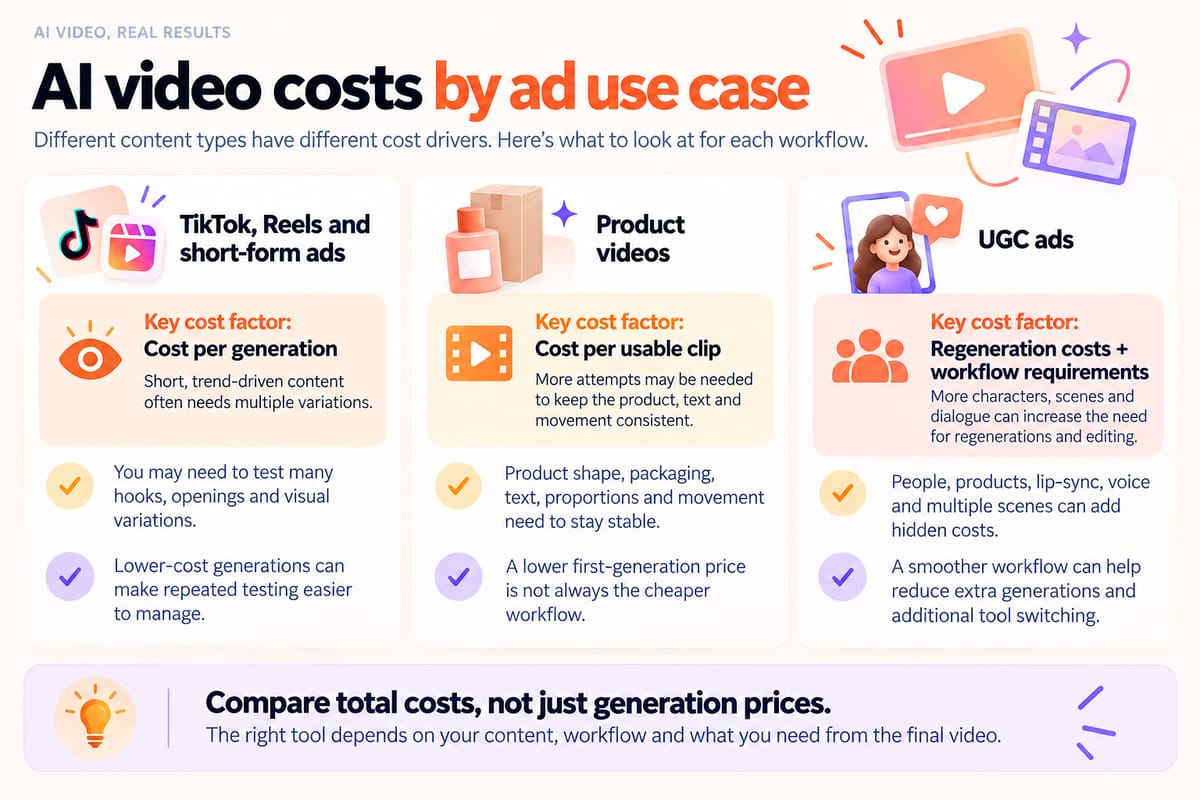
The cheapest AI video generator depends on what you need to create. A low price per generation may help when testing ideas, but it does not always mean a lower cost per usable clip.
Here are the main costs to consider for three common ad formats.
TikTok, Reels, and short-form ads
If you need to test different hooks, openings or visual ideas, start by comparing cost per generation.
Lower-cost generations can help you create more variations within the same budget. However, several failed attempts can quickly increase your total spending.
When comparing models, consider both the price of each generation and how many attempts are needed to get a usable result.
What to compare: Cost per generation, number of variations and total credits used.
Product videos
For product videos, focus on cost per usable clip, not just the price of a single generation.
Product shape, packaging, label text, proportions and movement need to remain consistent. If these details become distorted, another generation may be needed.
A useful calculation is:
Cost per usable clip = Total generation cost ÷ Number of usable clips
Consider two hypothetical workflows that each produce one usable clip:
- Workflow A: Two generations at US$0.50 each = US$1.
- Workflow B: Five generations at US$0.30 each = US$1.50.
Workflow A costs more per generation but less per usable clip. This example illustrates the calculation and is not a result from our editorial test.
What to compare: Total generation cost and number of usable clips.
UGC ads
UGC-style ads may involve people, products, voice, lip-sync and multiple scenes. Inconsistent characters, distorted products or inaccurate lip-sync can lead to additional generations.
For these ads, consider regeneration costs and any additional tools your workflow requires.
If your team uses several AI video models, check whether you need separate subscriptions or can access them through one platform.
BuzzVideo AI offers access to multiple AI video models, including Seedance, Veo and Kling. Teams can check model availability and credit requirements before choosing which to use.
However, using one platform does not automatically reduce costs. Actual spending depends on the subscription plan, selected models, additional tools and number of generations required.
What to compare: Regeneration costs, subscription fees, model availability and additional tool costs.
Hidden costs of AI video generation
The cheapest AI video generator is not always the one with the lowest advertised price. Regenerations, unused credits, plan restrictions and additional fees can all affect your actual spending.
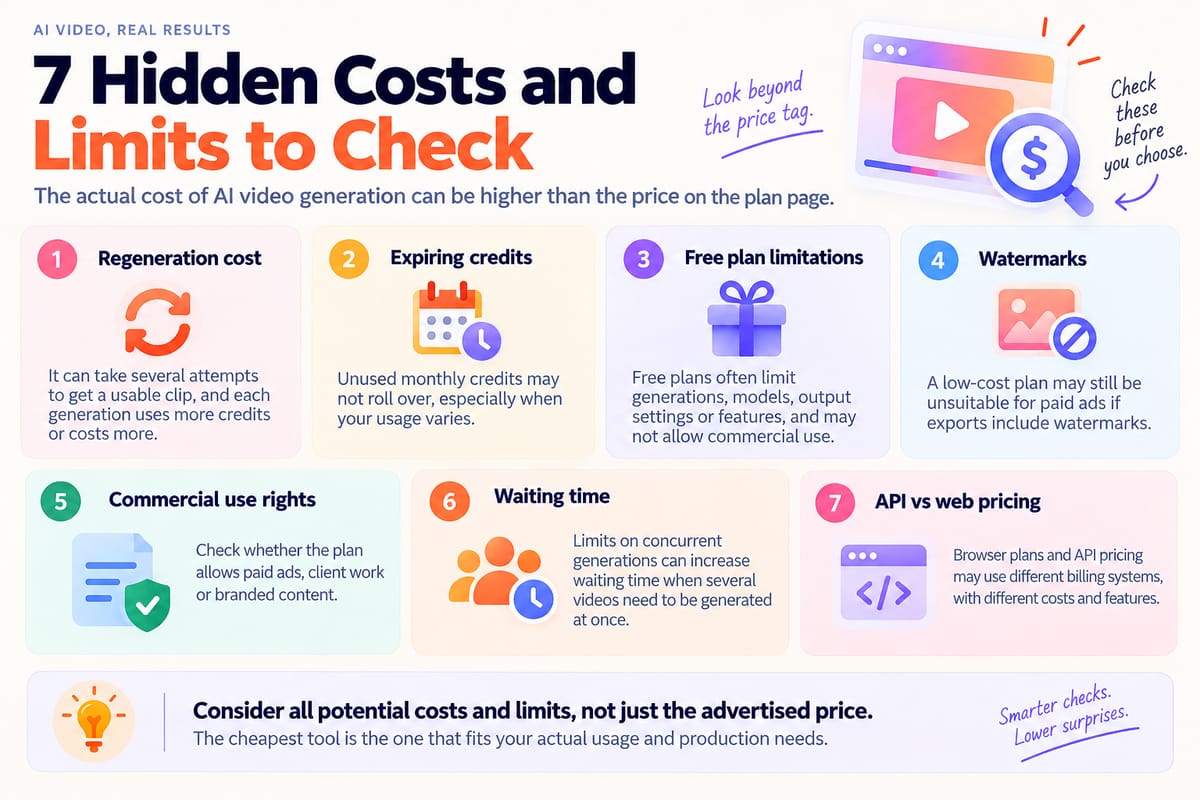
Here are seven costs to check before choosing a tool.
1. Regeneration cost
The first generated video may not be usable. Product distortion, unnatural movement or visuals that do not follow the brief can lead to another generation.
If one generation costs US$0.30 and you need three attempts to get one usable clip, the total generation cost is US$0.90.
Cost per usable clip = Total generation cost ÷ Number of usable clips
This is why comparing the cost of usable outputs is more useful than looking at generation prices alone.
2. Expiring credits
Some subscriptions include credits that expire at the end of each billing cycle.
According to the BuzzVideo AI pricing page, unused subscription credits do not roll over to the next billing cycle. The credit allocation schedule for annual plans should be confirmed before subscribing.
According to Runway's official credit guide, monthly credits on Standard, Pro and Unlimited plans do not roll over. Max allows limited rollover, while purchased credits do not expire.
If your team does not use its full credit allowance, the effective cost per video may be higher than expected.
3. Free does not mean unlimited
Free AI video plans may restrict generations, available models, output settings or export features.
The BuzzVideo AI Free plan includes 500 one-time credits, but video generation is available on paid plans.
Before comparing free tools, check which features are actually available and whether they meet your needs.
4. Watermarks
Some free or lower-priced plans add watermarks to exported videos.
If you need clean videos for paid ads, branded content or client projects, check whether your chosen plan includes watermark-free exports.
A cheaper plan may not be suitable if you need to upgrade to remove watermarks.
5. Commercial use rights
Not all AI video plans offer the same commercial-use rights.
Before using generated videos for paid ads, branded content or client projects, check the provider's licensing terms.
Watermark-free output does not automatically mean commercial use is permitted.
If commercial use requires a higher-priced plan or an additional licence, include that expense in your budget.
6. Concurrent generations
Concurrent generation limits determine how many video generation jobs can run at the same time.
For individual creators, generating one video at a time may be enough. Agencies and marketing teams producing multiple ads may need higher limits.
The BuzzVideo AI pricing page lists the following limits for paid plans:
- Starter: Up to 4 concurrent generations
- Pro: Up to 8 concurrent generations
- Ultra: Up to 12 concurrent generations
Higher concurrency does not directly reduce the cost per clip, but it may help teams process multiple jobs more efficiently. Lower limits can increase waiting time when several videos need to be generated at once.
7. API pricing and web pricing may be different
Some AI video platforms use separate pricing systems for web subscriptions and API access.
Credits or allowances included in a web subscription may not apply to API usage.
If you mainly generate videos through a browser, compare web subscription prices. If your team uses an API for automated production, check its usage rates and any additional access fees.
The key point: Compare costs based on the workflow you actually use. Web subscription fees and API charges should not be treated as the same pricing model.
How BuzzVideo AI pricing works
BuzzVideo AI does not charge one fixed price for every AI video. Instead, paid subscription plans include credits, and each model uses a different number of credits depending on video length, resolution and settings.
The BuzzVideo AI pricing page lists credit requirements for specific model configurations. Changing the settings may change the number of credits needed.
The prices below should not be treated as directly equivalent to our five-second, 720p editorial test, as the listed model configurations may differ.
Current BuzzVideo AI plans
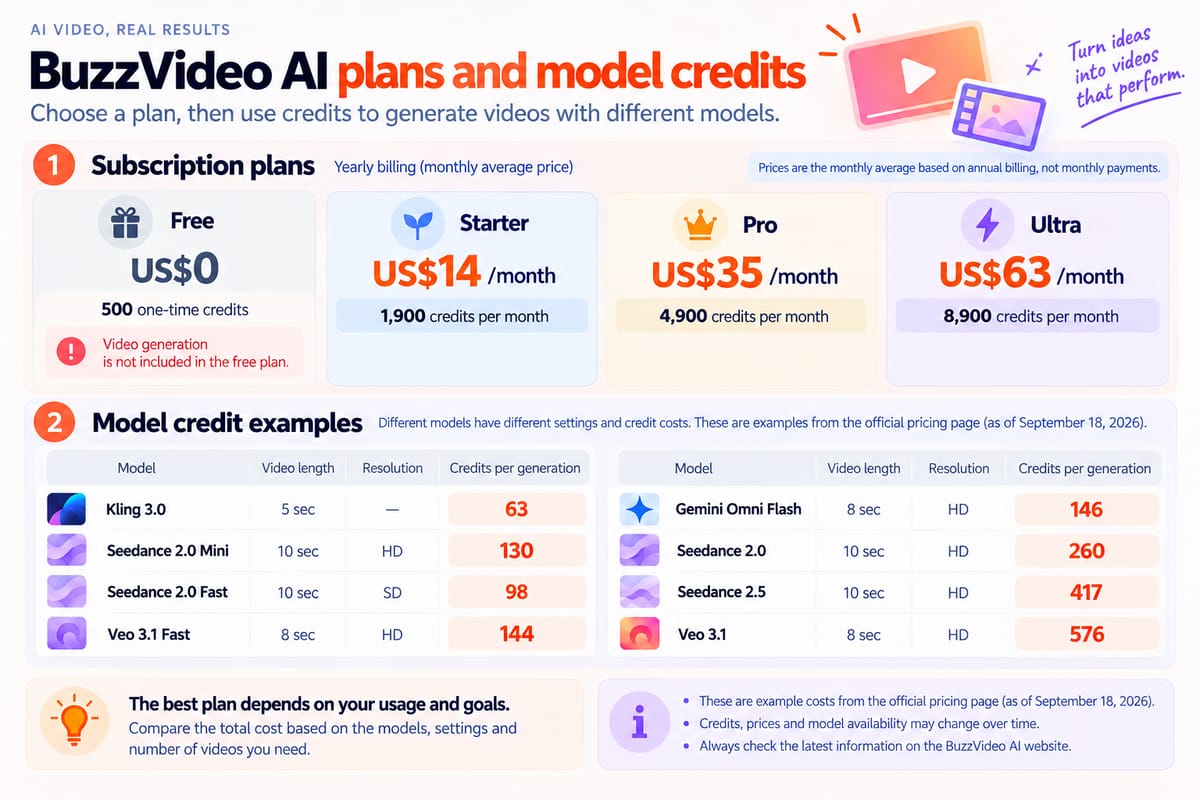
The following prices are based on annual billing, as listed on September 18, 2026.
| Plan | Monthly price on annual billing | Credits |
|---|---|---|
| Free | US$0 | 500 one-time credits |
| Starter | US$14 | 1,900/month |
| Pro | US$35 | 4,900/month |
| Ultra | US$63 | 8,900/month |
Annual subscriptions are billed upfront, while the prices above show the equivalent monthly cost.
The Free plan does not include video generation. Paid plans offer different model access and credit allowances.
Check the latest billing and credit allocation terms before subscribing.
How many credits do different models use?
The BuzzVideo AI pricing page lists the following credit requirements for specific video settings.
| Model | Video settings | Credits per generation |
|---|---|---|
| Kling 3.0 | 5 sec | 63 |
| Seedance 2.0 Mini | HD, 10 sec | 130 |
| Seedance 2.0 Fast | SD, 10 sec | 98 |
| Veo 3.1 Fast | HD, 8 sec | 144 |
| Gemini Omni Flash | HD, 8 sec | 146 |
| Seedance 2.0 | HD, 10 sec | 260 |
| Seedance 2.5 | HD, 10 sec | 417 |
| Veo 3.1 | HD, 8 sec | 576 |
Model availability also depends on your subscription plan. For example, Seedance 2.5 and Seedance 2.0 require Pro or Ultra, while Starter includes Seedance 2.0 Mini and Fast.
These examples use different or incompletely specified video settings and should not be treated as directly comparable.
Credit requirements may also differ from those recorded in our editorial test. Always check the credit cost displayed for your selected model and settings before generating a video.
How to estimate your actual cost
BuzzVideo AI allows users to access different video models through one credit system. You can compare model options and credit requirements without purchasing separate subscriptions for each model.
However, using one platform does not automatically make it the cheapest option.
Your actual spending depends on the subscription plan, selected models, video settings and number of generations required.
A useful calculation is:
Cost per usable video = Total spending ÷ Number of usable videos
For example, if your team allocates US$35 in subscription costs to one month and produces 20 usable videos, the average subscription cost is US$1.75 per video.
This is a hypothetical example based on allocating subscription costs across one month. Additional credits, tools and other production expenses are not included.
For marketers comparing AI video generators, the key is to look beyond monthly subscription prices and calculate how much it costs to produce videos they can actually use.
FAQ
1. Which AI video generator is 100% free?
Some AI video generators offer free plans, but they may limit video generations, resolution, available models or exports.
BuzzVideo AI offers a Free plan with 500 one-time credits, but video generation requires a paid subscription.
Before choosing a free tool, check whether it actually allows video generation and whether you can export the results you need.
2. How much does AI video generation cost?
AI video generation costs vary depending on the model, video length, resolution, pricing plan and number of attempts needed.
For marketers, cost per usable clip is often more useful than the monthly subscription price alone.
To estimate it, divide your total relevant spending by the number of usable clips produced. Include subscription costs, additional credit purchases and separately billed generation fees without counting the same expense twice.
3. Is CapCut AI free?
CapCut offers free AI features, but not every feature is available for unlimited free use.
Some AI tools require credits. According to CapCut's official credit guide, the actual cost depends on the feature and the number of credits used.
Check the latest credit requirements before generating videos.
4. What is the easiest free AI video generator?
The easiest option depends on what you want to create.
For quick tests, look for tools with browser-based generation, simple controls, free credits and minimal setup.
Before choosing one, check its generation limits, available models, output settings and watermark restrictions. A tool that is easy to try for free may not meet your needs for regular marketing production.
Ready to compare AI video costs?
Explore BuzzVideo AI's latest plans, monthly credits and model pricing to estimate the cost of your next video project.

About the author
Hai Taeng
SEO Content Editor
With experience in SEO content writing and optimization, I enjoy exploring new topics, finding fresh angles, and making complex subjects easier to understand. I believe good content should be clear, useful, and engaging. My goal is to create well-researched, easy-to-follow content that answers readers' questions, offers practical tips, and inspires them to discover something new.