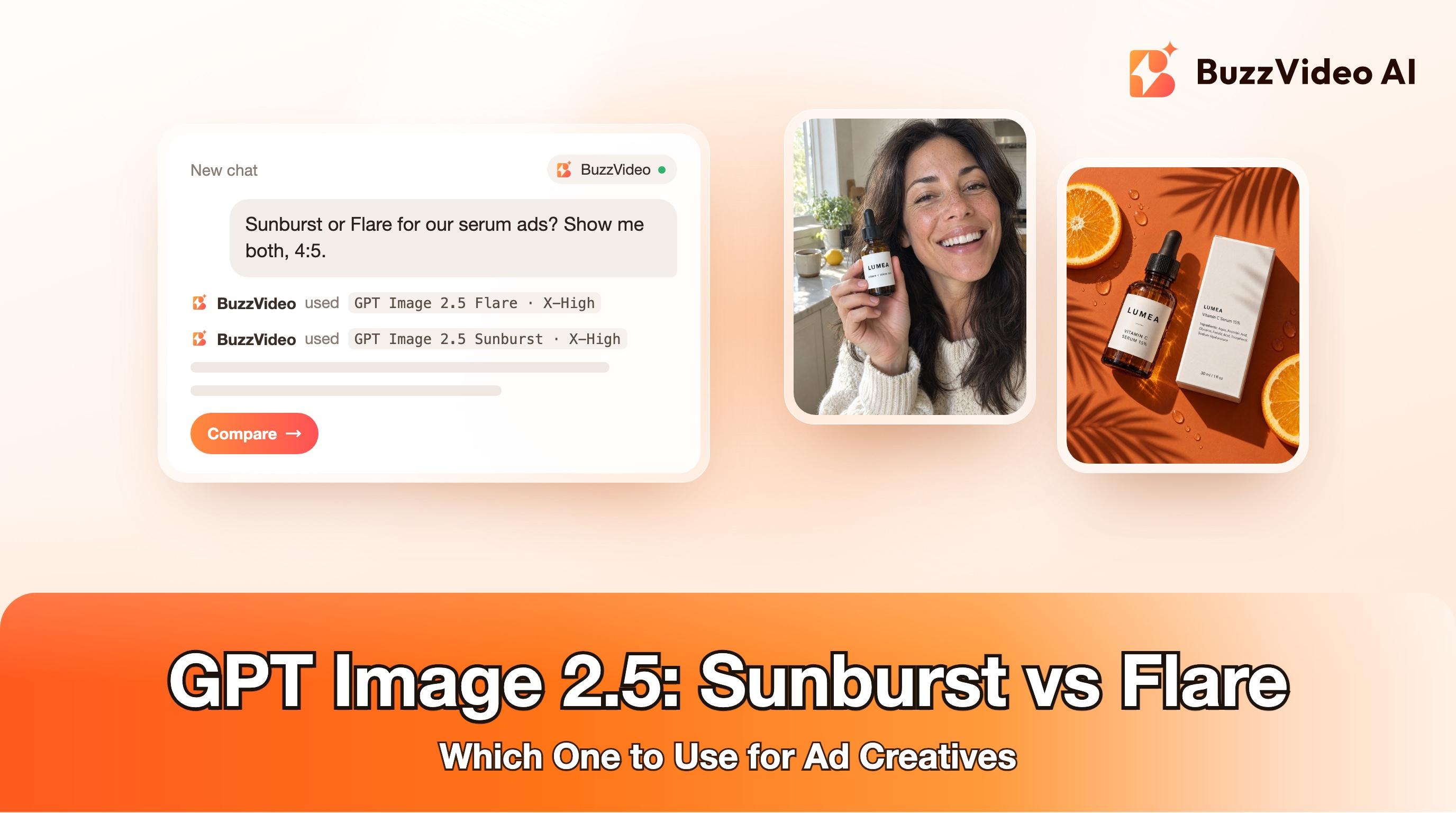
GPT Image 2.5 Sunburst vs Flare: Which to Use for Ads (2026)
Sunburst vs Flare tested on real ad prompts: speed, text, detail and credit cost on BuzzVideo, plus copy-paste prompts.
GPT Image 2.5 Flare and GPT Image 2.5 Sunburst are the two versions of OpenAI's newest image model. Flare is the fast everyday generator; Sunburst is the slower, more precise option that OpenAI points to when editing accuracy and fine detail matter most. For ad creatives, a simple rule works: draft and test with Flare, then switch to Sunburst for packshots, labels and edits you plan to ship.
Both models are live in BuzzVideo AI on every paid plan, at the same credit price. Below: what each one is, what an image costs, what happened when we ran the same two ad prompts through both, and copy-paste prompts for the ad formats that sell right now.
What are GPT Image 2.5 Sunburst and Flare?
OpenAI released GPT Image 2.5 as two API models. Its developer docs describe Sunburst as the choice for "workflows where editing precision matters most" and Flare as the choice for "fast, high-quality everyday image generation" (OpenAI image generation guide). The Sunburst model page calls it OpenAI's most capable model for image generation and editing, with a default snapshot dated September 8, 2026 (OpenAI model page).
| GPT Image 2.5 Flare | GPT Image 2.5 Sunburst | |
|---|---|---|
| OpenAI positioning | Fast, high-quality everyday generation | Editing precision and fine detail |
| BuzzVideo model menu says | Fast photoreal product and lifestyle shots in bulk | Best for fine print, labels and detailed portraits |
| Quality levels | Low, Medium, High, X-High, Max | Low, Medium, High, X-High, Max |
| Aspect ratios on BuzzVideo | 1:1, 3:4, 4:3, 4:5, 9:16, 16:9 | 1:1, 3:4, 4:3, 4:5, 9:16, 16:9 |
| Speed in our test | Faster | Noticeably slower |
| Price on BuzzVideo | Same credits per image | Same credits per image |
Two things are new compared with GPT Image 2: the two extra quality tiers (X-High and Max) and the split into a speed model and a precision model. OpenAI's guide also notes that text rendering has improved but the model can still struggle with precise text placement, so check every label at full size before you ship.
Try it: open BuzzVideo, switch to Image and pick GPT Image 2.5 Flare or Sunburst from the model menu. Try GPT Image 2.5 on BuzzVideo →
How much do Sunburst and Flare cost on BuzzVideo?
Sunburst and Flare cost exactly the same on BuzzVideo. Price depends only on the quality level and the aspect ratio. These are the credit prices the generator showed us today for one image:
| Quality | 1:1 | 4:5 (feed) | 9:16 (Stories/Reels) |
|---|---|---|---|
| Low | 3 | 2 | 2 |
| Medium | 6 | 5 | 5 |
| High | 22 | 17 | 16 |
| X-High | 38 | 30 | 29 |
| Max | 85 | 66 | 64 |
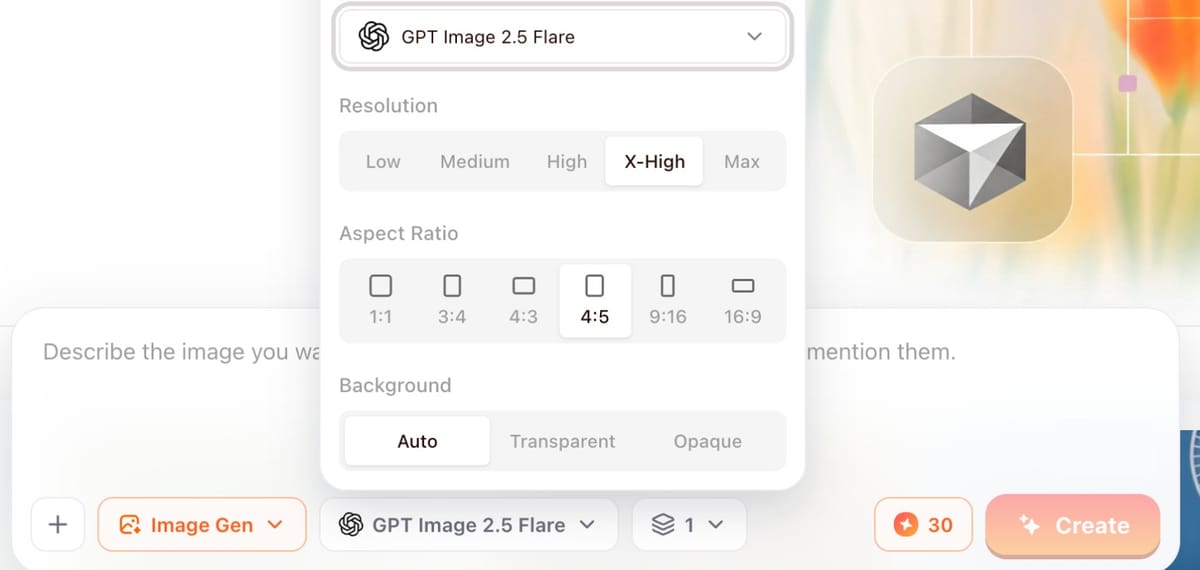
Both models are included on Starter, Pro and Ultra; they are not on the Free plan. Paid plans billed yearly work out to $14, $35 and $63 a month for 1,900, 4,900 and 8,900 credits a month (pricing). On Pro that is roughly 980 Medium 4:5 drafts, or about 160 X-High 4:5 finals, in a month. The useful takeaway: a Low or Medium draft costs a fraction of an X-High final, so test concepts cheaply and only pay for top quality on the winners.
Which is better for ad images: Sunburst or Flare?
We ran the same two prompts through both models in BuzzVideo, at X-High quality and 4:5, with no reruns and no retouching. The product is our fictional LUMEA Vitamin C serum. Before writing the prompts we looked at the highest-reach vitamin C serum image ads in the Meta Ad Library: most are lo-fi phone photos of real-looking people, so test one copies that look and test two is a bold editorial flat-lay with small print.
Test 1: a candid phone-photo ad with a person
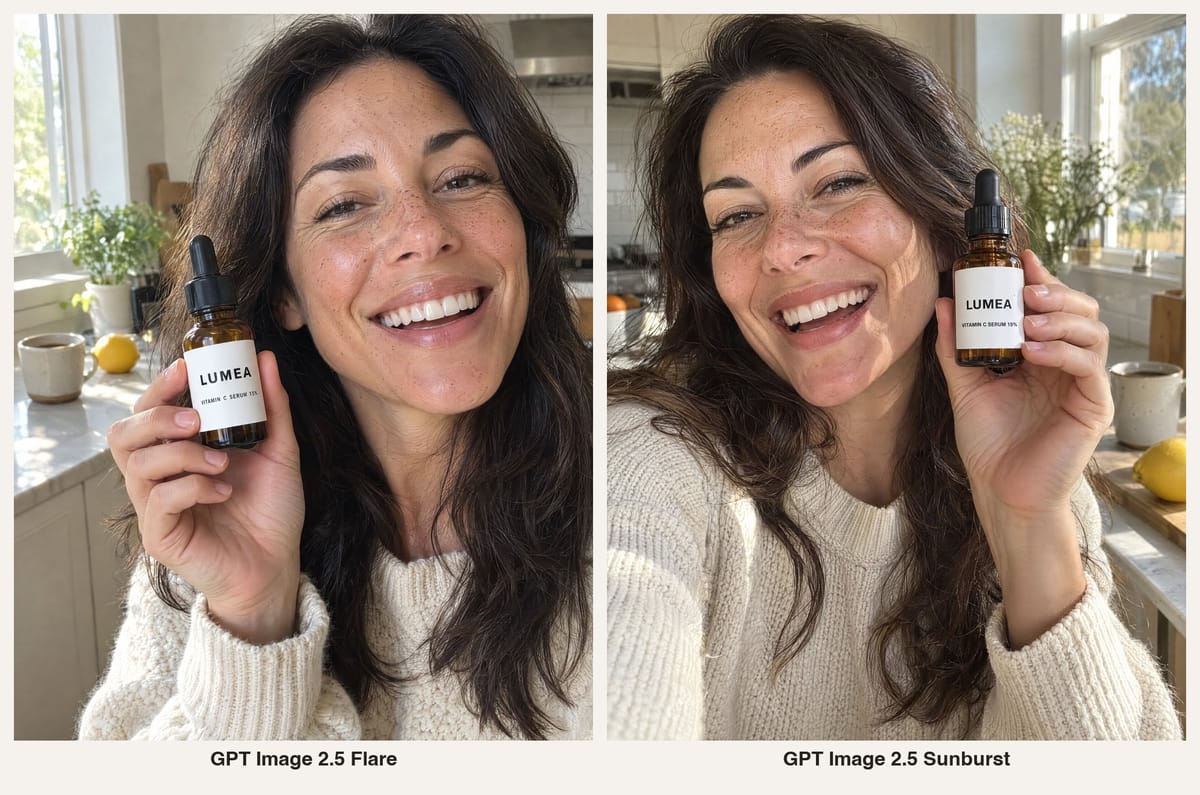
- Both look like a real phone photo. Freckles, skin texture, window light and a slightly off-centre frame. Either could sit in a feed next to the lo-fi ads that are winning in this category.
- Both spelled the label correctly: "LUMEA" and "VITAMIN C SERUM 15%".
- Flare followed the instructions more literally. We asked for the bottle in her right hand, and Flare put it there. Sunburst moved it to her left hand and added a small stray mark on the label next to the brand name, visible when you zoom in.
- Sunburst has more cinematic light: stronger sun, deeper contrast, more depth in the background.
Verdict for people-led social ads: Flare. It was faster, it followed the brief more closely, and the casual look is the point of this format anyway.
Test 2: an editorial flat-lay with fine print
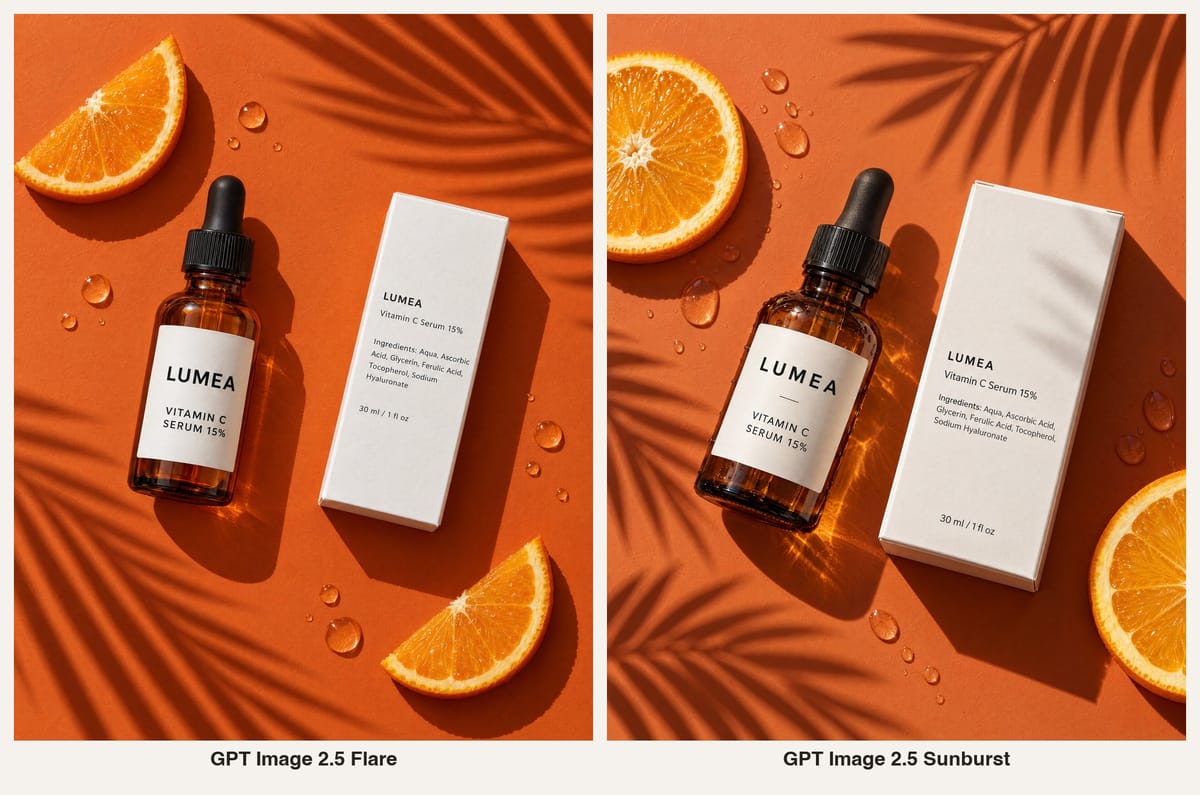
- Both rendered every line of the carton correctly, including the ingredients list and "30 ml / 1 fl oz". At full size, Sunburst's small print is slightly larger and crisper.
- Sunburst adds more material detail: water droplets on the glass, light caustics through the amber bottle, paper texture on the box. That reads as a more premium packshot.
- Flare is cleaner and flatter. Good enough for testing, and arguably easier to place text on later.
Verdict for packshots and anything with small text: Sunburst, when the image is a final you will put money behind. Flare got the text right too, so for quick concept tests it is still fine.
One test is not a benchmark. Your products, prompts and quality settings will change the results, so run your own side-by-side before you standardise on one model.
When should you use Flare and when should you use Sunburst?
| Job | Pick | Why |
|---|---|---|
| Testing 10–30 ad concepts | Flare, Low or Medium | Fast and cheap; you only need to see the idea |
| UGC-style or lifestyle photos with people | Flare, High or X-High | Followed the brief closely in our test; casual look fits the format |
| Hero packshot for a paid campaign | Sunburst, X-High | More material detail on glass, liquid and paper |
| Labels, ingredient lists, small print | Sunburst | Crisper fine print; OpenAI positions it for detail |
| Editing an existing product photo | Sunburst | OpenAI recommends it where editing precision matters |
| Transparent-background cut-outs | Either | Both show Auto, Transparent and Opaque background options on BuzzVideo |
How do you use GPT Image 2.5 for ads on BuzzVideo?
Step 1: Draft the concepts with Flare
Pick GPT Image 2.5 Flare, set quality to Low or Medium and the ratio you will run (4:5 for feed, 9:16 for Stories and Reels). Write one prompt per concept and generate several at once. At 5 credits a Medium 4:5 image, twenty concepts cost about 100 credits.
Step 2: Shortlist two or three winners
Choose on composition and idea, not polish. Check that the product is the hero, that nothing covers the label, and that there is empty space where your headline and offer will go.
Step 3: Re-render the winners at X-High
Keep the same prompt. Use Flare at X-High for people-led lifestyle shots, and switch to Sunburst at X-High for packshots and anything with a readable label. Attach a real product photo as a reference so the packaging stays accurate.
Step 4: Zoom to 100% and check every detail
Look at hands, finger counts, label spelling, stray marks and props. In our test the one defect (a dot on the label) was only visible at full size.
Step 5: Add headline, price and offer in editing
Do not ask the model to draw prices, dates or discount badges. Add them as text in your editor or ad tool, placed in empty space and never over the product, face or hands. That keeps offers accurate and lets you reuse one image across several promotions.
Copy-paste GPT Image 2.5 prompts for ad creatives
Replace the bracketed parts. Each prompt says what must not appear, because that is where most rejects come from.
“Candid UGC photo (Flare): Candid smartphone photo for a social ad, front-camera feel. A [age, look] person in [setting] laughs naturally, holding one [product] in their right hand at cheek level, label facing the camera. The label reads exactly "[BRAND]" and "[PRODUCT NAME]". Real skin texture, warm natural light, slightly imperfect framing, shallow depth of field. No other text, no logos, no watermarks, no extra products.”
“Editorial flat-lay with small print (Sunburst): Top-down editorial flat-lay on a saturated [colour] background with hard sunlight and [plant] shadows. One [product] lying diagonally next to its carton, back panel facing up. The carton reads exactly these lines: "[BRAND]" / "[product name]" / "Ingredients: [list]" / "[size]". Props: [2 props]. No other text, no barcodes, no logos, no extra products.”
“Giant-product scene (Flare, 4:5): Surreal editorial ad photo: a giant [product] the size of a sofa stands in a [setting], a stylish [person] leans against it and looks at the camera. Bold [colour] palette, soft daylight, fashion-magazine styling. The label reads exactly "[BRAND]". No other text, no logos, leave clear empty space at the top for a headline.”
“Packshot edit from a real photo (Sunburst, with reference image): Using the attached product photo, keep the bottle, cap and label exactly as they are. Replace the background with [new set], add soft reflection and [props]. Do not change any text on the label. No extra products, no new text.”
Ready to compare them on your own product?
Upload one product photo, run the same prompt through Flare and Sunburst at Medium, and decide in a few minutes which one you will use for finals. If you want the images turned into video ads next, the Marketing Agent can take the winners straight into UGC Ads, Product Demo or Ad Variations.
FAQs
What is the difference between GPT Image 2.5 Sunburst and Flare?
Flare is OpenAI's faster everyday model; Sunburst is the slower one aimed at editing precision and fine detail. On BuzzVideo both have the same quality levels, aspect ratios and price.
Is GPT Image 2.5 Sunburst more expensive than Flare?
Not on BuzzVideo: both cost the same credits per image, from 2 credits (Low, 4:5) to 85 credits (Max, 1:1). OpenAI's API model page also lists Sunburst at the same token rates as GPT Image 2.
Which GPT Image 2.5 model is better for product photos?
For hero packshots and anything with readable labels, Sunburst gave us crisper small print and richer material detail. For lifestyle and UGC-style photos with people, Flare was faster and followed the brief more closely.
Can I use GPT Image 2.5 for free on BuzzVideo?
No. Both GPT Image 2.5 models need a paid plan (Starter, Pro or Ultra). The Free plan's 500 one-time credits work with other image models.
Which quality level should I use for ads?
Use Low or Medium to test ideas and X-High for images you will run. Max costs more than double X-High; save it for large placements or print.
Can GPT Image 2.5 write text on images correctly?
In our two tests, both models spelled every word correctly, including an ingredients list. OpenAI still warns that text placement can be imperfect, so always check labels at full size and add prices and offers in editing.
Can I use GPT Image 2.5 from ChatGPT or Claude?
Yes. With BuzzVideo MCP, you can generate images with BuzzVideo's models from ChatGPT or Claude on any plan; the GPT Image 2.5 models still need Starter or above.
Last verified: November 3, 2026, against our live pricing and product pages.
Next reads: AI product photography from one photo · Amazon listing images with AI · BuzzVideo pricing: cost per ad · Ad variants sprint playbook

About the author
Monica
Product Manager
As a Product Manager at BuzzVideo AI, I work with marketers and growth teams on AI ad workflows—from brief to shippable creatives. I write about practical product workflows, model choices, and how teams turn product pages into ads that feel native on Meta and TikTok.