How to Make Amazon Listing Images with AI in ChatGPT or Claude
Step-by-step: build a full Amazon, Shopee or Taobao listing image set inside ChatGPT or Claude with BuzzVideo MCP—facts check, plan, overlays and review.
To make Amazon listing images with AI, start from one sharp product photo, plan a numbered set (a text-free main image on pure white, then lifestyle, selling-point, spec and comparison images), generate the backgrounds with an image model, and add every headline and number afterwards as a text overlay so nothing is misspelt. With BuzzVideo MCP you can run the whole job from ChatGPT or Claude: the chat follows BuzzVideo's marketplace listing guide, checks your product facts with you, shows the image plan and the credit cost, and only generates after you approve.
Below: each step, a prompt to copy, the platform conventions (Amazon, Shopee, Lazada, Taobao, Shopify), the cost, and the review checks that keep your label and numbers right.
What is a marketplace listing image set?
A listing image set is the gallery shoppers swipe through on a product page: one main image that appears in search results, then supporting images that explain why to buy. BuzzVideo's guide builds the whole set for one product, plus A+ or detail-page modules if you ask.
| Image | What it does |
|---|---|
| 01 Main | The product alone, following the platform's main-image rules (on Amazon: pure white, no text) |
| 02 Hero | A lifestyle scene plus a 2–6 word headline on the key benefit |
| 03–05 Selling points | One point per image, with a visual that proves it |
| 06 Spec / size | Dimensions, weight, capacity and what's in the box |
| 07 Comparison | "Ours vs ordinary" with confirmed facts only |
| 08–09 How to use, trust | Numbered steps; packaging and guarantees you confirm |
Try it: connect BuzzVideo to your AI chat once, then send a product photo and say which marketplace it's for. Connect BuzzVideo MCP →
What do you need before you start?
- A BuzzVideo account. Image generation and MCP are included on every plan, including Free (pricing).
- BuzzVideo MCP connected to ChatGPT, Claude or another MCP client — see how to use BuzzVideo MCP in ChatGPT and Claude.
- A sharp, straight-on product photo. If it's already on plain white and at least 1500 px on the long side, it becomes the master as-is. Back, side and detail photos help too.
- Your product facts: size and weight, materials or ingredients, what's in the box, variants, and the 3–5 selling points in order of importance.
- Your brand look (optional): logo, colours and font. Default: clean and bright, with the packaging's main colour as accent.
- An AI chat that can run commands, for the text step. Headlines and spec tables are laid out on your computer; without that, you get clean backgrounds plus a layout sheet per image for your designer.
How do you make Amazon listing images with AI step by step?
Step 1 — Ask for the set in your AI chat
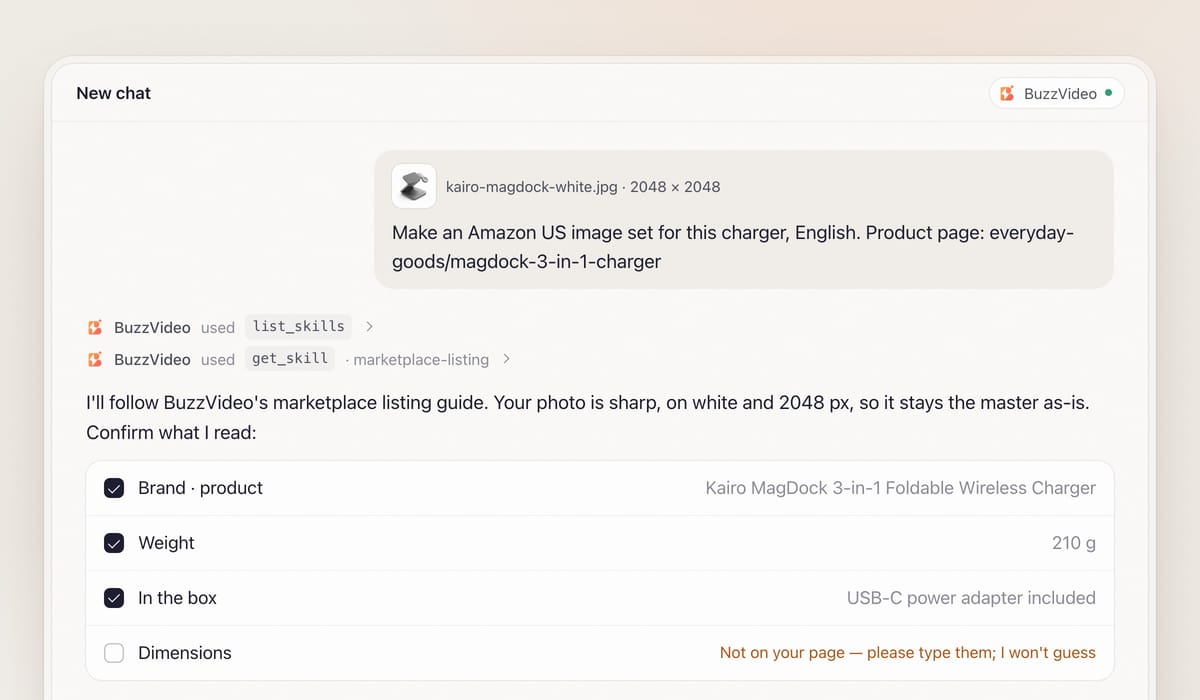
Attach the product photo and say what you need in one message: platform and market (Amazon US, Amazon UK, Etsy…), the language of the text, and a link to your product page if you have one. When BuzzVideo MCP is connected, the chat looks up BuzzVideo's guides (list_skills) and loads the marketplace listing one (get_skill), so it follows the same steps every time.
It then asks what it can't guess in one round, with defaults: language (bilingual is an option), extra photos and facts, selling points in order, an optional competitor type for the comparison, and your brand look.
Step 2 — Confirm the facts and the product master
Before anything goes on an image, the guide lists the brand, product name, every selling point, number, size, material, certification and comparison claim exactly as it read them, and asks you to confirm each one. If something is missing or hard to read, it asks rather than guesses — above, the page gives a weight but no dimensions.
Comparison images never name a competitor unless you say they may; otherwise they say "ordinary products". If your copy is in a different language from the pack (say, a German listing on Amazon.de), it confirms how the brand name is written and never changes the product's own label.
Next comes the product master. A sharp photo on white at 1500 px or more is used as-is; a smaller one stays as the label reference, and the guide generates a 2K clean master from it, quoting every label line word for word. You confirm it matches the real product.
Step 3 — Approve the image plan and the credit quote
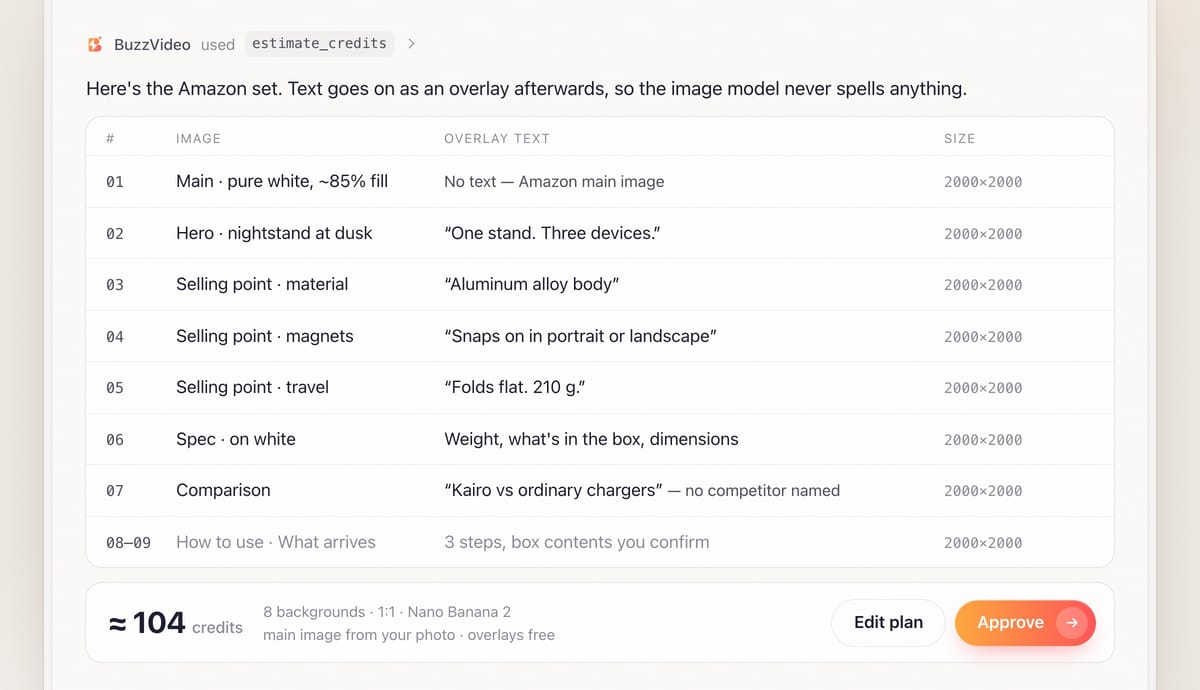
You get one row per image: purpose, background visual, product placement, the exact overlay text (a 2–6 word headline and up to three short lines), icons, ratio and pixel size. Every background leaves an empty area for text, so nothing lands on the product. The plan comes with a credit quote from estimate_credits, and nothing is generated until you say yes.
Step 4 — Generate the backgrounds and scenes
After approval, the chat picks an image model that accepts reference images and generates all images that share a ratio in one call. Each prompt carries the master, one consistent light and palette, where the empty text area goes, your label text quoted verbatim, and an instruction to add no text, numbers, icons or watermarks of its own. A failed task is refunded and the chat offers one retry.
Step 5 — Add the text as precise overlays
Image models misspell headlines, so the guide never asks them to write any. It renders the text, icons, dimension lines and spec tables as a separate layer in a real font and places it over each background, with the headline at least about 6% of the image height so it reads on a phone.
If a background has no clean text area, it scales the image down over a blurred copy of itself and sets the text in the freed band instead of regenerating. Files are named like 01_Amazon_Main_2000x2000.jpg.
Step 6 — Review and deliver
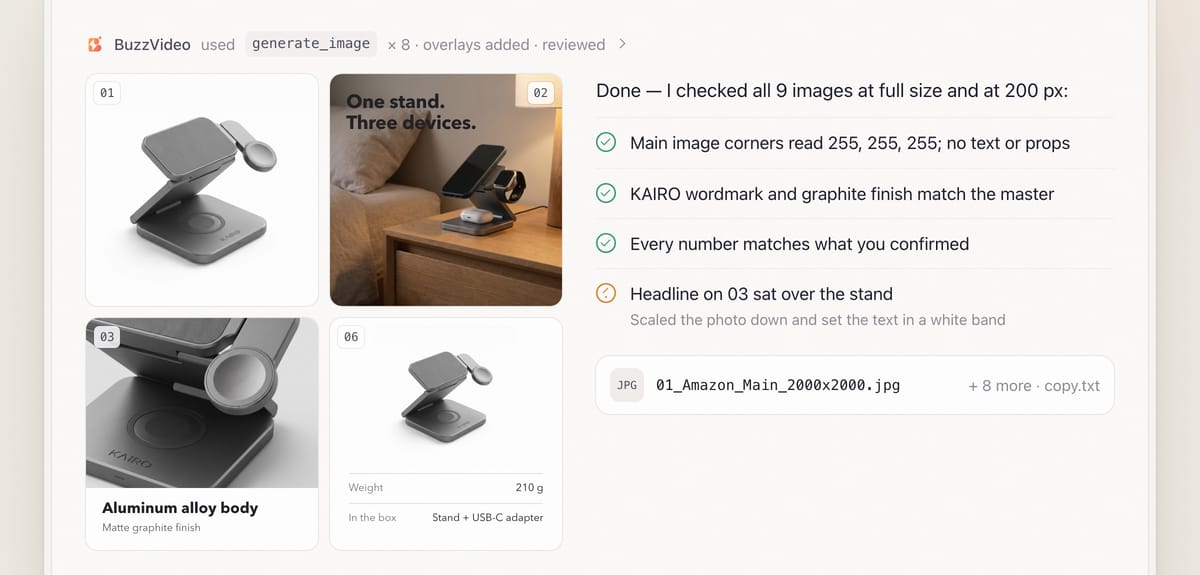
Review is mandatory. Every image is checked at full size and at 200 px: label and logo match the master, the product hasn't changed shape or colour, every number matches what you confirmed, no text covers the product, and the headline still reads as a thumbnail. On the main image the corners must read 255, 255, 255.
You receive the numbered set, the master image, the overlay copy and layout files, plus the models used, credits spent and what review fixed. The chat then asks you to confirm every claim and check the platform's current rules before uploading.
Copy-paste prompt
“Make a [9]-image listing set for this product for [Amazon US], text in [English]. Product facts: [size, weight, materials, what's in the box]. Selling points in order: [1], [2], [3]. Comparison against [ordinary products of this type] — don't name competitors. Brand colours: [hex codes]. Show me the facts list, the image plan with exact overlay text and the credit quote before generating.”
Which platform conventions does the guide build for?
These are general conventions; the guide always asks you to check your seller centre's current and category rules before uploading.
| Platform | Main image | Text on images | Typical sizes |
|---|---|---|---|
| Amazon | Pure white (RGB 255, 255, 255), product fills about 85%, only the product being sold | None on the main image; fine on secondary images | At least 1000 px on the long side, 1600+ for zoom; 2000 × 2000 is the default. A+ sizes vary by module |
| Shopee / Lazada | 1:1, product large and readable as a thumbnail | Text, badges and promo frames commonly allowed, even on the main image | At least 800 × 800 (typically 1024–1200 px), JPG under 2 MB, up to about 9 images |
| Taobao / Tmall | 1:1 (800 × 800 or larger); 3:4 is often used too | Selling-point text allowed | Detail page is a long scroll of 750 px wide sections |
| Shopify / own site | Flexible | Fine but optional | One consistent ratio (1:1 or 4:5) across the gallery |
What usually goes wrong, and how does the guide prevent it?
| Problem | What shoppers notice | What the guide does |
|---|---|---|
| Misspelt headlines | Typos and wrong numbers on the image | All text added as an overlay in a real font, never drawn by the model |
| Label drift | Logo or pack text changed | Label lines quoted verbatim in every prompt; checked against the master |
| Main image rejected | Off-white background, text or props | Corners sampled for 255, 255, 255; no text on the Amazon main image |
| Text on the product | Headline covering the thing you sell | Empty text area planned per image; scale-down band if needed |
| Unreadable on phones | Tiny supporting lines | Headline about 6% of image height; every image checked at 200 px |
| Risky claims | Numbers or comparisons you can't back up | Every fact confirmed with you; no competitor named without permission |
How much do AI listing images cost?
You pay in BuzzVideo credits, and the guide shows the quote before generating. The text overlays are rendered on your computer, so they cost nothing. As a rough example, a nine-image Amazon set where your own white-background photo is the main image needs eight generated backgrounds; on Nano Banana 2 at 13 credits per image that's about 104 credits, or under $1 on Pro billed yearly. A smaller source photo adds one more image for the 2K master. Per-model rates are on our pricing page; for the full math see BuzzVideo pricing and cost per ad.
Which BuzzVideo guide should you use instead?
| You want… | Use this guide |
|---|---|
| A numbered listing set with headlines, specs and comparisons | Marketplace listing (this one) |
| Plain catalogue or studio photos without text | Product photos |
| A video ad, or a video for the listing | Product ad |
Step-by-step guides: Product photos · Product ad
You don't need to name the guide: describe what you want, and the chat picks the matching one. If you'd rather start with a short video from the same photos, see product demo videos from photos.
Ready to build your first listing set? Connect BuzzVideo to your AI chat and send a product photo.
FAQs
Can AI make the Amazon main image?
Yes, but often it shouldn't. A sharp photo on white at 1500 px or more is used as-is, because regenerating can only change the label. Otherwise the guide generates a clean 2K master on pure white and asks you to confirm it.
Will the text on my images be spelt correctly?
Headlines, numbers and spec tables are never drawn by the image model; they're added as a separate text layer in a real font, then checked word by word against the facts you confirmed. That step needs an AI chat that can run commands on your computer; without it you get clean backgrounds and a layout sheet per image instead.
Can it make A+ content or a Taobao detail page?
Yes, if you ask. It makes a banner module, a feature grid, a comparison module and a brand story module at the platform's sizes, or 750 px wide sections for a Taobao or Tmall detail page. Amazon A+ module sizes differ by module type, so it asks which modules your account has and tells you to check the sizes.
Can I use it on the Free plan?
Yes. Image generation and MCP are on every plan, and Free includes 500 credits — enough to try a set like the example above.
Last verified: November 2, 2026, against our live pricing and product pages.
Next reads: How to use BuzzVideo MCP in ChatGPT and Claude · Product demo videos from photos · BuzzVideo pricing and cost per ad

About the author
Monica
Product Manager
As a Product Manager at BuzzVideo AI, I work with marketers and growth teams on AI ad workflows—from brief to shippable creatives. I write about practical product workflows, model choices, and how teams turn product pages into ads that feel native on Meta and TikTok.