Nano Banana 2.1 vs Pro for Product Ads (2026)
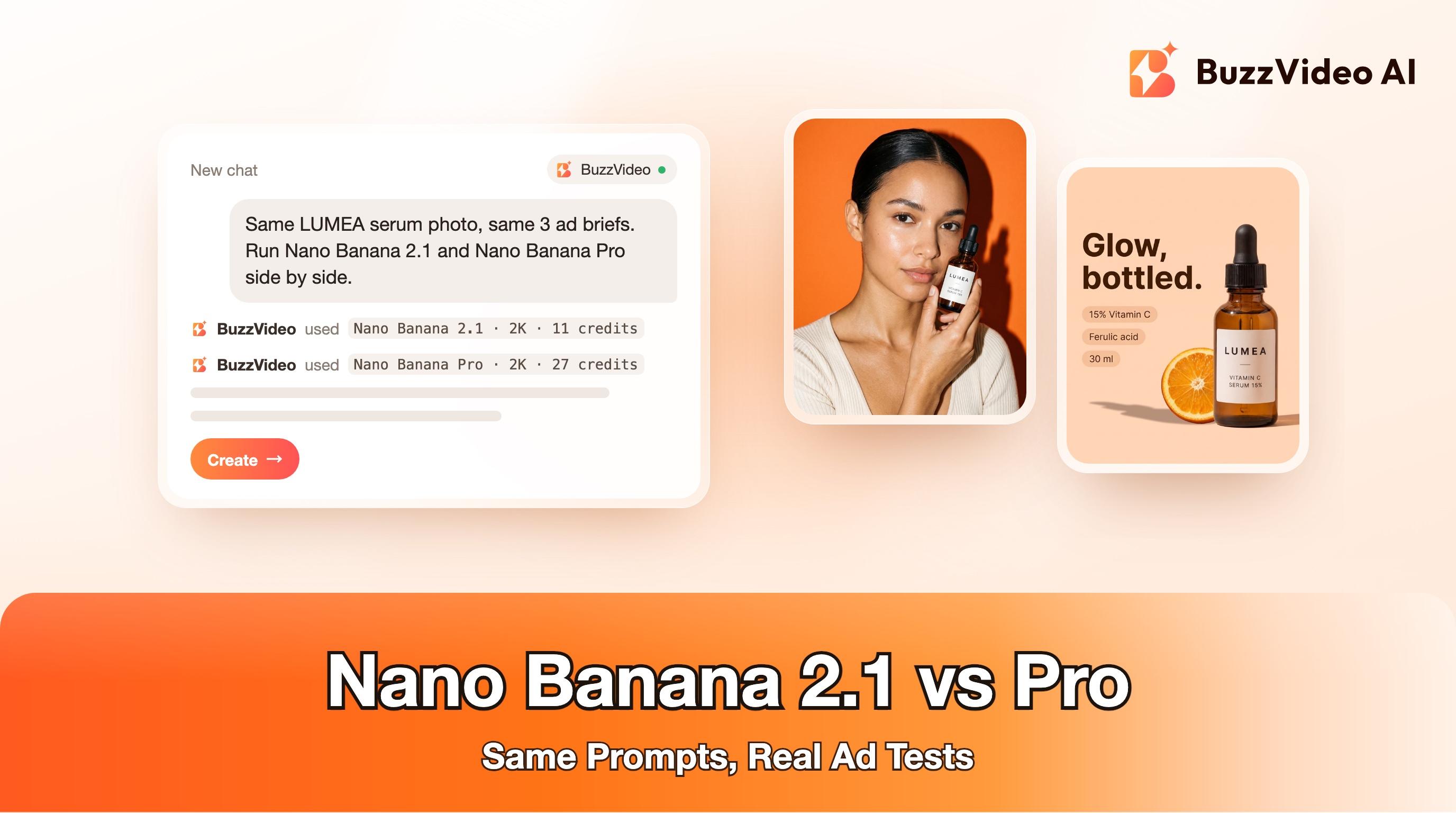
We ran Nano Banana 2.1 and Pro on the same product photo and three ad briefs. See the images, the cost per image and which model to use when.
For most product ads, start with Nano Banana 2.1. In our side-by-side test on one product photo and three ad briefs, it matched Nano Banana Pro on label accuracy and headline spelling, followed a posing instruction more literally, and cost 11 credits per 2K image on BuzzVideo against 27 for Pro. Keep Pro for the shots where its more polished, studio-style finish is worth paying more than double.
Google released Nano Banana 2.1 on October 6, 2026 as what it calls the more efficient counterpart to Nano Banana Pro, and both are available in BuzzVideo AI's Marketing Agent. Below: what changed in 2.1, how we tested both models, the full results with images, a cost comparison, and copy-paste prompts for product ads.
Try it: Open Generate Image in the Marketing Agent, attach a product photo and run the same prompt on Nano Banana 2.1 and Nano Banana Pro. Open the Marketing Agent →
What is Nano Banana 2.1?
Nano Banana 2.1 (model code gemini-nano-banana-2.1) is Google's latest image generation and editing model. Google's model page describes it as an update to Nano Banana 2 that keeps Flash-level speed and cost while improving visual quality, prompt adherence, multi-turn character consistency and text rendering, and calls it "the more efficient counterpart" to Nano Banana Pro.
- Output at 1K, 2K or 4K, with wide and tall ratios up to 8:1 and 1:8.
- Up to 14 reference images, with consistency for up to 4 characters and 10 objects.
- Configurable thinking levels: minimal, medium (the default) and high.
- Grounding with Google Search, so it can look things up before drawing.
In Google's own preference tests, reported by Decrypt, Nano Banana 2.1 scored 1,050 Elo against 990 for Nano Banana 2 and 935 for Nano Banana Pro. Those are vendor numbers, and independent tests weren't available at launch, so we ran our own.
Nano Banana 2.1 vs Pro: what are the differences?
| Nano Banana 2.1 | Nano Banana Pro | |
|---|---|---|
| Google model code | gemini-nano-banana-2.1 | gemini-3-pro-image |
| Google's positioning | High-efficiency generation and editing | "Professional design engine" for studio-quality visuals, complex layouts and precise text |
| Reference images | Up to 14 | Up to 14 |
| Resolutions | 1K, 2K, 4K | 1K, 2K, 4K |
| Ratios in BuzzVideo | 1:1 to 8:1 and 1:8, including 4:5 and 9:16 | 1:1 to 21:9, including 4:5 and 9:16 |
| BuzzVideo credits (1K / 2K / 4K) | 7 / 11 / 23 | 27 / 27 / 48 |
| BuzzVideo plans | Starter, Pro, Ultra | Starter, Pro, Ultra |
Google's descriptions come from its Nano Banana 2.1 and Nano Banana Pro model pages; credits and plans are from BuzzVideo's live pricing data. Neither model is on the Free plan.
How did we test Nano Banana 2.1 against Pro?
- One reference photo: LUMEA, a fictional vitamin C serum in an amber dropper bottle.
- Three briefs that mirror formats brands run on Meta and TikTok: a static ad with a headline and feature chips, a creator-style beauty portrait, and a giant-product street shot.
- Identical prompts, 4:5, 2K, one run per model per brief, no cherry-picking and no retouching.
- Both models were run in BuzzVideo on the same morning; we checked every image at full size for label text, hands and product shape.
Which model handles text in a static ad better?
We asked both models for the headline "Glow, bottled." and three pill-shaped chips reading "15% Vitamin C", "Ferulic acid" and "30 ml", with the bottle on the right.
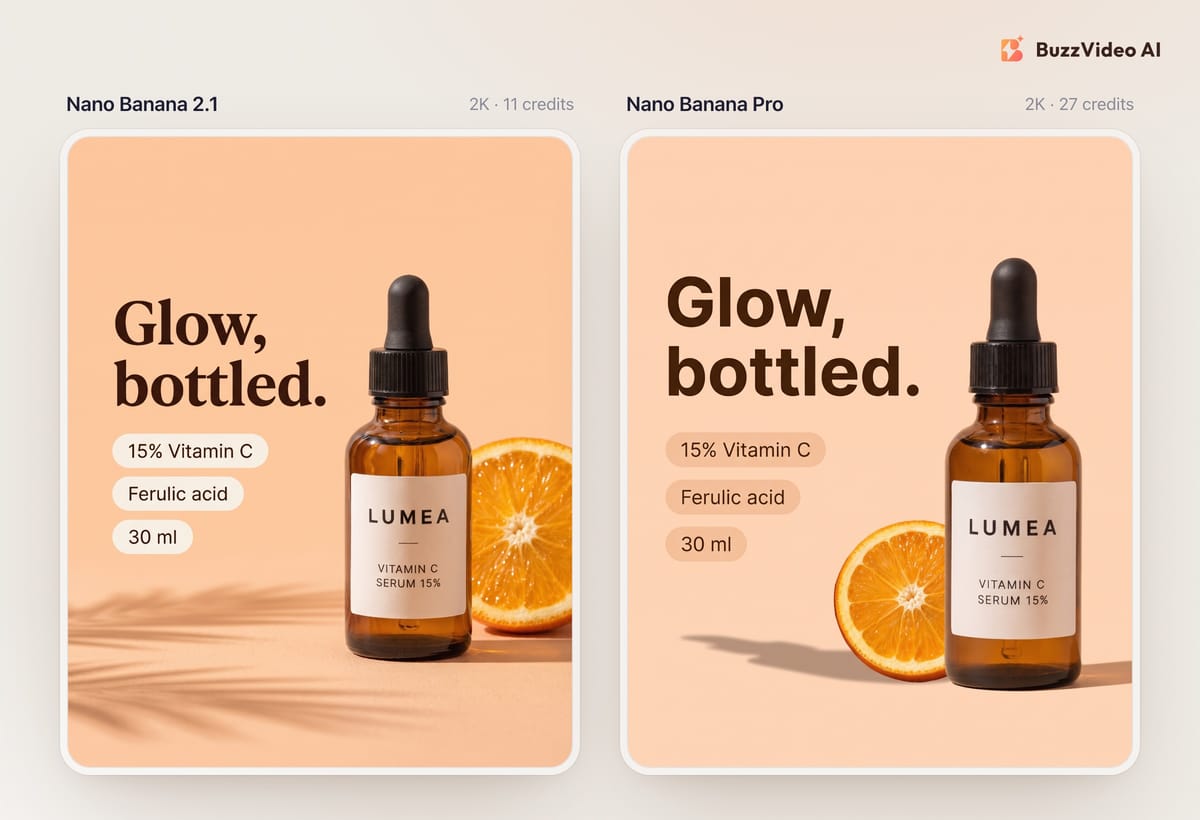
Both got every word right, and both kept the LUMEA label identical to the reference. The differences were style choices. Nano Banana 2.1 picked a serif headline and carried the palm-leaf shadow over from our reference photo without being asked. Pro used a clean sans-serif and a plainer studio look. For a static ad you would usually set the headline yourself in editing anyway; this test shows that either model can handle in-image text when you need it.
Which model is better for a creator-style product portrait?
The brief: a woman holds the bottle in her right hand beside her cheek, label to camera, on-camera flash on a tangerine backdrop.
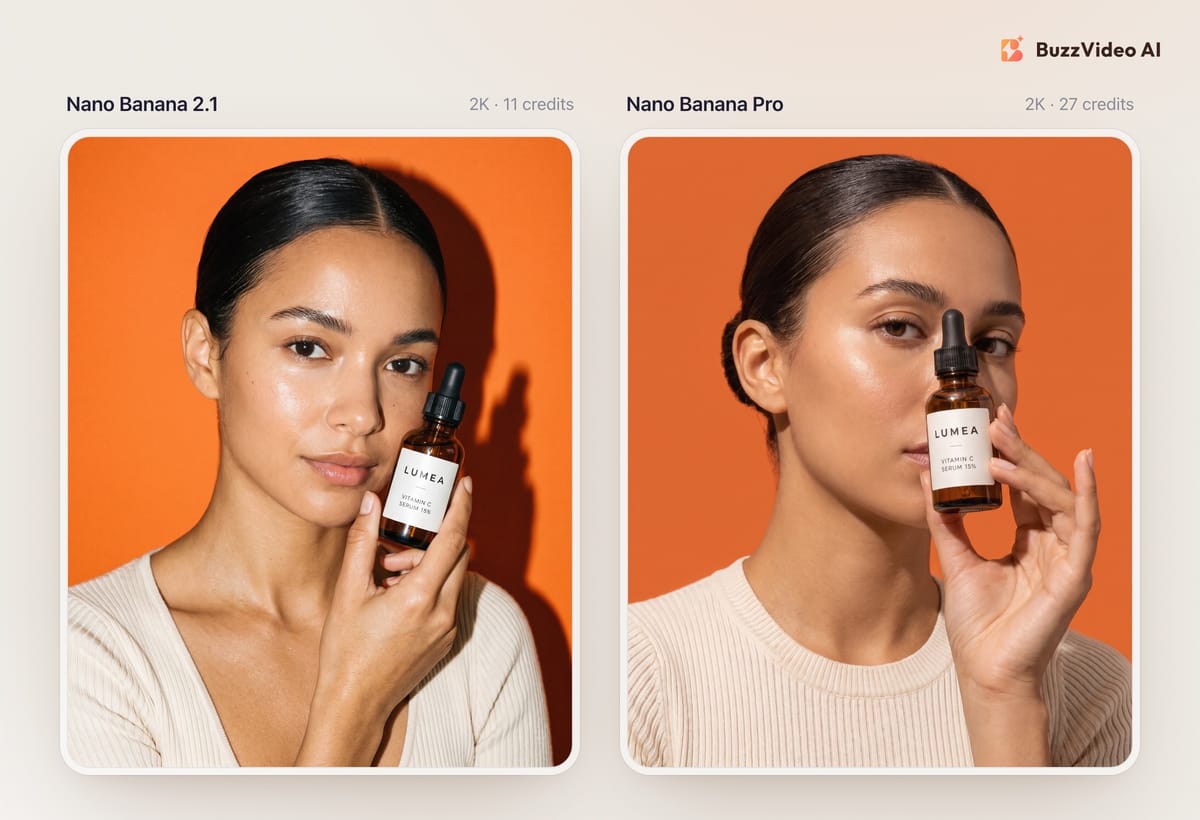
Nano Banana 2.1 followed the pose instruction literally: bottle beside the cheek, face fully visible. Pro produced a stronger editorial pose but put the bottle in front of the nose and mouth, which hides part of the face — not what we asked for, and harder to use in an ad. Hands and labels were clean in both. If you need exact composition, 2.1 was the easier model to direct in this test.
Which model is better for giant-product and surreal ads?
The brief: a three-metre version of the bottle in a sunlit city plaza, with a woman in a camel trench coat leaning against it.
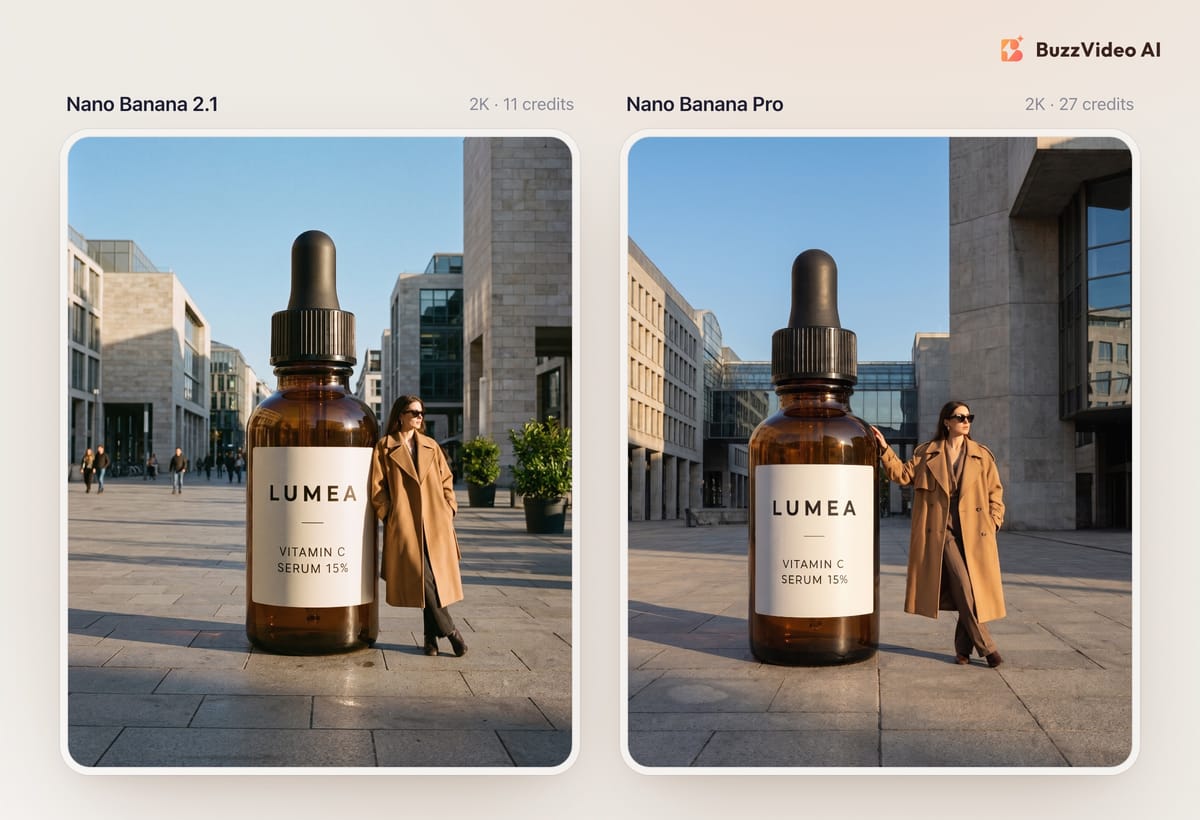
This was the closest result. Pro's frame looks more like a planned campaign shoot, with tidier architecture and a natural hand on the bottle. Nano Banana 2.1's version feels more like street-style photography, with passers-by in the plaza. Both made the bottle about two metres tall rather than three. If this were the hero image of a brand campaign, Pro's finish would be worth the extra credits; for a test variant, 2.1 is enough.
Nano Banana 2.1 vs Pro: results at a glance
| Brief | Nano Banana 2.1 | Nano Banana Pro | Our pick |
|---|---|---|---|
| Static ad with headline and chips | All text correct; serif style; carried reference styling | All text correct; clean sans-serif | Tie — use 2.1 on cost |
| Creator-style portrait | Followed the pose exactly | Stronger pose, but the bottle hid part of the face | 2.1 |
| Giant product in a city | Good, livelier background | More polished, campaign look | Pro for hero images |
| Cost per 2K image | 11 credits | 27 credits | 2.1 |
How much do Nano Banana 2.1 and Pro cost on BuzzVideo?
A batch of 100 test images at 2K costs 1,100 credits with Nano Banana 2.1 and 2,700 with Pro. On the Starter plan ($14 a month billed yearly, 1,900 credits a month), that is the difference between fitting a 100-image test into one month and not. At 1K the gap is wider: 7 credits against 27. Prices are from the BuzzVideo pricing page, and the Create button always shows the exact cost before you generate.
Which should you use for product ads?
| If you need… | Use |
|---|---|
| Many variants for Meta or TikTok testing | Nano Banana 2.1 |
| Exact composition, pose or layout | Nano Banana 2.1 |
| Very wide or tall banners (up to 8:1 or 1:8) | Nano Banana 2.1 |
| A hero image for a campaign or landing page | Nano Banana Pro |
| A second opinion when 2.1 misses the brief | Nano Banana Pro |
We build BuzzVideo, so take this as one team's test, not a benchmark. If your work is mostly typography-heavy posters, also try GPT Image 2.5 — see our Sunburst vs Flare comparison.
How do you run the same test in BuzzVideo?
Step 1: Open Generate Image
In the Marketing Agent, open the Image tab and choose Generate Image.
Step 2: Attach your product photo
Use a clean, well-lit photo where the label is readable. Both models copy what they see, including shadows and props.
Step 3: Pick the model, ratio and resolution
Open the model settings, choose Nano Banana 2.1, set 4:5 for feed or 9:16 for Stories and Reels, and 2K.
Step 4: Run, then switch to Pro with the same prompt
Generate once, switch the model to Nano Banana Pro without touching the prompt, and generate again. Compare at full size: label text, hands, product shape, and whether the composition matches your brief.
Copy-paste Nano Banana prompts for product ads
Replace the bracketed parts and attach your product photo as the reference.
“Clean static Meta ad, vertical 4:5. The exact [product] from the reference image stands on the right third on a [colour] background with [one prop] and soft hard-light shadow. On the left, bold typography: headline '[headline]' on two lines; below it three small rounded pill chips reading exactly '[feature 1]', '[feature 2]', '[feature 3]'. Keep the product and label identical to the reference. Spell every word exactly as given. No other text, no prices, no logos, no watermark.”
“Editorial beauty ad photo, vertical 4:5. A stylish [person] holds the exact [product] from the reference image in the right hand beside the cheek, label facing the camera, face fully visible. Direct on-camera flash against a [colour] seamless backdrop. One product only, one hand, five fingers. No other text, no logos, no watermark.”
“Surreal fashion campaign photo, vertical 4:5. A giant version of the exact [product] from the reference image, about [height] tall, stands in [location]. A fashionable [person] leans casually against it. Warm late-afternoon light, editorial street-style mood. Keep the label identical to the reference. Only one product. No signs with words, no logos, no watermark.”
Nano Banana 2.1 makes it cheap to test more product ad ideas, and Nano Banana Pro is there for the frames that need extra finish. Run both on your own product photo and let the results decide.
FAQs
Is Nano Banana 2.1 better than Nano Banana Pro?
Not across the board. In our product ad test it matched Pro on text and labels and followed composition more closely at less than half the credits, while Pro produced a more polished look for hero shots.
When was Nano Banana 2.1 released?
Google released Nano Banana 2.1 on October 6, 2026. It is available through the Gemini API and in tools that integrate it, including BuzzVideo AI.
How much does Nano Banana 2.1 cost on BuzzVideo?
7 credits at 1K, 11 at 2K and 23 at 4K. Nano Banana Pro costs 27 credits at 1K or 2K and 48 at 4K.
Can Nano Banana 2.1 render text in ads?
Yes. In our test it spelled a two-line headline and three feature chips correctly. For prices and offers we still add text in editing so it is always exact.
Can I use Nano Banana 2.1 on the BuzzVideo Free plan?
No. Nano Banana 2.1 and Nano Banana Pro are available on the Starter, Pro and Ultra plans.
How many reference images does Nano Banana 2.1 support?
Up to 14, with consistency for up to 4 characters and 10 objects, according to Google's model page.
Last verified: November 9, 2026, against our live pricing and product pages.
Next reads: GPT Image 2.5 Sunburst vs Flare for ads · AI static ads for Meta · AI model photoshoot from a flat-lay · AI product photography from one photo

About the author
Monica
Product Manager
As a Product Manager at BuzzVideo AI, I work with marketers and growth teams on AI ad workflows—from brief to shippable creatives. I write about practical product workflows, model choices, and how teams turn product pages into ads that feel native on Meta and TikTok.