How to Turn a Product URL into Video Ads with AI (2026)
A step-by-step workflow to turn any product page URL into testable vertical video ads with AI, with script templates, model choices, and fixes for common failures.
The fastest way to get from a Shopify, Amazon, or landing-page link to a testable video ad in 2026 is an AI URL-to-video workflow: paste the product URL, let the system pull title, benefits, and images, generate scripts and shots, then render vertical creatives for TikTok, Reels, and Meta.
On BuzzVideo AI, that job maps to the URL to Video tool inside Marketing Agent: it turns the product page into a brief, script, and ad variations, then renders them with the video model you choose.
Why start from a product URL instead of a blank prompt?
| Starting point | What you get | Risk |
|---|---|---|
| Blank text prompt | Pretty clip, weak product truth | Wrong claims, wrong packaging |
| Product photo only | Strong hero shots | Missing benefits from reviews/PDP |
| Product URL | Name, bullets, images, offer context | Scrape noise—always edit the script |
Performance teams don’t lose because they can’t make a video. They lose because they can’t make enough on-brief variants before the learning phase ends. URL-to-video compresses research + first draft into minutes so you spend human time on hooks and offers.
Try it: paste your product link and get three ad scripts back. Turn my product URL into ads →
What do you need before you start?
- A live product URL (PDP, Amazon listing, app store page, or landing page)
- A BuzzVideo account on Starter or above for video (you can try Marketing Agent and images free first)
- 1–3 reference images if packaging must stay exact (upload even when URL scrape works)
- A clear offer line (price, bundle, guarantee)—don’t rely on the page alone
Then check the page itself. URL-to-video can only use what the page shows:
- At least three clear images, including one straight-on shot with the label readable
- Benefits written as text, not only baked into images
- Specs a viewer cares about (size, weight, what's in the box) stated plainly
- Customer reviews if you want a social-proof angle—our demo page had none, so we skipped that angle rather than invent quotes
- No login wall or pop-up that hides the product content
How do you turn a product URL into video ads?
1. Paste the URL into Marketing Agent or URL to Video
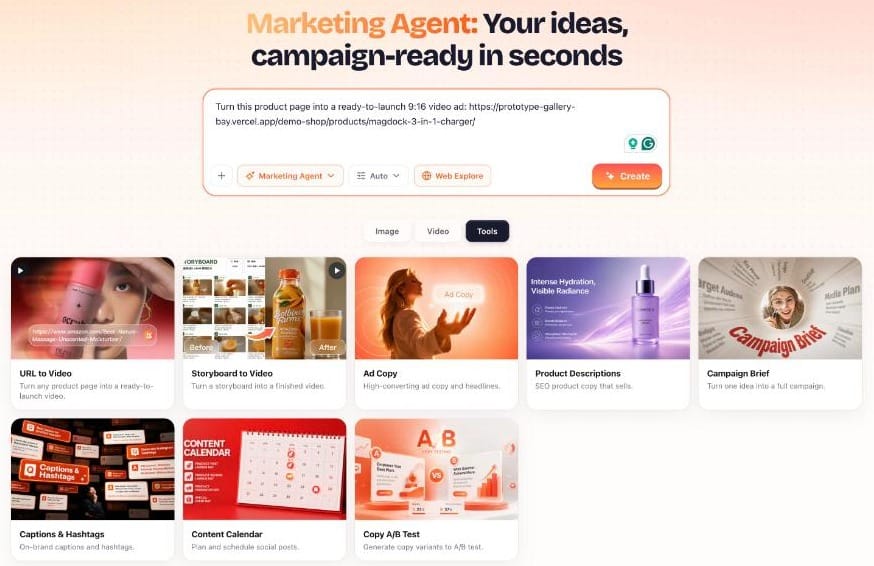
Open app.buzzvideo.ai, open Marketing Agent and pick URL to Video in the Tools tab, and paste the link. Use @ to attach extra files if the agent supports referenced uploads in your session.
Ask in plain language, for example:
“Create three 15-second TikTok UGC ads from this product URL. Hooks should lead with the #1 customer complaint this product solves. Keep packaging accurate. End with a clear CTA.”
2. Audit what the AI extracted
Before you generate video, fix the brief:
- Product name and spelling
- Top 3 benefits (from reviews if possible—not only marketing bullets)
- Claims you cannot legally run
- Price / promo accuracy
- Audience (who is speaking: creator, expert, couple, unboxing)
This edit pass is the difference between “AI spam” and usable creative.
3. Choose the ad format before the model
Pick the job:
| Format | Length | Best first model mindset |
|---|---|---|
| UGC / talking creator | 10–20s | Natural motion; later polish on Seedance if needed |
| Product hero / demo | 10–15s | Packaging consistency; Seedance 2.x when on Pro/Ultra |
| Hook batch for testing | 6–10s openings | Cheaper/faster models for volume, then upscale winners |
BuzzVideo’s Marketing Agent surface also lists related tools: UGC Ads, Product Demo, Ad Variations, Video Batch Variations, and Storyboard to Video.
4. Generate a storyboard when consistency matters
For multi-shot product stories, run Storyboard to Video: lock frames for hook → demo → proof → CTA, then generate continuous video so character and packaging don’t drift shot-to-shot.
5. Render, then route models on purpose
A practical pattern:
- Draft on a lower-credit video model (or Seedance Fast/Mini on Starter+) to explore hooks.
- Re-run the winning prompt/references on Seedance 2.0 or 2.5 (Pro/Ultra) for the hero cut.
- Spin Ad Variations / batch endings for A/B tests.
Credit examples from our pricing page: Seedance 2.5 ≈ 417 credits per 10s HD, Seedance 2.0 ≈ 260, Kling 3.0 ≈ 63 per 5s, and Seedance 1.5 Pro ≈ 21 per 10s SD for the cheapest drafts. For the full math, see BuzzVideo pricing and cost per ad.
6. Export for the placement
- 9:16 for TikTok / Reels / Shorts / Meta Stories
- 1:1 for feed tests
- Captions on for sound-off
- Watermark-free on paid plans
7. Launch a structured creative test
Don’t ship one “perfect” ad. Ship a matrix:
- 3 hooks × 2 avatars/presenters × 1–2 CTAs
- Kill losers in 48–72 hours
- Rebuild only the winning structure with tighter packaging references
How we made the three demo ads on this page
We used a product page from our demo store—the Kairo MagDock 3-in-1 charger, a fictional product—and built three angles from what the page actually says:
- Problem/solution: cable clutter on a nightstand, then one stand that charges everything (the video at the top of this page).
- Feature demo: phone, watch and earbuds charging at once.
- Travel: folds flat and weighs 210 g.
Each ad is one 12-second Seedance 2.5 clip with three shots (720p, 500 credits), plus a headline and a 3-second end card added in editing. The page had no customer reviews, so we skipped the social-proof angle instead of inventing quotes.
Review caught three problems before anything shipped: garbled text on a phone screen (we cut the shot before it appeared), a folded charger that "melted" when a hand touched it, and a fake passport the model added as a prop (we regenerated that shot without hands or documents). All three ads cost about 1,700 credits in total—roughly $12 on Pro billed yearly, or about $4 per finished ad.
What script structure works for URL-based ads?
Use this 4-beat template (≈15–25 seconds):
- Hook (0–3s): Problem or surprising visual—not logo.
- Demo (3–12s): Product in use; show the mechanism.
- Proof (12–18s): Review line, stat, or before/after (only if true).
- CTA (last 2–3s): One action + offer.
Example (fictional skincare—replace with your PDP truth):
- Hook: “If your vitamin C oxidizes in a week, you’re not crazy.”
- Demo: Dropper texture + morning routine insert
- Proof: “Dark-glass bottle + dropper—built to stay stable”
- CTA: “Shop the serum—link in bio / shop now”
Copy-paste prompts for three URL-to-video angles
These are the three angles we used for the demo ads above, written as reusable prompts. Replace the brackets with facts from your page:
- Problem/solution: "From this product page: [URL]. Make a 12-second 9:16 ad. Shot 1: the everyday problem [e.g. tangled cables on a nightstand], no product visible. Shot 2: the product solves it in one action. Shot 3: the result, product label readable. Keep the packaging identical to the product photos. No on-screen text."
- Feature demo: "From this product page: [URL]. Make a 12-second 9:16 ad showing [feature 1], [feature 2] and [feature 3] one after another, hands only, clean desk, soft daylight. One feature per shot. Keep the product identical in every shot."
- Use case: "From this product page: [URL]. Make a 12-second 9:16 ad about [situation, e.g. travel]. Show [the spec that matters, e.g. folds flat, 210 g] in action. No documents, screens, or text props in frame."
That last line is there for a reason: models add props with fake text (we got a fake passport). Keep props simple, and add your headline in editing instead of asking the model to write it.
Why do URL-to-video ads fail, and how do you fix them?
| Failure | Fix |
|---|---|
| Packaging morphs | Add 2–3 clear pack shots as references; shorten the shot list |
| Script copies weak PDP fluff | Rewrite from reviews; kill buzzwords |
| Looks like a TV ad on TikTok | Switch to UGC framing, handheld, imperfect room light |
| Too expensive per test | Draft on Fast/Mini or Kling; only finalize winners on Seedance 2.5 |
Why use BuzzVideo for URL-to-video
BuzzVideo starts from the same product URL but doesn't stop at one avatar template: you also get storyboard consistency, multi-model routing, Marketing Agent copy, talking avatars, and MCP, so you can brief from ChatGPT or Claude too. Comparing tools? See BuzzVideo vs Creatify vs Arcads vs HeyGen.
Want to go from product URL to video ads in one flow? Open Marketing Agent and paste your link.
FAQs
Can BuzzVideo turn any URL into a video ad?
It works best with product pages that have clear images and descriptions (Shopify, Amazon, app listings, landing pages). Always verify scraped copy before spend.
Do I need Seedance for URL-to-video?
No. URL-to-video is a BuzzVideo workflow. Seedance is one of the video models you can select for higher-fidelity renders (Pro/Ultra for 2.0/2.5).
Is video available on the Free plan?
Video starts on Starter. The Free plan gives you 500 one-time credits to try Marketing Agent and image models first.
How long until I have a testable ad?
Many teams reach a first vertical cut in under 15 minutes after URL paste and script cleanup. Iteration for packaging accuracy may take longer.
Can I make many variants from one URL?
Yes—use Ad Variations / batch variation tools to change hooks and endings for creative testing.
Can I use an Amazon or Shopify product URL?
Yes. Any public product page with clear images and copy works, including Amazon listings, Shopify product pages, app store pages, and landing pages. If a page blocks scraping, upload the product photos instead and paste the key benefits into the brief.
How much does a URL-to-video ad cost?
It depends on the model and length. On Pro billed yearly, a 10-second Seedance 2.0 HD clip costs about 260 credits (roughly $1.90), and a 5-second Kling 3.0 draft about 63 credits (roughly $0.45). See BuzzVideo pricing and cost per ad.
Last verified: October 30, 2026, against our live pricing and product pages.
Next reads: Storyboard to video for consistent ads · Product demo videos from photos · Marketing Agent

About the author
Monica
Product Manager
As a Product Manager at BuzzVideo AI, I work with marketers and growth teams on AI ad workflows—from brief to shippable creatives. I write about practical product workflows, model choices, and how teams turn product pages into ads that feel native on Meta and TikTok.