Seedance 2.5 vs Kling 3.0 and Veo 3.1: AI Video Models Compared for Ads
Compare Seedance 2.5, Kling 3.0 and Veo 3.1 for video ads. Explore video length, references, audio, key features and practical testing tips.
Seedance 2.5 vs Kling 3.0 and Veo 3.1: AI Video Models Compared for AdsSeedance vs Kling: which AI video model should you test for your next ad? Seedance 2.5 supports videos of up to 30 seconds per generation and multiple types of reference material, while Kling 3.0 supports up to 15 seconds, multi-shot creation and multilingual audio. Veo 3.1 offers another option for shorter videos with native audio and video extension.
For brands and marketers creating product videos, TikTok ads and creator-style content, choosing a model depends on the creative brief. This guide compares the published features of Seedance 2.5, Seedance 2.0, Kling 3.0, Veo 3.1 and Sora, and explains how to test them for different advertising tasks.
About this comparison: This article is based on official model specifications, not a hands-on performance test by BuzzVideo AI. Actual features and settings may vary by platform and subscription plan.
For current model details and available settings, explore the Seedance AI Video Generator on BuzzVideo AI.
Seedance vs Kling, Veo and Sora: Features at a Glance
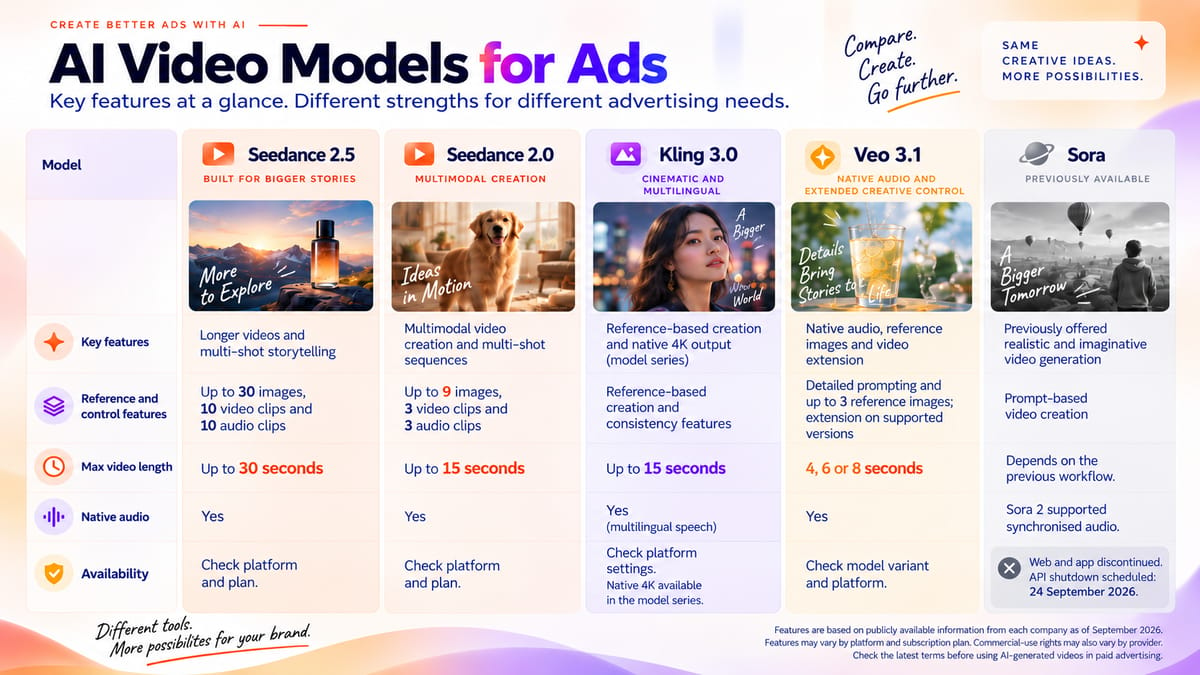
The table below compares the published features of five AI video models, including video length, reference inputs, native audio and service availability.
| Model | Key features | Reference and control features | Video length | Native audio | Availability |
|---|---|---|---|---|---|
| Seedance 2.5 | Longer sequences, multi-shot storytelling and video extension | Up to 30 images, 10 video clips and 10 audio clips | Up to 30 seconds per generation | Yes | Check platform and plan |
| Seedance 2.0 | Multimodal creation, editing and extension | Up to 9 images, 3 videos and 3 audio clips | Up to 15 seconds per generation | Yes | Check platform and plan |
| Kling 3.0 | Multilingual audio, multi-shot creation and native 4K output within the series | Reference-based creation and subject consistency features | Up to 15 seconds per generation, with up to 6 shots | Yes | Check model version and platform |
| Veo 3.1 | Native audio, reference images and video extension | Detailed prompting and up to 3 reference images; extension on supported versions | 4, 6 or 8 seconds per generation | Yes | Check model version and platform |
| Sora | Previously supported video generation with synchronised audio | Prompt-based video creation | Depended on the previous model and workflow | Sora 2 supported synchronised audio | Web and app discontinued; API closure scheduled for 24 September 2026 |
Video length refers to a single generation unless otherwise stated. Features may vary by model version, platform and subscription plan.
What about Sora?
According to OpenAI, Sora's web and app services were discontinued on 26 April 2026. The Sora API is scheduled to close on 24 September 2026.
Sora is included for reference, but its announced discontinuation makes it unsuitable for planning new long-term video production workflows.
Commercial-use rights vary by provider, platform and subscription plan. Check the applicable terms before using AI-generated videos in paid advertising.
The table is based on published information from ByteDance, Kuaishou and Google.
To compare actual results, use the same creative brief and comparable settings wherever possible, then review the generated videos.
Seedance 2.5 vs Kling 3.0: What Are the Key Differences?
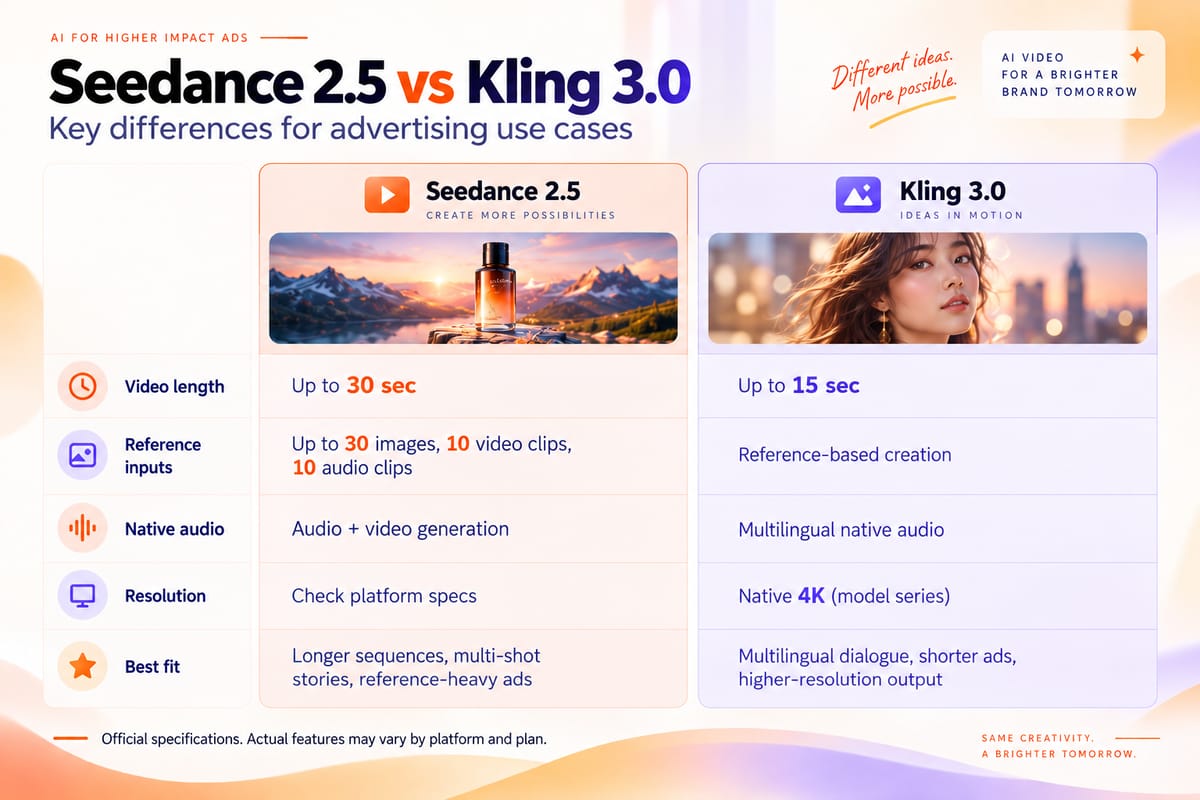
Seedance 2.5 and Kling 3.0 both support AI video creation with native audio and reference-based features. The main differences in their published specifications are video length, reference options and output resolution.
For advertising teams, these differences can help narrow down which model to test. However, official specifications alone cannot determine which model produces better results.
Video Length: 30 Seconds vs 15 Seconds
According to ByteDance, Seedance 2.5 supports up to 30 seconds of video generation in a single pass, along with multi-shot creation, video extension and editing features.
Kuaishou states that Kling Video 3.0 supports video generation of up to 15 seconds, including multi-shot sequences.
For a longer product story, Seedance 2.5 is worth testing. For a shorter ad, either model may be suitable, depending on the brief.
Reference Inputs: Different Levels of Control
Seedance 2.5 supports up to 30 images, 10 video clips and 10 audio clips as reference materials in a single generation.
Kling 3.0 also supports reference-based creation. Its Video 3.0 and Video 3.0 Omni versions offer features designed to maintain consistent characters, objects and scenes.
If your ad uses several product images, character references or sample videos, compare the reference options available in each model.
More reference inputs do not automatically mean better consistency. Check whether the generated video accurately follows your supplied materials.
Native Audio: Check Dialogue and Synchronisation
Both models support native audio generation.
Seedance 2.5 combines audio and video generation and accepts audio references.
Kling 3.0 supports speech in English, Chinese, Japanese, Korean and Spanish, along with selected accents and dialects. Its multilingual features may be useful when creating different language versions of an ad.
For dialogue-based ads, check pronunciation, lip movements, sound effects and audio synchronisation before publishing.
Video Resolution: Check 4K Availability and Platform Limits
Kling AI confirms that its Kling 3.0 video model series supports native 4K generation.
However, resolution options vary by model and platform. BuzzVideo AI currently lists Seedance 2.5 with output resolution of up to 720p, while Google's documentation confirms 4K support for certain Veo 3.1 variants.
If your project requires 4K output, check the exact model version, available resolution settings and subscription plan before production.
Published resolution specifications do not establish which model will produce better-looking ads. Review the generated videos at the output settings available to you.
Which Model Should You Test for Ads?
Seedance 2.5 is worth testing for longer sequences and projects involving multiple reference assets. Kling 3.0 is worth testing for multilingual dialogue or workflows requiring native 4K output, where available.
Both models support native audio and reference-based creation. Their published specifications can help narrow down your options, but the final decision should depend on your advertising brief and actual outputs.
For a practical testing method, see the three ad briefs below.
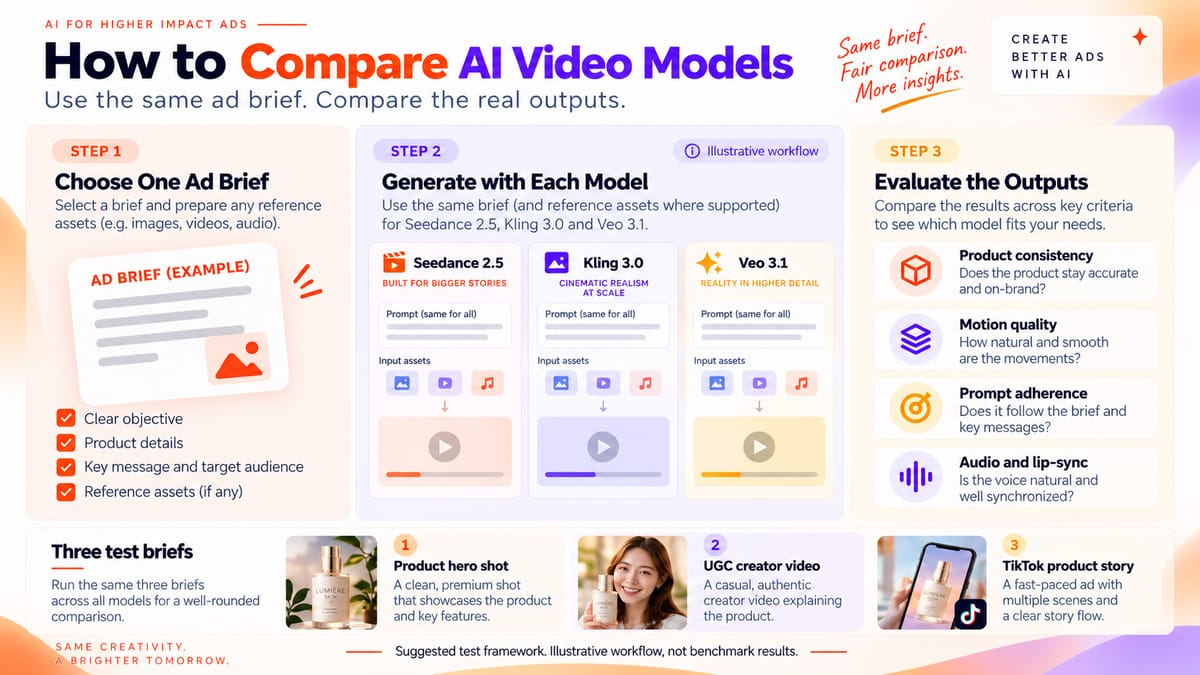
How to Compare AI Video Models Using the Same Three Ad Briefs
Official specifications show what an AI video model supports, but they cannot tell you how well it will perform for a specific ad.
A practical way to compare Seedance 2.5, Kling 3.0 and Veo 3.1 is to give them the same creative brief, use the same reference assets where supported, and compare the generated outputs.
The three briefs below focus on product consistency, character appearance, camera movement and how closely each video follows your instructions.
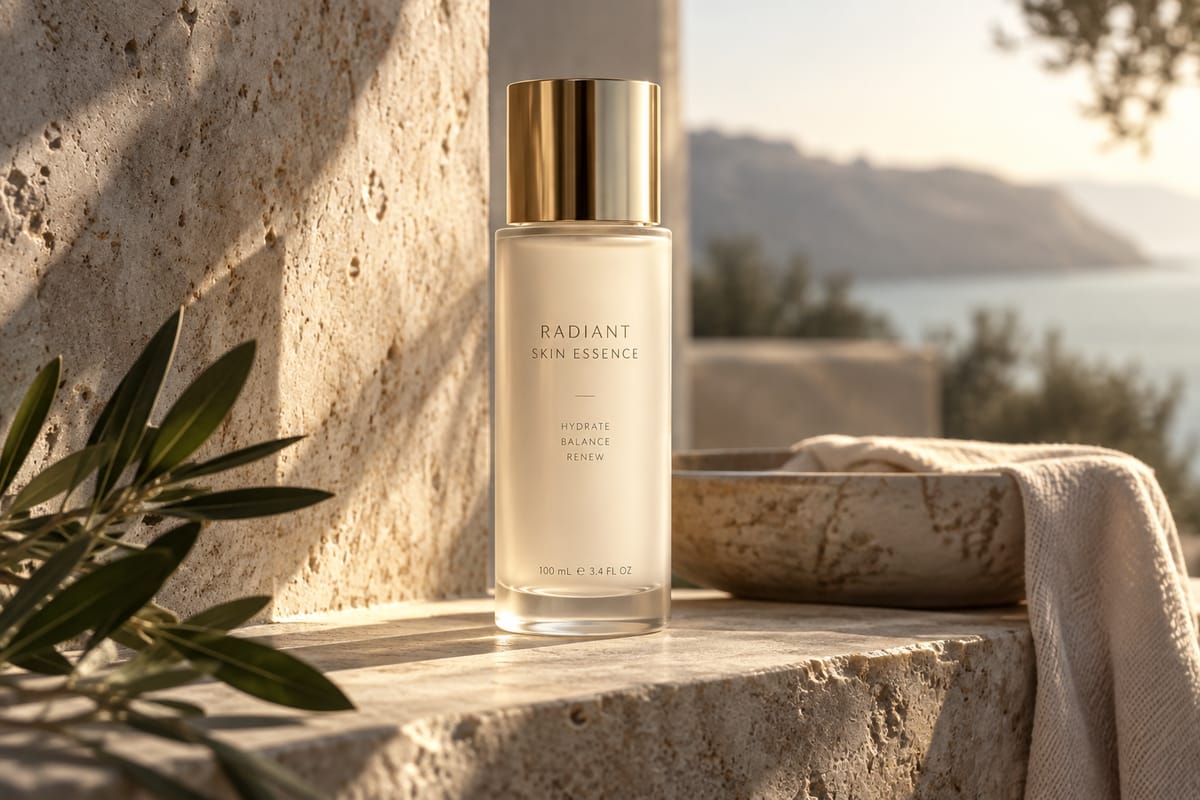
Brief 1: Product Hero Shot
Create a video of a premium skincare bottle on a clean stone surface. Start with a close-up, slowly move towards the bottle, then move the camera around it.
Keep the bottle shape, label, cap and lighting consistent throughout the video.
What to check:
- Does the bottle change shape?
- Does the label remain accurate?
- Does the camera move naturally?
- Does the lighting stay consistent?
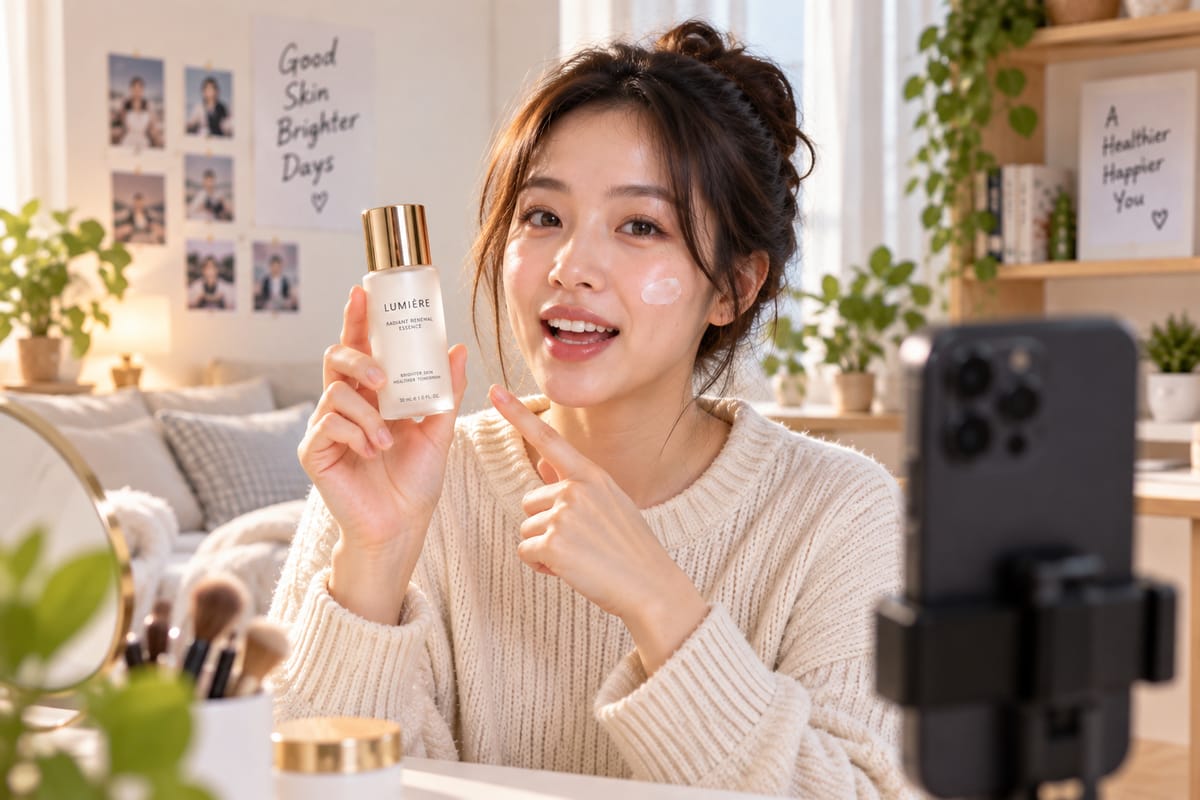
Brief 2: UGC-Style Creator Video
Create a video of a creator holding a beauty product in a bright indoor setting. The creator looks at the camera, introduces the product and demonstrates how to use it.
What to check:
- Does the face remain consistent?
- Does the clothing change unexpectedly?
- Does the product keep the same appearance?
- Do the lip movements match the audio?
- Are there visible AI-generated errors?
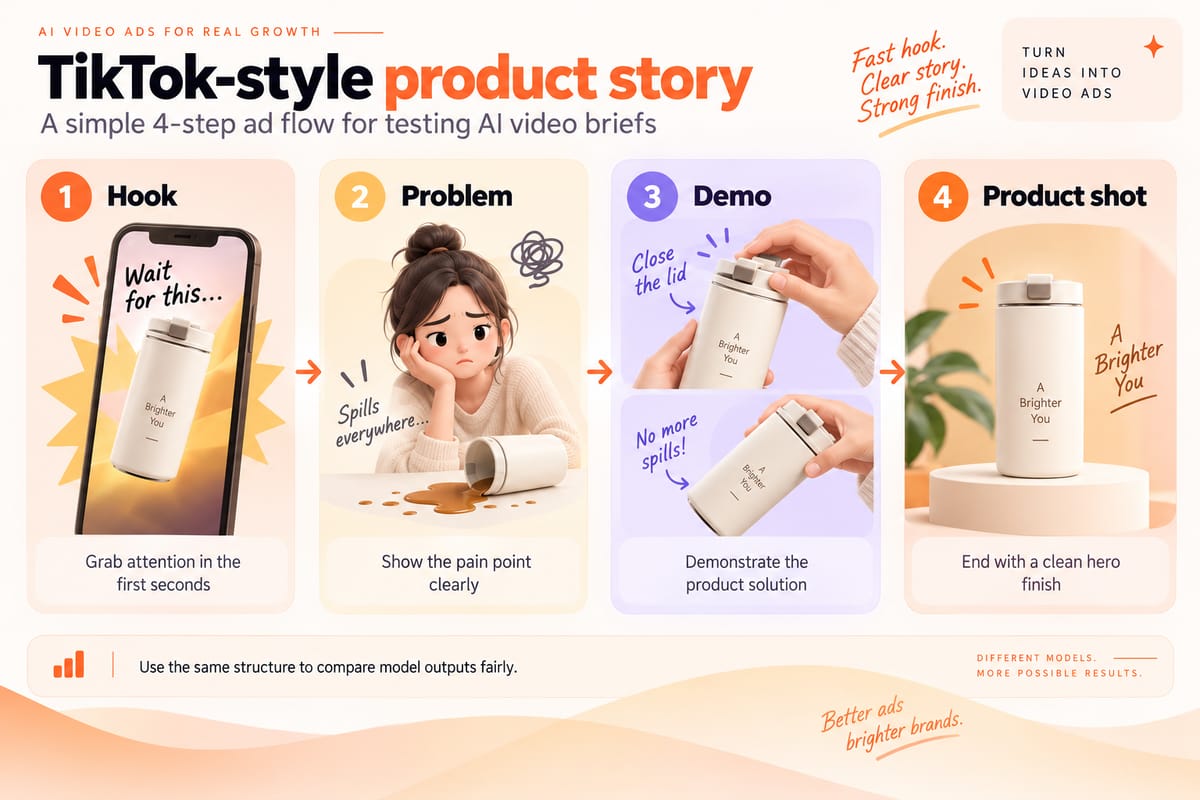
Brief 3: TikTok-Style Product Story
Create a short product ad with four parts:
Hook → Problem → Demo → Product Shot
Start with a strong opening, introduce the problem, demonstrate the product and finish with a clear product shot.
What to check:
- Does the product remain consistent across shots?
- Are the scene transitions natural?
- Does fast movement cause visible distortion?
- Does the video follow the brief accurately?
How to Make the Comparison Fair
Use the same advertising briefs, reference assets and target video length wherever the models support them. If their maximum video lengths differ, compare them at a duration they all support and test longer sequences separately.
Record the model version, input materials, generation settings and number of attempts for each test.
If a model does not support a particular reference type or output setting, record that limitation rather than treating it as a failed generation.
Evaluate the outputs using the same criteria: product consistency, motion, camera movement, audio and prompt accuracy.
Seedance 2.0 vs Kling 3.0: Additional Feature Differences
Seedance 2.0 and Kling 3.0 both support reference-based video creation and native audio. Their published specifications provide useful context, although this article focuses primarily on Seedance 2.5 vs Kling 3.0.
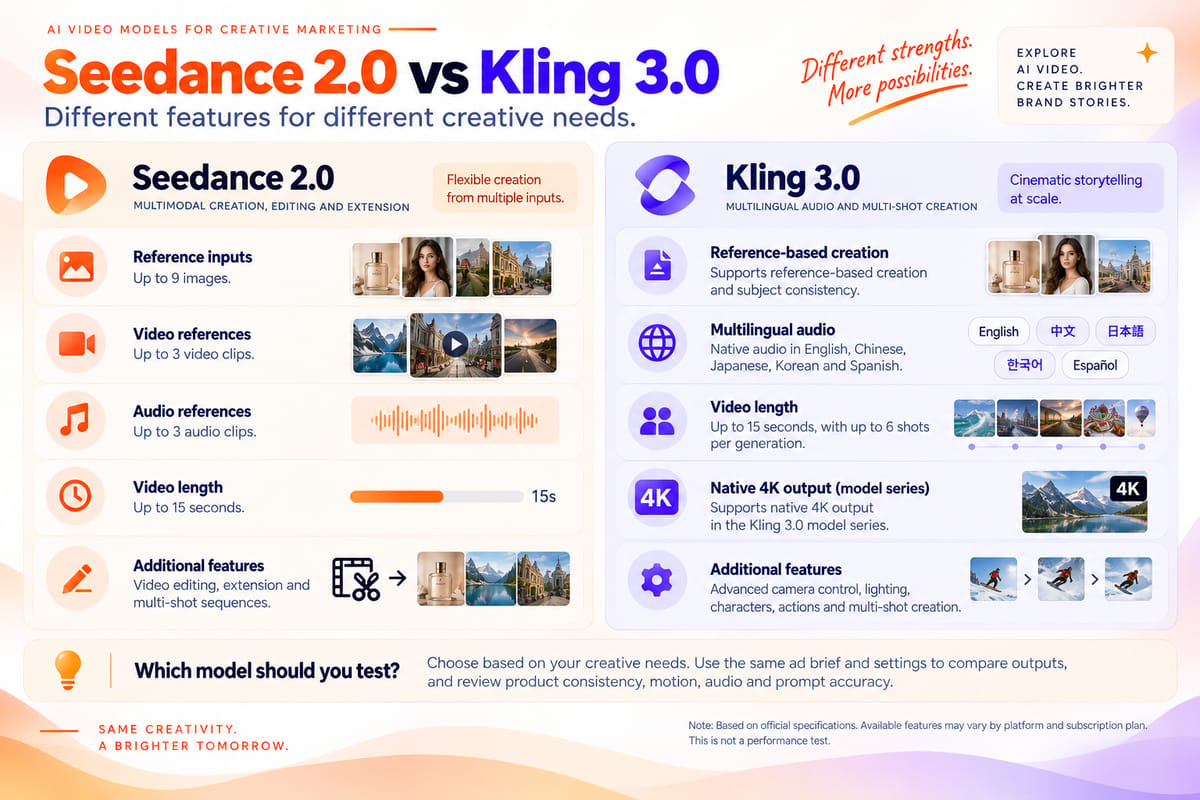
Seedance 2.0: Multimodal References and Video Editing
According to ByteDance, Seedance 2.0 combines text, image, video and audio inputs in a single generation workflow.
Each generation supports up to:
- 9 image references
- 3 video references
- 3 audio references
It also supports video editing, extension and multi-shot audio-video generation of up to 15 seconds.
These features may be useful when an ad needs to follow specific product images, characters, camera movements or audio references. However, reference support does not guarantee consistent details throughout the generated video.
Kling 3.0: Multilingual Audio and Video Editing
According to Kuaishou's official announcement, Kling 3.0 supports reference-based video creation, native multilingual audio and in-video editing.
Its multilingual features may be useful for campaigns requiring different language versions of the same ad.
When comparing Kling 3.0 with Seedance 2.0, check the available language options, reference inputs, editing features and output settings on your chosen platform.
Seedance 2.0 or Kling 3.0: Which to Test First?
Seedance 2.0 supports multimodal references, video editing and extension, while Kling 3.0 offers multilingual audio, reference-based creation and in-video editing.
Compare the language options, reference inputs and editing features required by your advertising brief.
Use the same instructions and comparable settings wherever possible, then review the outputs for product consistency, motion, audio and prompt accuracy.
Seedance 2.5 vs Veo 3.1: Key Feature Differences
Google shut down the Veo 3 production API endpoints on 30 June 2026 and recommends moving to Veo 3.1.
For new advertising projects, compare Seedance 2.5 with Veo 3.1 rather than the retired Veo 3 API models.
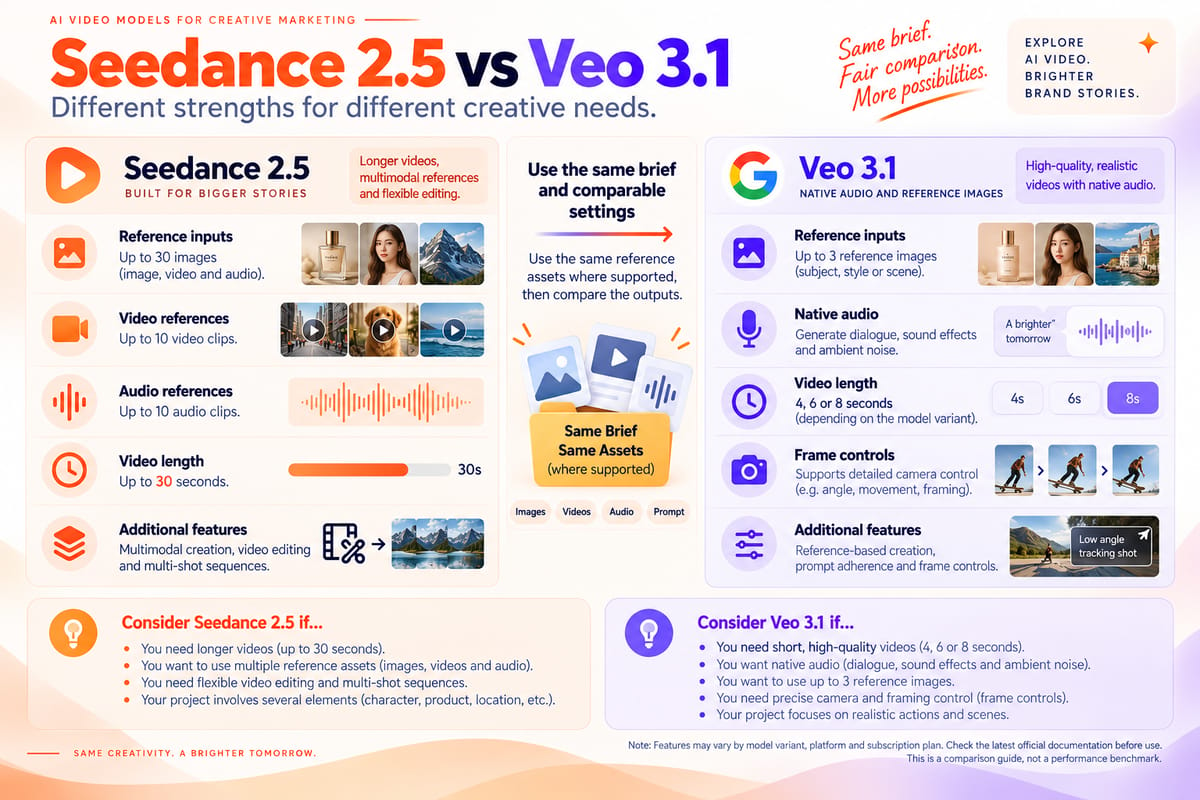
Seedance 2.5 supports up to 30 seconds in a single generation. Veo 3.1 supports native audio, reference images and video extension. The available video length and resolution depend on the selected settings.
Veo 3.1: Native Audio, Reference Images and Video Extension
According to Google's official documentation, Veo 3.1 supports native audio, reference images and frame-specific controls.
The model supports clips of 4, 6 or 8 seconds. Certain features, including reference images and higher-resolution output, require an eight-second duration.
Video extension is available for Veo 3.1 and Veo 3.1 Fast, but not Veo 3.1 Lite. In Google's Gemini API workflow, this feature only supports eligible videos previously generated with Veo. It cannot extend arbitrary uploaded videos.
For product ads, test whether the generated video follows your camera instructions, maintains product details and produces synchronised audio. Check which features are available on your chosen platform before production.
Seedance 2.5: Longer Videos and Multimodal References
According to ByteDance, Seedance 2.5 supports video generation of up to 30 seconds in a single pass, along with image, video and audio references.
These features may be useful for ads that need multiple product images, character references, camera movements or audio inputs.
However, longer video generation and more reference inputs do not guarantee better quality or consistency. The final output still needs to be checked against the original brief.
Seedance 2.5 or Veo 3.1: Which to Test First?
Consider Seedance 2.5 if your ad needs longer single-pass sequences or several types of reference material.
Consider Veo 3.1 if your project requires shorter clips, native audio, reference images or specific frame controls.
For a direct comparison, use the same creative brief and comparable settings wherever possible. Review product consistency, motion, audio and how closely each video follows your instructions.
Which AI Video Models Should You Test for Different Ad Types?
The right AI video model depends on what your ad needs to achieve. Video length, multilingual audio, product consistency and reference support are useful starting points when deciding which models to test.
Here are four common advertising scenarios and the features to consider.
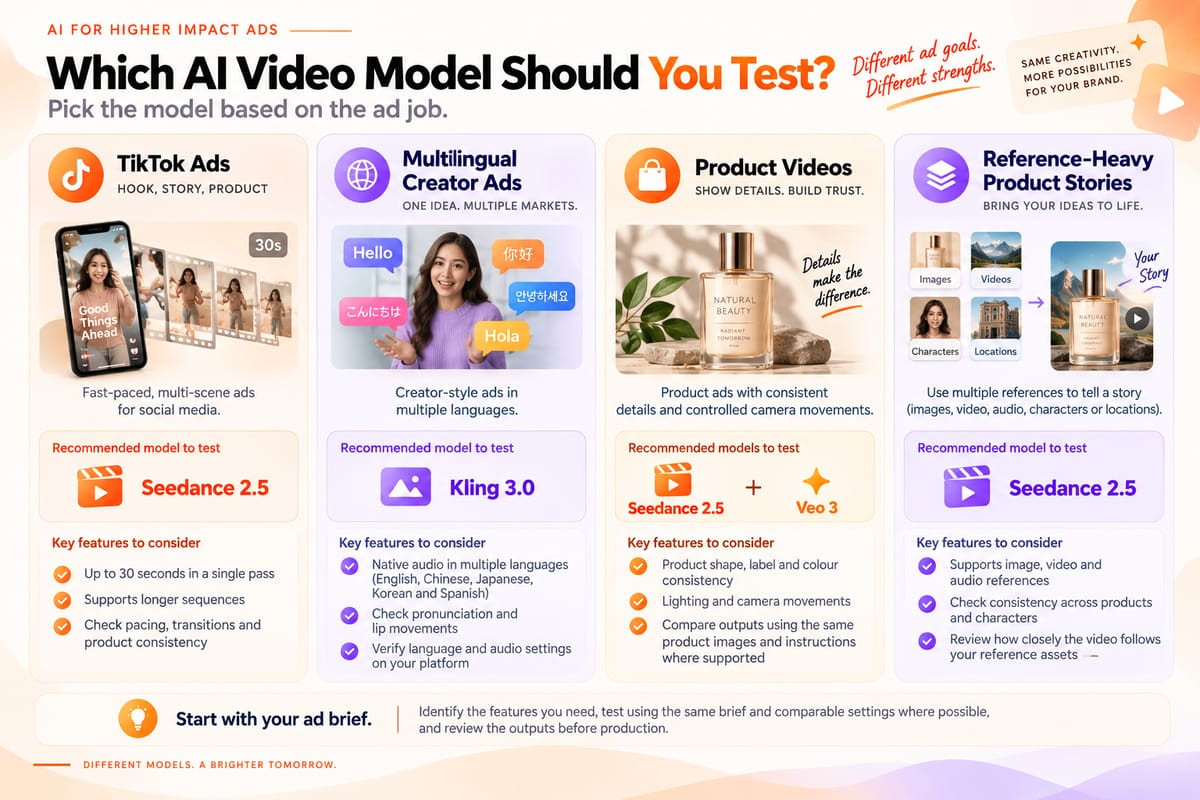
TikTok Ads: Test Seedance 2.5 for Longer Sequences
For a TikTok ad following a Hook → Problem → Demo → Product Shot structure, Seedance 2.5 is worth testing.
According to ByteDance, the model supports video generation of up to 30 seconds in a single pass, along with features designed to improve continuity across longer sequences.
What to check: Does the opening capture attention? Does the product remain consistent across shots? Are the pacing and transitions natural?
A longer video does not automatically make a better ad. Review the complete sequence before using it in a campaign.
Multilingual Creator Ads: Test Kling 3.0
If your campaign needs different language versions of a creator-style ad, Kling 3.0 is worth testing.
According to Kuaishou, Kling 3.0 supports native audio in English, Chinese, Japanese, Korean and Spanish, along with selected accents and dialects.
What to check: Is the dialogue accurate? Does the pronunciation sound natural? Do the lip movements match the speech?
Check the languages and audio settings available on your chosen platform before production.
Product Videos: Compare Veo 3.1 and Seedance 2.5
For product ads that require consistent details, controlled camera movements and natural lighting, test Veo 3.1 alongside Seedance 2.5.
Google's Veo 3.1 documentation describes reference-image support and frame-specific controls, while Seedance 2.5 supports longer single-pass videos and multimodal references.
Use the same product images and instructions wherever supported.
Check whether the product retains its shape, label and colour. Review the lighting, camera movements and how closely each video follows your brief.
Reference-Heavy Product Stories: Test Seedance 2.5
If your ad needs multiple product images, character designs, locations or sample videos, Seedance 2.5 is worth testing.
According to ByteDance, the model supports image, video and audio references within the same generation workflow.
These inputs may help communicate detailed creative requirements, but they do not guarantee that the final video will reproduce every reference accurately.
What to check: Do the products and characters remain consistent? Does the video follow the supplied references? Are there any unexpected changes between shots?
FAQ
Is there anything better than Kling AI?
It depends on your advertising needs.
Seedance 2.5 supports longer single-pass videos and multiple types of reference material. Veo 3.1 offers native audio, reference images and frame-specific controls, while Kling 3.0 supports multilingual audio and native 4K output within its model series.
Compare the features that matter to your project, then review the generated results before choosing a model.
Is Seedance better than Kling?
Neither model is better for every advertising task based on published specifications alone.
According to ByteDance, Seedance 2.5 supports videos of up to 30 seconds per generation and accepts image, video and audio references.
Kuaishou states that Kling 3.0 supports videos of up to 15 seconds, reference-based creation and multilingual audio.
Seedance 2.5 is worth testing for longer sequences, while Kling 3.0 offers options for multilingual creator ads. The final choice should depend on your creative requirements and the generated outputs.
Is Seedance better than Veo 3?
For new projects using the Gemini API, the more relevant comparison is Seedance 2.5 vs Veo 3.1, as Google discontinued its Veo 3 production API endpoints on 30 June 2026.
Seedance 2.5 supports up to 30 seconds per generation and accepts image, video and audio references.
Google's Veo 3.1 documentation describes native audio, reference images and video extension on supported variants.
Compare both models using the same advertising brief and review product consistency, motion, audio and prompt accuracy before choosing one for your project.
Which Kling 3.0 model should I use?
The Kling 3.0 series includes Video 3.0 and Video 3.0 Omni.
Video 3.0 supports reference-based creation, multilingual audio and multi-shot storytelling. Video 3.0 Omni offers additional reference-based features and storyboard controls.
Check which version is available on your chosen platform and whether it supports the inputs and controls required by your project.
How to Choose an AI Video Model for Your Ad
Start with your advertising brief. Identify the features you need most, such as video length, reference inputs, multilingual audio or resolution.
Test models that support those requirements. Use the same prompt and comparable settings wherever possible, then review the outputs for product consistency, motion, audio and prompt accuracy.
BuzzVideo AI gives you access to different video models in one workspace. Generate a video with one model, rerun the same prompt with another and compare the results before choosing an output for your ad.
Try Seedance 2.5 on BuzzVideo AI
Ready to create your next video ad?
Explore Seedance 2.5 on BuzzVideo AI, review its features and check which subscription plans provide access.
Choose a supported plan and try generating a video using your own creative brief.

About the author
Hai Taeng
SEO Content Editor
With experience in SEO content writing and optimization, I enjoy exploring new topics, finding fresh angles, and making complex subjects easier to understand. I believe good content should be clear, useful, and engaging. My goal is to create well-researched, easy-to-follow content that answers readers' questions, offers practical tips, and inspires them to discover something new.