How to Make an AI Product Commercial from Photos in ChatGPT or Claude
Step-by-step: turn product photos into a 15–30 second multi-scene product commercial inside ChatGPT or Claude with BuzzVideo MCP—scenes, script, credits, review.
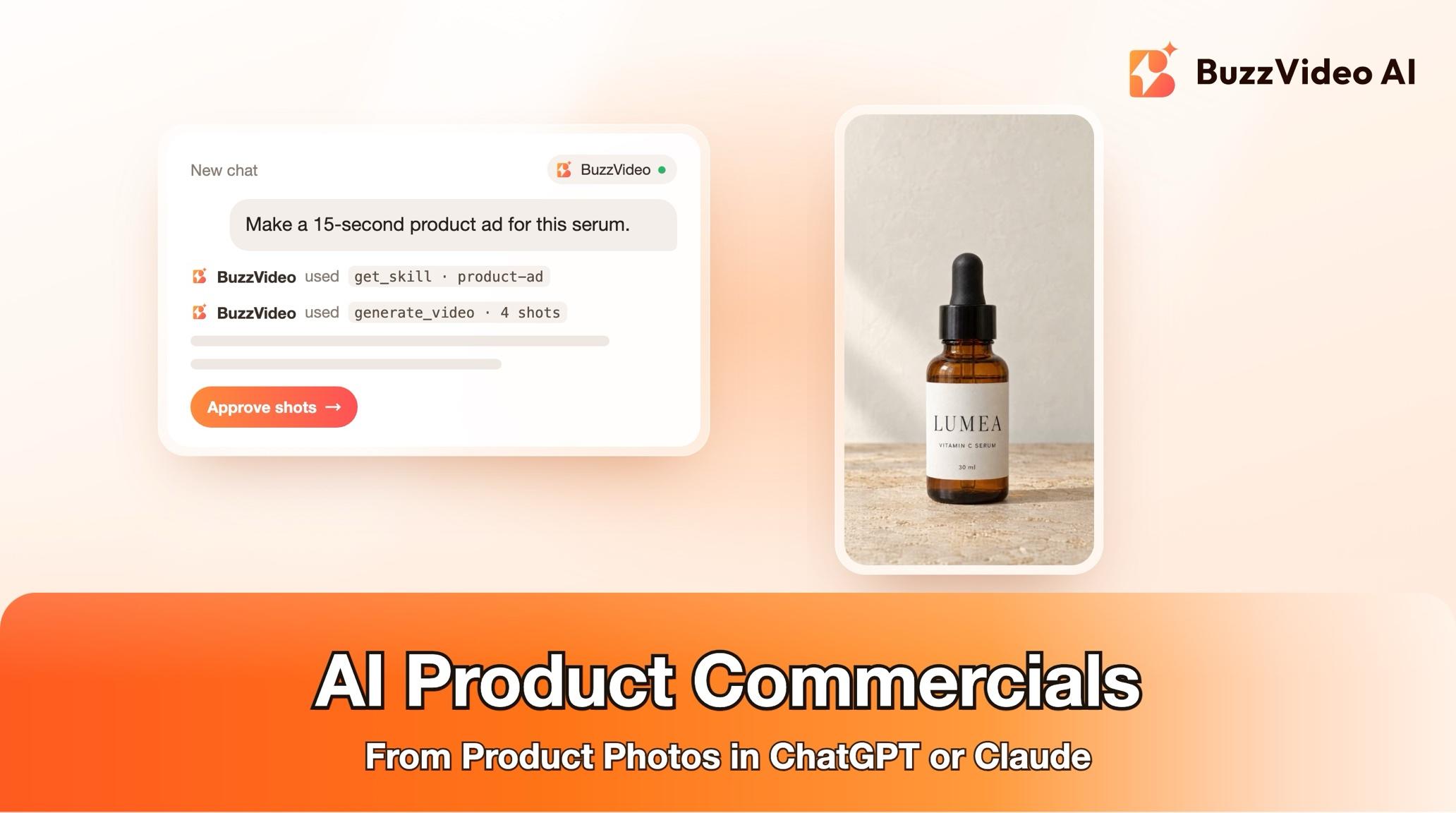
To make an AI product commercial, start from one sharp product photo, plan three to five scenes that each carry one beat of your message, turn the scenes into short video shots with the product kept identical, and cut them into a 15–30 second ad with a voiceover or fast text cards. With BuzzVideo MCP you can run the whole job from ChatGPT or Claude: the chat follows BuzzVideo's Product ad guide, checks your label text and claims, and asks you to approve the scene images and then the video cost before it spends credits on either.
Below: each step, a prompt to copy, a 15-second scene plan, real credit numbers, and the review checks that keep labels and sizes from changing between shots.
What is an AI product commercial?
An AI product commercial is a short, polished ad where the product is the star: a hook, a hero shot, the product in use and a packshot with a call to action. There is no presenter talking to camera. Every scene is generated from your real product photo, so the packaging looks the same in each one.
| Part | Product ad guide default |
|---|---|
| Length | 15 seconds (15–30 s supported) |
| Formats | 9:16 and 16:9, for Meta and TikTok ads |
| Scenes | 3–5, one message beat each |
| Sound | Voiceover, or a fast text-card cut with music you own |
| People | None by default; hands only or a person if you ask |
| Editing style | Fast-cut ad (Premium brand, Beat-synced, Talking-head or a reference video on request) |
Only have a product page link, or want slower demo clips? See product URL to video ads and product demo videos from photos.
Try it: connect BuzzVideo to your AI chat once, then send a product photo and ask for a 15-second ad. Connect BuzzVideo MCP →
What do you need before you start?
- A BuzzVideo plan with video. Video starts on Starter (Seedance 2.0 Fast and Mini); Seedance 2.0 and 2.5 need Pro or Ultra (pricing).
- BuzzVideo MCP connected to ChatGPT, Claude or another MCP client — see how to use BuzzVideo MCP in ChatGPT and Claude.
- A sharp front view of the product, ideally 1500 px or more on the long side, label readable.
- One main message and the claims you can make, exactly as approved.
- Music you own the rights to, if you want music.
- A chat that can run commands for the final edit (Claude Code, for example). Without that, you get the approved shots, voiceover and an edit plan instead of finished files.
How do you make an AI product commercial step by step?
Step 1 — Ask for the ad and confirm the label
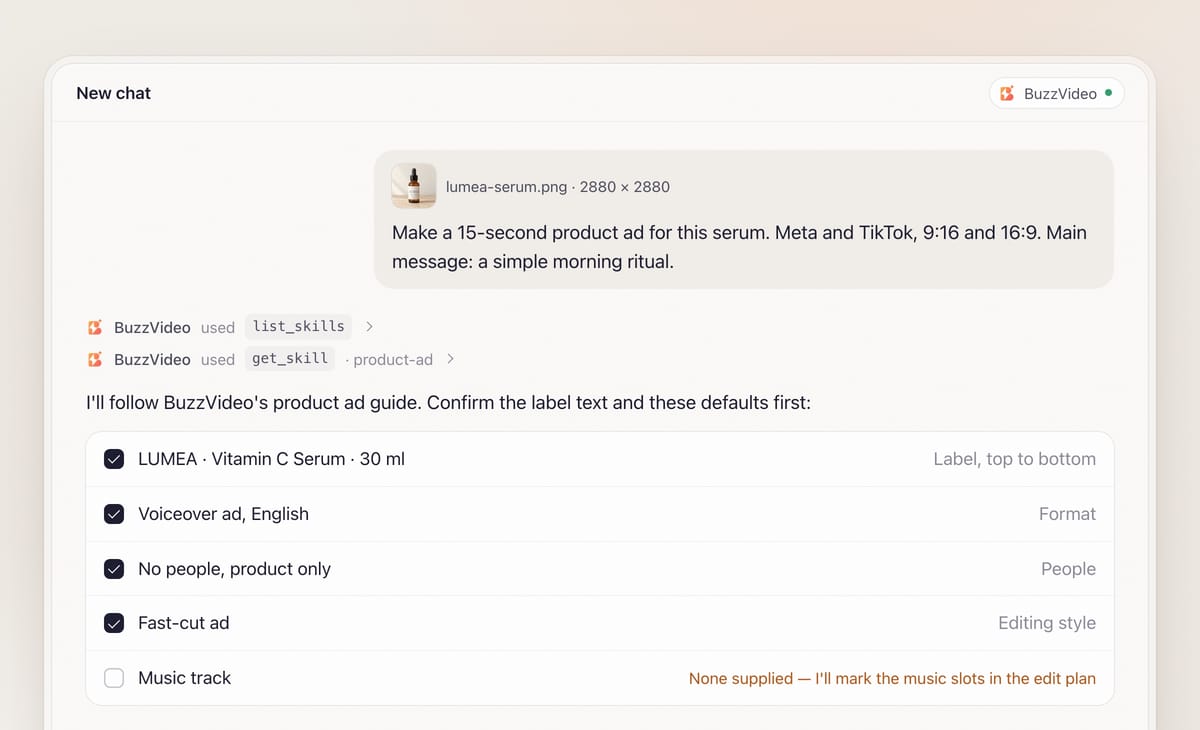
Attach the product photo and describe the ad in one message. With BuzzVideo MCP connected, the chat looks up BuzzVideo's guides (list_skills) and loads the product ad one (get_skill), so it follows the same steps every time.
It then asks, in one round with defaults: voiceover or text cards (most preset voices are English), whether people appear, the editing style, and whether you have music. It lists the brand, product name and every claim exactly as read from your packaging for you to confirm. Anything it can't read, it asks you to type.
Step 2 — Get a clean product master
Every scene is built from one clean master. A sharp, straight-on photo on plain white of at least 1500 px is used as-is—regenerating could only change the label. A smaller photo stays the label reference, and the guide generates a 2K master from it for you to confirm.
Every prompt then quotes each legible label line word for word, with "copy all label text exactly; do not invent words". Sides the photo doesn't show, like the back of a box, stay blank unless you say otherwise.
Step 3 — Approve the concept and scene images
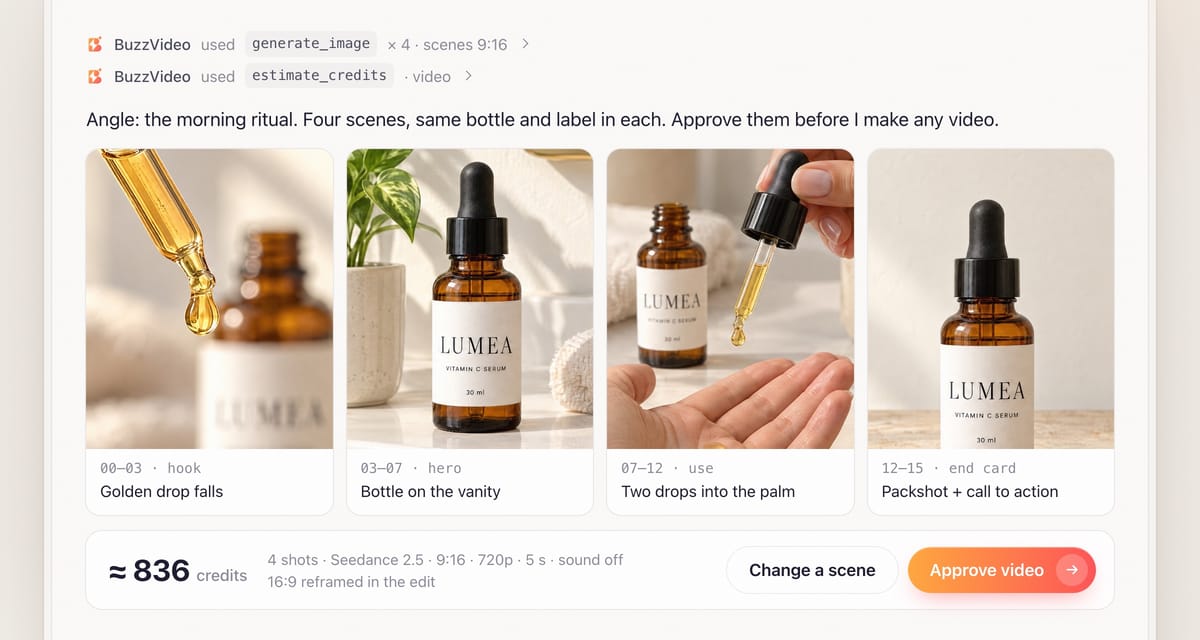
The guide picks one angle—problem to solution, the result, the ritual, the ingredient hero or a gift moment—writes the script (about 35–40 English words for 15 seconds) and plans the scenes.
Scene images come first because they cost far less than video. You approve the concept, script and image quote, then review the scenes. Each 9:16 scene leaves a clear area for captions and room for a 16:9 crop. This is the first approval gate.
Step 4 — Approve the video quote and generate the shots
Each approved scene becomes a 4–6 second shot with one simple move, using the scene image and the clean master as references. The product stays under about 60% of the frame height, because video models redraw the label as it grows in frame. Generated sound is off.
You approve the shot plan and the estimate_credits quote first—the second gate—and choose how to get 16:9: a second set of shots (costs more) or a reframe in the edit (free, less full). Failed tasks are refunded automatically.
Step 5 — Voiceover and edit
For voiceover, the guide picks a voice in your language and uses word timestamps for captions. It then loads BuzzVideo's video editor guide: product on screen in the first second, cuts every 0.8–1.5 seconds, captions clear of the label, and a 1–1.5 second end card with packshot, brand and call to action. Both 1080×1920 and 1920×1080 are rendered.
Step 6 — Review and deliver
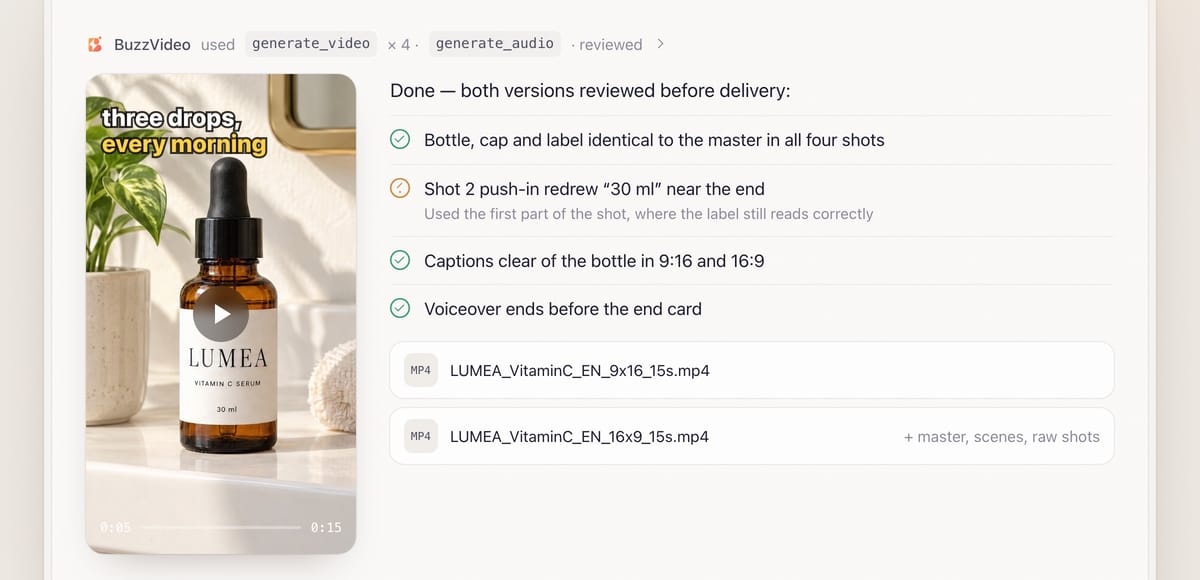
Review is mandatory. The guide compares the packaging with the master at full size in the middle and end of every cut—name and size digit by digit, because push-ins often turn "300ml" into "30ml". Bad sections are swapped for an earlier part of the shot or a tighter crop. Captions are checked against your confirmed claims, with up to two extra fix passes.
You receive LUMEA_VitaminC_EN_9x16_15s.mp4 and LUMEA_VitaminC_EN_16x9_15s.mp4, plus the master, scene images, raw shots and a note on models, credits and fixes.
Copy-paste prompt
“Make a [15]-second product ad from this photo for [Meta and TikTok], in 9:16 and 16:9. Main message: [one sentence]. Audience: [who]. Claims we can make: [list]. Format: [voiceover in English / text cards, no voice]. People: [none / hands only]. Style: [Fast-cut ad]. Music: [attached / none]. Show me the label text you read, the concept, the scene images and the credit quotes before generating any video.”
How should a 15-second product commercial be structured?
| Beat | Time | Scene | Example voiceover |
|---|---|---|---|
| Hook | 0–3 s | The result or the problem, strong in the first second | "Your morning routine, in three drops." |
| Product hero | 3–7 s | Product in its setting, label to camera | "LUMEA Vitamin C Serum." |
| Use / demo | 7–12 s | How it is physically used, in hand | "Two drops, pressed in after cleansing." |
| End card | 12–15 s | Clean packshot, brand, one line, call to action | (on the card) "Shop now" |
Each 4–5 second shot yields three or four 1–1.5 second cuts, so 15 seconds needs three to four shots. If you cap the shots, the guide shortens the ad rather than stretching cuts.
What usually goes wrong, and how does the guide prevent it?
| Problem | What viewers notice | What the guide does |
|---|---|---|
| Label drift | Size or name changes mid-shot | Label quoted verbatim in every prompt; every cut checked digit by digit |
| Push-in redraws | Small print turns into near-words | Product kept under ~60% of frame; real photo used for label close-ups |
| Wrong physics | Mist from a closed cap | Prompts state exactly how the product is used and which hand holds it |
| Mixed editions | Two versions of the pack in one ad | Asks which edition is the hero and uses only that |
| Text over the product | Caption hides the label | Caption area planned before each shot prompt |
| Unapproved claims | A number the brand can't back up | Claims confirmed first; every caption and card checked against them |
How much does an AI product commercial cost?
You pay in BuzzVideo credits, quoted before each stage. A rough example from estimate_credits: a master and four scene images on GPT Image 2.5 Sunburst at X-High, 65 credits; four 5-second Seedance 2.5 shots at 720p, sound off, 836 credits; a 15-second voiceover, about 7. Roughly 910 credits—around $6.40 on Pro billed yearly. A separate 16:9 set roughly doubles the video part; cheaper models cost less. See pricing and BuzzVideo pricing and cost per ad.
Which BuzzVideo guide should you use instead?
| You want… | Use this guide |
|---|---|
| A multi-scene ad from product photos | Product ad (this one) |
| A creator talking to camera about the product | UGC product review |
| An ad from a product page URL only | Link to ad |
| A remake of a specific ad that's already running | Ad remake |
| Studio still images, no video | Product photos |
| A 3D turntable or exploded view | 3D product video |
Step-by-step guides: UGC product review · Link to ad · Ad remake · Product photos · 3D product video · Transparent video
You don't need to name the guide; the chat picks it. Afterwards it suggests Ad hook variants, Ad resizer (1:1, 4:5) and Ad localizer. For consistency across longer ads, read storyboard to video: consistent ads.
Does an AI product commercial need an AI label?
Often, yes—especially with an AI voiceover or AI people. TikTok requires the AI-generated content disclaimer for ads with AI-generated people or voices (TikTok ad policy), and Meta shows an "AI info" label on ads made or significantly edited with generative AI (Meta).
Ready to make your first product commercial? Connect BuzzVideo to your AI chat and send a product photo.
FAQs
Can I make a product commercial from one photo?
Yes, if the label is readable. Under about 1500 px, the guide generates a 2K master. If extra photos show different editions, you pick one.
Can I add music?
Only a track you supply. Without one, the ad has voice and sound only; any placeholder music goes in a separate file marked PLACEHOLDER-MUSIC.
Which languages can the voiceover use?
Most preset voices are English, and they can also read other languages such as Spanish; the guide plays you a sample first so you can check the accent, or you can use your own recording. It also asks you to listen to the brand name's pronunciation.
Can people appear in the ad?
Yes—hands only or a person. The guide makes one character image or uses a BuzzVideo avatar so the same face appears in every scene.
Can I get 1:1 or 4:5 versions?
This guide delivers 9:16 and 16:9. For 1:1 and 4:5, it suggests the Ad resizer guide afterwards.
Last verified: November 2, 2026, against our live pricing and product pages.
Next reads: How to use BuzzVideo MCP in ChatGPT and Claude · Product demo videos from photos · Ad variants sprint playbook

About the author
Monica
Product Manager
As a Product Manager at BuzzVideo AI, I work with marketers and growth teams on AI ad workflows—from brief to shippable creatives. I write about practical product workflows, model choices, and how teams turn product pages into ads that feel native on Meta and TikTok.