How to Research Your Competitors' Ads with AI in ChatGPT or Claude
Step-by-step: research the ads your competitors are running from ChatGPT or Claude with BuzzVideo MCP—ad table, hooks, offers, gaps and a remake shortlist.
To research competitor ads with AI, pick 3–5 competitors, collect the ads they are running now from public sources such as the Meta Ad Library and the TikTok Creative Center, then break each ad down into its angle, hook, offer, call to action and visual style. Patterns across those ads show what competitors keep spending on, and the gaps show where your brand can stand out.
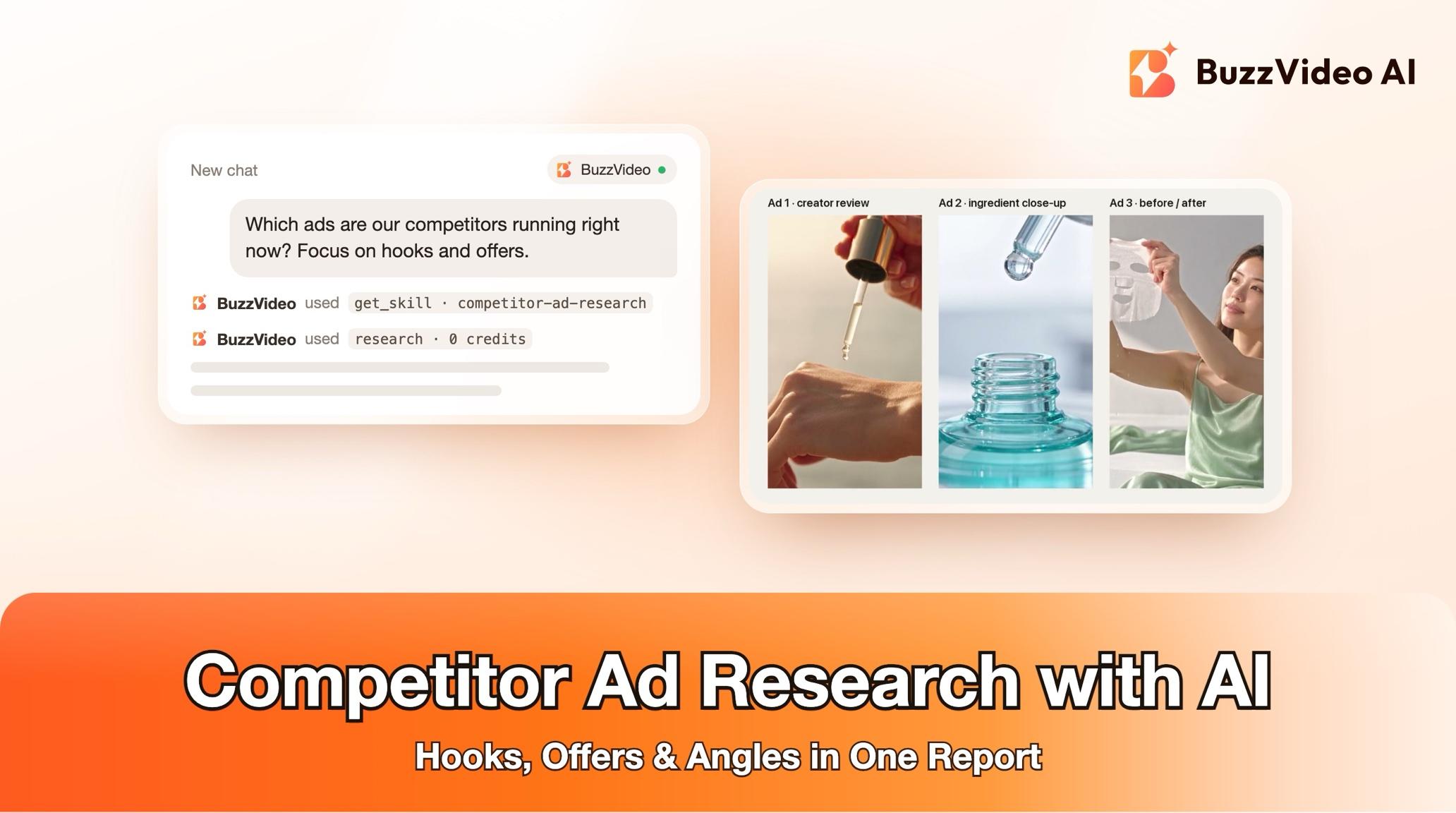
With BuzzVideo MCP you can run the whole job from ChatGPT or Claude. The chat follows BuzzVideo's Competitor ad research guide: it confirms the competitor set with you, collects and tags the ads, checks every link before delivering, and hands you a report with a shortlist of ads worth remaking. It only researches, so it spends no BuzzVideo credits.
What is competitor ad research?
Competitor ad research is a structured look at the paid ads other brands in your category are running: what they say, how they open, what they offer and how they look. The output is a report, often called a swipe file, that your team uses to plan new ads instead of guessing.
| Part | What the guide records |
|---|---|
| Competitors | 3–5 names you confirm; 5–10 ads each where available |
| Sources | Public ad libraries, brand social pages, your own links or screenshots |
| Per ad | Link, source, paid or organic, format, date seen, angle, hook, offer, CTA, visual style |
| Synthesis | Patterns per competitor, what seems to be working, gaps, watch-outs |
| Next step | A shortlist of 3–5 ads worth remaking, each with the guide to use |
| Credits | None — research only |
Try it: connect BuzzVideo to your AI chat once, then ask what ads your competitors are running. Connect BuzzVideo MCP →
What do you need before you start?
- A BuzzVideo account on any plan. MCP is included on every plan, including Free (pricing), and this guide uses no credits.
- BuzzVideo MCP connected to ChatGPT, Claude or another MCP client — see how to use BuzzVideo MCP in ChatGPT and Claude.
- Your brand, product and market. A product page link is enough. Name your market—for example the US, the UK or global.
- 3–5 competitor names or page links, if you know them. If you don't, the guide proposes five for you to confirm.
- A way to see the ads. A browser your AI chat can drive, an ad-intelligence connector, or your own links, screen recordings and screenshots. More on this below.
How do you research competitor ads step by step?
Step 1 — Ask, and confirm the competitor set
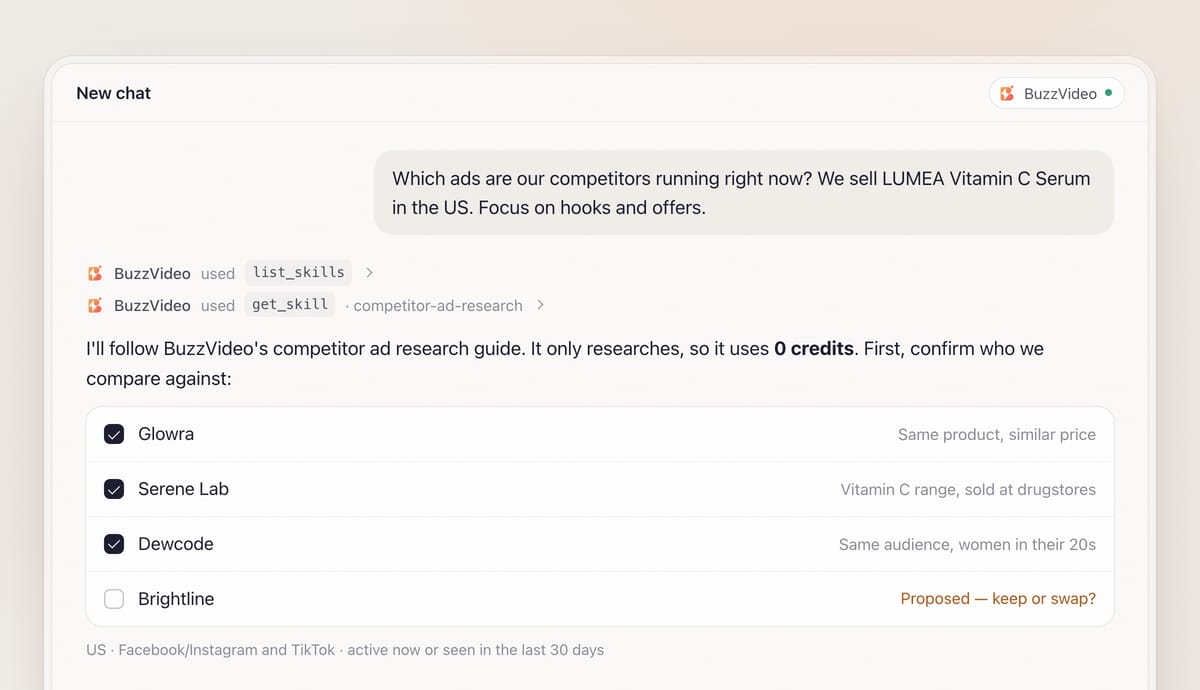
Describe your brand, product and market in one message. When BuzzVideo MCP is connected, the chat looks up BuzzVideo's guides (list_skills) and loads the competitor ad research one (get_skill), so it follows the same method every time.
It asks the rest in one round, with defaults you can accept: platforms (Facebook/Instagram and TikTok), time window (active now or seen in the last 30 days), focus (hooks, offers, video style, UGC versus studio) and what you will do next — new concepts, remakes or an agency brief. Then it writes one line per competitor: who they are and why they compete (same product, price band or audience). You confirm or swap names before anything is collected. It also lists your own brand name and claims as it understood them, since gaps are measured against those.
Step 2 — Collect the ads, with honest sources
The guide tells you which method it will use and what that method can miss. If an ad-intelligence connector is connected, it goes first. With a browser, it lists each competitor's ads from the brand's own page view in the Meta Ad Library rather than from keyword search, which is fuzzy and full of retailer ads. It does not log in, accept non-essential cookies or solve CAPTCHAs; if a page needs sign-in, it asks you to do that step or share screenshots.
If your AI chat can only search the web, the guide says so plainly: the Meta Ad Library and the TikTok Creative Center usually block plain page fetches, so it asks for your links or screenshots and works from those. It also checks retailers in your market for live offers.
Each ad is tagged on-category or other product. Competitors often advertise a different product or a store-wide sale; those are kept as context, but the patterns are built on on-category ads only. If a competitor has no on-category ads, that is reported as a finding.
Step 3 — Break every ad down
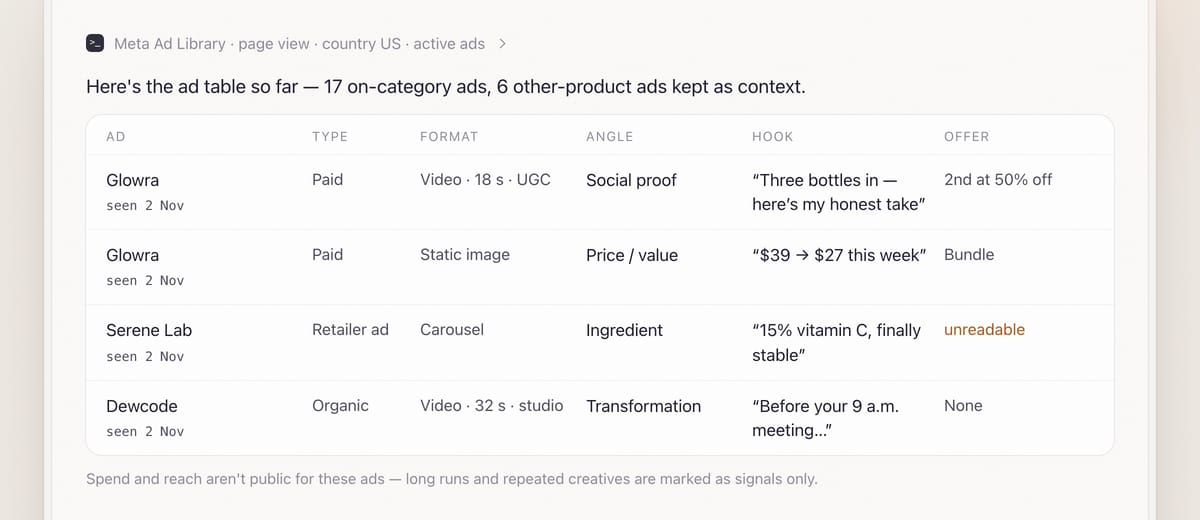
Each ad gets a few words per field: the angle (problem/solution, social proof, ingredient, price, gifting, comparison and so on), the hook in the first 1–3 seconds quoted where readable, the offer, the CTA, the visual style and the claims made, as written. If a price or claim in a screenshot is hard to read, the table says "unreadable" instead of guessing. Prices keep the currency shown; if none is shown, it writes "currency not stated".
Step 4 — Read the patterns, gaps and watch-outs
The synthesis covers patterns per competitor in 2–3 lines each, what seems to be working (angles several competitors share, or one ad running a long time or in many variants), gaps your brand could own (no UGC, no Spanish-language version, no gifting angle before a festival) and watch-outs such as medical, "No. 1" or before/after claims to pass to your own compliance check.
Step 5 — Get a shortlist, after a mandatory review
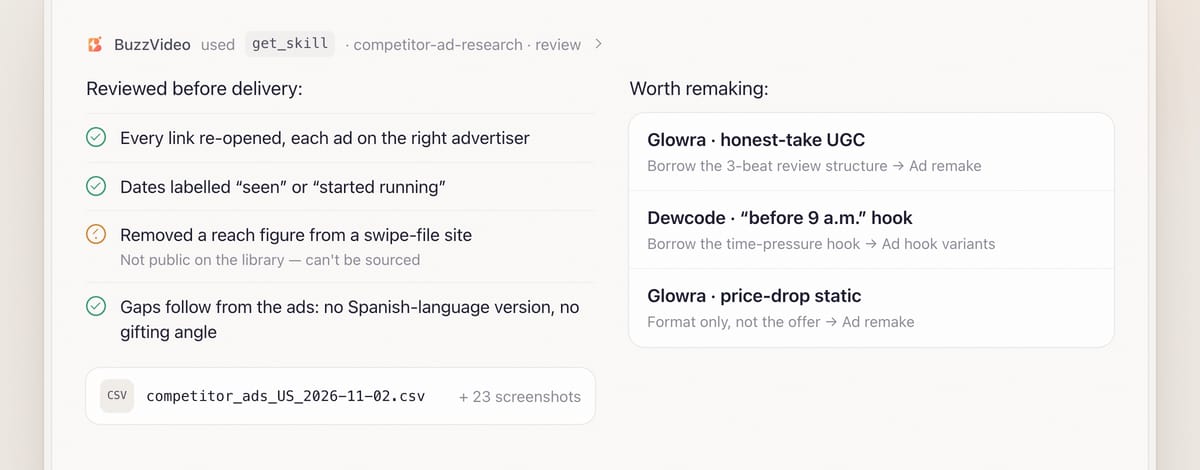
The guide picks 3–5 ads worth remaking. For each it gives the link, why it is worth borrowing (structure, hook or format — never its footage, music, logos or exact copy), how it fits your product, and the next guide: Ad remake, Ad hook variants, Viral remix or Festival campaign.
Before delivering, the chat reviews its own report: it re-opens every link, checks each ad is attributed to the right advertiser, labels every date as "date seen" or the library's start date, removes any number it cannot source and checks every opportunity follows from the evidence. If it can write files, you also get the ad table as a CSV or spreadsheet plus the screenshots, with their paths.
Copy-paste prompt
“Research the ads my competitors are running. My brand: [brand], product: [product or link], market: [US]. Competitors: [3–5 names, or propose 5]. Platforms: [Facebook/Instagram and TikTok], ads active now or seen in the last [30] days. Focus on [hooks and offers]. Next I want to [make new concepts / remake one ad]. Confirm the competitor set with me before collecting.”
What can public ad libraries tell you, and what can't they?
| Signal | Available publicly? | How the guide treats it |
|---|---|---|
| The creative, advertiser and start date | Usually | Recorded per ad with the date you saw it |
| Active status and platforms | Often | Recorded; results change daily and by country |
| Many ads using the same creative | Sometimes | Called a spend signal, not proof |
| Long-running ads | Yes, from start dates | Called a signal that the advertiser keeps spending |
| Spend, impressions, CTR, conversions | No, for commercial ads | Never shown unless public, with the source cited |
| Third-party swipe-file sites | Yes | Labelled secondary; each item marked paid ad or organic post |
A report that invents performance numbers misleads your next brief. If a competitor's global page runs nothing in a smaller market, the guide looks for local pages, retailer ads and creator partnership ads, and labels them as such.
What usually goes wrong, and how does the guide prevent it?
| Problem | What it causes | What the guide does |
|---|---|---|
| Keyword search only | Retailer and unrelated ads mixed in | Lists ads from each brand's own page view |
| Wrong product | Patterns based on a serum when you sell a mist | Tags on-category vs other product |
| Organic posts counted as ads | False spend signals | Marks every item paid ad or organic post |
| Guessed text or prices | A brief built on a misread offer | Writes "unreadable" or "currency not stated" |
| Invented metrics | False confidence | No spend or reach unless publicly shown and cited |
| Copying a winning ad | Legal and brand risk | Shortlist borrows structure only, never footage, music, logos or copy |
How much does competitor ad research cost?
Nothing in BuzzVideo credits. The guide only researches and never calls a generation tool, so you can run it on the Free plan. Credits come in only when you act on the findings: the next guide (for example Ad remake) shows its own plan and a quote from estimate_credits, and waits for your approval before generating. Per-model rates are on our pricing page; for the math on a finished ad see BuzzVideo pricing and cost per ad.
Which BuzzVideo guide should you use instead?
| You want… | Use this guide |
|---|---|
| A report on what competitors are running | Competitor ad research (this one) |
| To rebuild one chosen ad for your product | Ad remake |
| To copy a specific viral video's edit with your product | Viral remix |
| A shot-by-shot breakdown of one video | Video understand |
| New hooks for an ad you already have | Ad hook variants |
Step-by-step guides: Ad remake · Viral remix · Video understand · Ad hook variants · Festival campaign
You don't need to name the guide: describe what you want, and the chat picks the matching one.
Ready to see what your category is running? Connect BuzzVideo to your AI chat and name your competitors.
FAQs
Does competitor ad research use credits?
No. The guide only researches and never generates, so it spends no BuzzVideo credits. Any remake you start afterwards shows its own quote first.
Can it show how much a competitor spends?
No. Public ad libraries don't show spend, impressions or conversions for commercial ads. The guide uses signals such as how long an ad has run and how many ads share a creative, and labels them as signals.
Do I need a browser connected to my AI chat?
It helps but isn't required. Without a browser or an ad-intelligence connector, the guide works from the links, screen recordings and screenshots you share, and tells you what that can miss.
Will it log in to my accounts?
No. It doesn't log in, accept non-essential cookies or solve CAPTCHAs. If a library needs sign-in, it asks you to do that step or to share screenshots.
Which markets does it work for?
Any market you name, such as the US, the UK or global. It searches in the market's language, checks local retailers, and notes when an ad shown in your market actually points to another one.
What do I get at the end?
A report in your language: a five-bullet summary, method and data limits, the competitor set with ad counts, the ad table, patterns, what's working, gaps, watch-outs and a shortlist with the next guide for each — plus a CSV and screenshots if your chat can write files.
Last verified: November 2, 2026, against our live pricing and product pages.
Next reads: How to use BuzzVideo MCP in ChatGPT and Claude · The ad variants sprint playbook · Best AI ad generators for TikTok

About the author
Monica
Product Manager
As a Product Manager at BuzzVideo AI, I work with marketers and growth teams on AI ad workflows—from brief to shippable creatives. I write about practical product workflows, model choices, and how teams turn product pages into ads that feel native on Meta and TikTok.