Seedance 2.5 Prompt Guide: Tested Ad Prompts (2026)
How to prompt Seedance 2.5 for ads: timed shot-by-shot structure, product and creator references, real prompts behind three videos, and credits per clip.
The best Seedance 2.5 prompts for ads are written like a shot list: split the clip into timed beats (0–4s, 4–9s and so on), give each beat one camera setup, one action and the exact line of dialogue, and tie every beat to a reference image that locks the product and the person. Seedance 2.5 can run for up to 30 seconds in a single generation, so a timed structure is what keeps a 20- or 30-second ad on track instead of drifting after the first few shots.
Seedance 2.5 is available in BuzzVideo AI's Marketing Agent on the Pro and Ultra plans. Below: what the model can do, how it compares with the Seedance 2.0 family, the prompt structure we use, three finished videos with the real prompts behind them, and what each clip costs in credits.
Try it: Open Seedance 2.5 in BuzzVideo, attach a product photo, and paste the timed template from this guide. Open Seedance 2.5 →
What is Seedance 2.5?
Seedance 2.5 is ByteDance's video generation model, released on July 31, 2026 as the successor to Seedance 2.0. It generates picture and sound together and is built for longer, more controlled clips. According to ByteDance's launch post:
- A single generation now runs up to 30 seconds, up from 15 seconds in Seedance 2.0, and clips can be extended in further rounds.
- One generation can take up to 30 reference images, 10 reference videos and 10 reference audio clips for characters, scenes, props, style and lighting.
- Prompts can control narrative, camera and rhythm for specific time ranges, and edits can target specific moments of a clip.
- It accepts clay-render references: untextured 3D blockouts that set poses, motion paths and camera angles.
- ByteDance itself notes that physics in complex motion and scenes with several interacting people still have room to improve.
The API is also live for developers on BytePlus ModelArk. In BuzzVideo you don't need an API key: you pick Seedance 2.5 in Generate Video and set length, ratio and resolution in the composer.
Seedance 2.5 vs Seedance 2.0: which one should you use?
| Seedance 2.5 | Seedance 2.0 | Seedance 2.0 Fast | Seedance 2.0 Mini | |
|---|---|---|---|---|
| Length per generation | 4–30 s | 4–15 s | 4–15 s | 4–15 s |
| Resolution | 480p, 720p, 1080p | 480p, 720p, 1080p, 4K | 480p, 720p | 480p, 720p |
| References (image / video / audio) | 30 / 10 / 10 | 9 / 3 / 3 | 9 / 3 / 3 | 9 / 3 / 3 |
| Aspect ratios | 21:9, 16:9, 4:3, 1:1, 3:4, 9:16 | Same six | Same six | Same six |
| Credits, 10 s at 720p | 463 | 289 | 231 | 145 |
| BuzzVideo plans | Pro, Ultra | Pro, Ultra | Starter, Pro, Ultra | Starter, Pro, Ultra |
Specs and credits are from BuzzVideo's live model settings and pricing data on November 10, 2026, for generations without a reference video. Sound can be switched on or off on all four.
A simple rule: use Seedance 2.5 when the ad needs more than 15 seconds in one continuous generation, or more references than 2.0 accepts (for example a product, a creator, a location and a style frame in the same clip). For 6–15 second hooks and variants, Seedance 2.0 costs less, and it is the only one of the four that renders 4K. Seedance 2.0 Fast and Mini are the budget options for drafts and volume testing, and the two you can use on Starter.
How do you structure a Seedance 2.5 prompt?
Every prompt behind the videos in this guide follows the same six-part order. It works because Seedance 2.5 reads timing instructions, so you can tell it what happens when rather than describing one long scene and hoping it paces itself.
- Format line. Length, orientation and style in one sentence: "Create a 20-second vertical selfie-style UGC product review…"
- Reference roles. Say what each attached image is for. "Use @Image1 as the absolute product reference. Use @Image2 as the presenter's identity reference."
- Product lock. Describe the product's shape, colours, materials and label text, then list what must not be invented: logos, extra parts, text, features.
- Timed beats. One block per time range with camera setup, action and the exact line of dialogue in quotes. Say "hard cut" where you want a cut and nothing where you want continuity.
- Sound. Name the sounds you want (creator voice, room tone, a tap on the cup) and what to leave out (music, voice-over).
- Negative list. No captions, prices, claims, watermarks, morphing or warped hands. Add text and offers later in the edit.
Copy-paste template
“Create a [LENGTH]-second [9:16 vertical / 16:9] [UGC selfie review / cinematic product commercial] for [PRODUCT] in [SETTING], with [LIGHT] and [CAMERA FEEL]. Use @Image1 as the absolute product reference. Use @Image2 as the presenter's identity reference: preserve her face, hair and outfit.
- Seedance 2.5 ad prompt template
Preserve the @Image1 product exactly in every shot: [SHAPE, COLOURS, MATERIALS, LABEL TEXT]. Do not invent logos, printed text, extra parts or features.
0–4 seconds — [SHOT TYPE]. [ACTION]. She says: "[LINE 1]"
4–9 seconds — hard cut to [SHOT TYPE]. [ACTION]. She says: "[LINE 2]"
9–14 seconds — [SHOT TYPE]. [ACTION]. "[LINE 3]"
14–20 seconds — hard cut to [CLOSING SHOT]. [ACTION]. "[LINE 4]"
Sound: clear creator voice, [ROOM TONE], [1–2 PRODUCT SOUNDS]. No music or voice-over.
No captions, subtitles, prices, claims, watermarks, morphing or deformed hands. Keep the product rigid and identical in every shot.”
Example 1: a 20-second UGC review in one generation
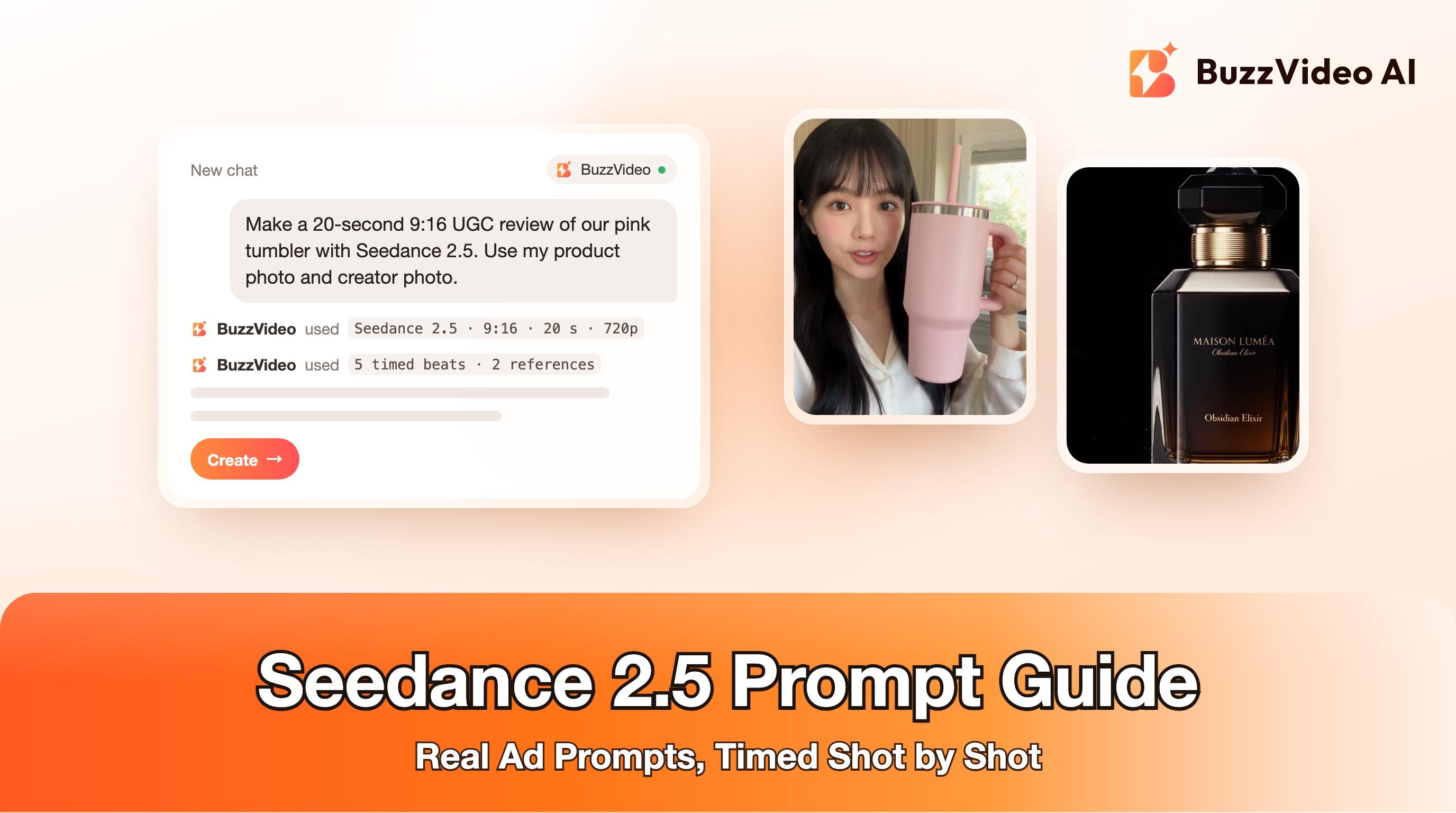
This review runs 20 seconds, which Seedance 2.0 can't do in one generation. The prompt splits it into five beats: a selfie hook (0–4s), a close product turn (4–9s), a counter demo (9–14s), a quiet sip (14–17s) and a selfie sign-off (17–20s). Two lines did most of the work:
- "Use @Image1 as the absolute product reference" plus a full description of the tumbler (matte pastel-pink body, squared handle, straw, thin silver band) and a list of things not to invent. The cup keeps its shape and colour in every shot.
- Dialogue in quotes for each beat, with "keep all dialogue verbatim and in this exact order", plus a gesture tied to each line (a tap on the side, pointing at the lid), so the action and the words are planned together.
The prompt also rules out insulation, leak-proof and health claims. That's deliberate: claims belong in your edited captions, where you control the wording and can back them up. See the full prompt and settings.
Example 2: a timed creative concept
This one has no reference images, just a short prompt (about 180 words) with three time ranges: a painted general snatches a chip bag from a pedestal (0–3s), characters in other paintings pass it along the gallery wall (3–9s), and a visitor catches it and takes a bite (9–15s). Because the bag is described the same way in every beat ("the same vibrant blue BuzzVideo chip bag"), it stays consistent as it moves through five different paintings.
The takeaway for concept ads: you don't need a long prompt to get a story, but you do need the timing and one repeated description of the hero product. See the full prompt and settings.
Example 3: a luxury product film, and why you should attach a product photo
The prompt for this perfume film is long and very specific: five time ranges (a light sweep in darkness, the bottle reveal, a liquid macro, the hero shot, the brand end frame), camera and lens notes, lighting, materials, motion limits and a negative list. The lighting, the macro detail and the pacing follow it closely.
What it can't do without a reference is keep the bottle identical. Compare the opening shots with the end frame: the bottle starts wider and squarer and ends slimmer, with a tall faceted cap. The liquid macro also puts real cinnamon sticks inside the bottle, where the prompt asked for abstract scent imagery. Words alone don't fix a shape. For a real product, attach a clean product photo as @Image1 and use the product-lock wording from the template. See the full prompt and settings.
How much does Seedance 2.5 cost per video?
| Length | 480p | 720p | 1080p |
|---|---|---|---|
| 5 s | 103 | 232 | 569 |
| 10 s | 206 | 463 | 1,138 |
| 15 s | 309 | 694 | 1,706 |
| 20 s | 412 | 925 | 2,275 |
| 30 s | 617 | 1,387 | 3,412 |
Credits per generation without a reference video, from BuzzVideo's live pricing data on November 10, 2026. Adding a reference video raises the price (for example 692 instead of 463 for 10 seconds at 720p). The Pro plan includes 4,900 credits a month, so a 20-second 720p clip uses about a fifth of it. Check the pricing page for current plans.
To spend less while you iterate, test the beats at 480p, then render the version you'll run at 720p or 1080p. Drafting at 480p and rendering once at 720p costs about 1,340 credits for a 20-second ad, roughly half of rendering three 720p attempts.
When is Seedance 2.5 not the right choice?
- You need 4K. Seedance 2.5 tops out at 1080p; Seedance 2.0 renders 4K.
- You're making many short variants. For 6–10 second hooks, Seedance 2.0 Fast or Mini costs a fraction per clip. See how to ship 50 ad variants in a week.
- The scene has several people interacting physically. ByteDance lists this as a current weak spot; keep the action to one or two people.
- You need exact on-screen text, prices or offers. Add them in the edit, not in the prompt.
If you run AI-generated people in ads, label them. TikTok's ad policy requires disclosure of AI-generated content, and Meta labels ads made or edited with its AI tools. Our guide to AI ad labels covers both.
Ready to write your first timed prompt? Open Seedance 2.5 in BuzzVideo, attach your product photo and a creator reference, and start from the template above.
FAQs
How long can a Seedance 2.5 video be?
Up to 30 seconds in a single generation, compared with 15 seconds for Seedance 2.0. In BuzzVideo you can pick any length from 4 to 30 seconds.
What is the best prompt format for Seedance 2.5?
A timed shot list: a format line, the role of each reference image, a product description with things not to invent, one block per time range with camera, action and dialogue, the sounds you want, and a negative list.
How many reference images can Seedance 2.5 use?
Up to 30 images, 10 videos and 10 audio clips in one generation. Seedance 2.0 accepts 9 images, 3 videos and 3 audio clips.
Does Seedance 2.5 support 4K?
No. In BuzzVideo, Seedance 2.5 renders at 480p, 720p or 1080p. Use Seedance 2.0 if you need 4K output.
How much does a Seedance 2.5 video cost on BuzzVideo?
463 credits for 10 seconds at 720p, 925 credits for 20 seconds and 1,387 credits for 30 seconds, without a reference video. 480p costs less than half of that.
Which BuzzVideo plan includes Seedance 2.5?
Pro and Ultra. Starter includes Seedance 2.0 Fast and Seedance 2.0 Mini, and the Free plan doesn't include video generation.
Can Seedance 2.5 keep my product looking the same in every shot?
Yes, when you attach a product photo and describe it in the prompt. Without a reference image, shapes and labels can drift between shots.
Last verified: November 10, 2026, against our live pricing and product pages.
Next reads: Wan 3.0 vs Seedance 2.5 · How to use Seedance · Is Seedance free? · Kling 4.0 for ads · MiniMax H3 for ads

About the author
Monica
Product Manager
As a Product Manager at BuzzVideo AI, I work with marketers and growth teams on AI ad workflows—from brief to shippable creatives. I write about practical product workflows, model choices, and how teams turn product pages into ads that feel native on Meta and TikTok.