Grok Imagine 2.0 for Product Photo Edits: Tested (2026)
We tested Grok Imagine 2.0 on one product photo: background swap, colourway change, white-background cutout, Story ad and 16:9 resize. Results and costs.
Grok Imagine 2.0 is a strong pick for editing an existing product photo. In our test on one fictional sunscreen tube, it swapped the background, changed the colourway, put the product on pure white and turned it into a 9:16 Story ad while keeping the label text letter for letter in all five edits. Where it slipped was in the details around the product: a tinted label colour, an extra full stop in a headline and studio lighting on a sunlit scene.
Grok Imagine 2.0 is available in BuzzVideo AI's Marketing Agent on every paid plan, positioned for precise local edits and background removal for product shots. Below: what xAI released, how it compares with other image models in BuzzVideo, the prompt structure we used, all five before-and-after results with honest notes, and what each edit costs.
Try it: Open Generate Image, pick Grok Imagine 2.0, attach one clean product photo and paste the edit template from this guide. Open the Marketing Agent →
What is Grok Imagine 2.0?
Grok Imagine 2.0 (Imagine Image 2.0) is xAI's image generation and editing model, released on August 7, 2026. xAI says it built the model "to make images you can use in real work", with editing treated as a first-class capability. According to xAI's announcement and API docs:
- It follows instructions closely, plans typography and layout, and preserves what you put in across generations and edits.
- Multi-reference editing accepts up to 5 input images in a single generation.
- Smart resize recomposes an image to a new ratio, from 1:2 to 2:1, by filling in the frame.
- Output is 1K or 2K, and the API model name is grok-imagine-image-2.0, priced by xAI at $0.04 per image.
- xAI reports that it ranked second on the Arena text-to-image and image-edit leaderboards as of its launch date. That is xAI's own claim, so we ran our own test.
One thing to know before you start: the magic wand, segmentation and transparent-background export that xAI shows are tools in its own Grok apps. Through the API, and so in BuzzVideo, you edit by attaching your photo and describing the change in the prompt. There is no brush or mask, which makes the wording of the prompt matter more.
Grok Imagine 2.0 vs other image models: which one for product edits?
| Grok Imagine 2.0 | Nano Banana 2.1 | Nano Banana Pro | GPT Image 2.5 Sunburst / Flare | Seedream 4.5 | |
|---|---|---|---|---|---|
| Credits per image | 8–16 (1K or 2K, low or medium quality) | 11 at 2K | 27 at 2K | 11 at high quality, 1:1 | 8 |
| Max resolution in BuzzVideo | 2K | 4K | 4K | Quality tiers, not K sizes | 4K |
| Strength for product work | Prompt-based edits of an existing photo, background swaps and white backgrounds | Cheap, consistent edits and product sets | Most polished studio finish | Fine detail; Flare can export transparent backgrounds | Consistent product sets with accurate text |
| BuzzVideo plans | Starter and up | Starter and up | Starter and up | Starter and up | All plans, including Free |
Credits are from BuzzVideo's live pricing data on November 10, 2026. A simple rule: use Grok Imagine 2.0 when you already have a good product photo and need new backgrounds, colourways or a white-background version of it. If you need 4K, use Nano Banana 2.1. If you need a true transparent PNG rather than a white background, use GPT Image 2.5 Flare. Our Nano Banana 2.1 vs Pro test and GPT Image 2.5 Sunburst vs Flare comparison cover those models in more depth.
How do you prompt Grok Imagine 2.0 for product edits?
Every edit below used the same five-part order. Because there's no mask, the prompt has to say both what changes and what must stay exactly as it is.
- The edit in one sentence. Start with the verb: "Replace only the background…", "Change only the colour of the tube…", "Remove the background and place the product on pure white…"
- The product lock. Describe the product (shape, colour, cap, pose, camera angle) and repeat the label text in full, letter for letter, with "do not redraw, restyle or move the label".
- The new content. Set, props, light direction and time of day, and where props sit relative to the product ("smaller than the tube, not covering the label").
- Text, if any. Give the exact words, the font style and the empty area where they go, "never over the product".
- The negative list. No people or hands (unless wanted), no extra bottles, no new text, logos, badges or claims.
Copy-paste template
“Edit the reference photo: [ONE EDIT, e.g. replace only the plain studio background with …]. Keep the [PRODUCT] exactly as it is in the reference: same [COLOUR, MATERIAL, CAP/LID, SHAPE], same pose and camera angle, and the same label text letter for letter ([LINE 1 / LINE 2 / LINE 3]). Do not redraw, restyle or move the label.
- Grok Imagine 2.0 product edit template
New [SET / COLOUR / BACKGROUND]: [DESCRIPTION], [LIGHT DIRECTION AND TIME OF DAY], [PROPS AND WHERE THEY SIT, smaller than the product and not covering the label].
[Optional text: in the empty [AREA], add one headline in [STYLE]: [EXACT WORDS]. Spell it exactly like that.]
No people, no hands, no extra products, no other text, logos, badges or claims anywhere.”
We tested 5 product photo edits: here's what happened
We made one plain reference photo of a fictional product, a FERNWELL mineral sunscreen tube, with GPT Image 2.5 Sunburst (3:4, 8 credits). Then we ran five edits on it with Grok Imagine 2.0 at 2K, one generation each, no reruns. Every result below is the first and only output.
1. Background swap to a lifestyle set
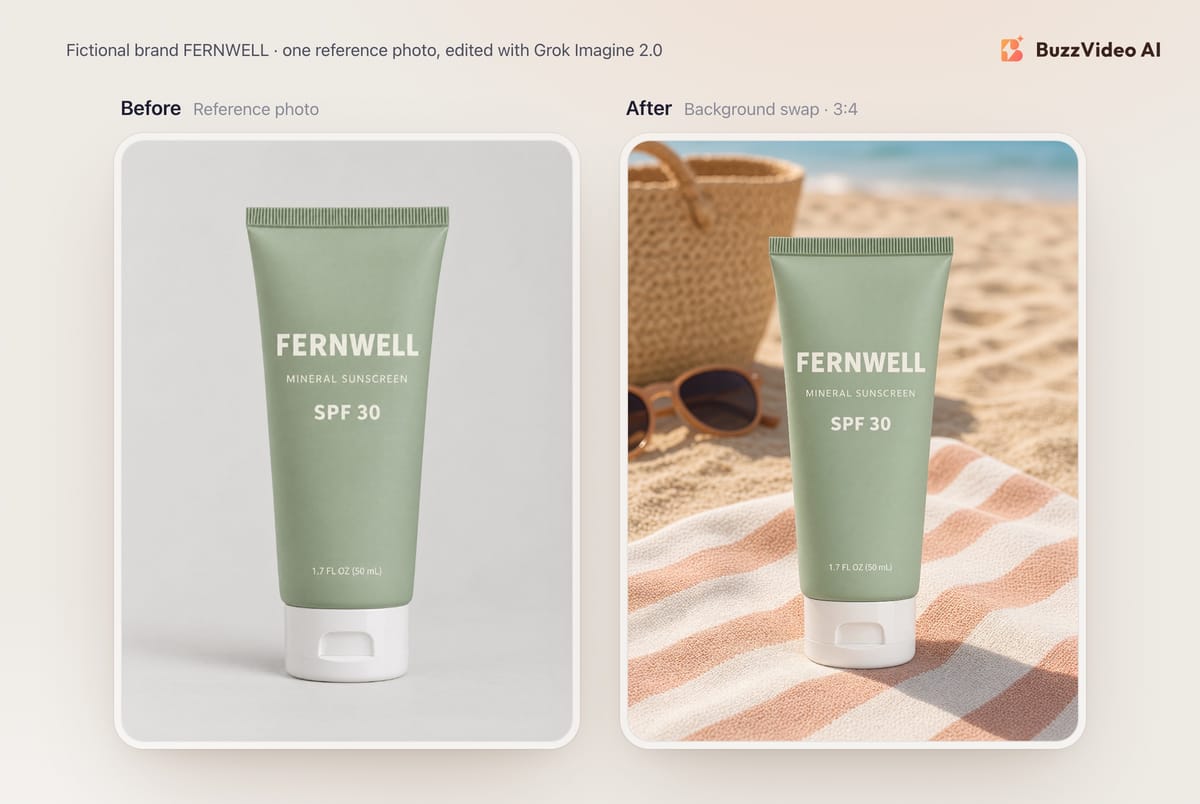
This was the best result of the five. All four label lines came back letter for letter, including the small "1.7 FL OZ (50 mL)", the tube kept its shape and cap, and the new light falls on it from the same side as the set, with a shadow on the towel. The props stayed soft in the background as asked. It's usable as a social post or a lifestyle image on a product page without retouching.
2. Local edit: new colourway plus props
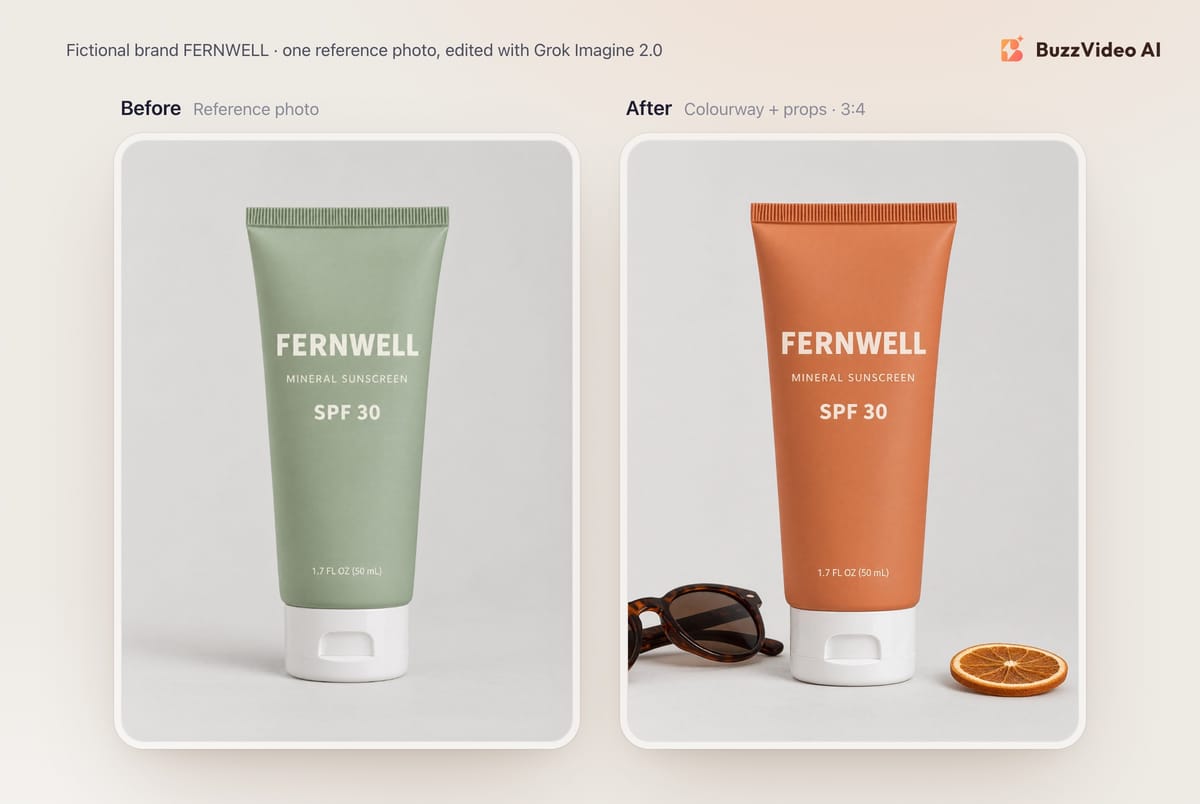
The colour change was clean: same matte finish, same crimped seal, same white cap, same grey background and framing. The two props landed where we asked, smaller than the tube and clear of the label. The label wording is exact, but its colour is not. The off-white text picked up a pale peach tint to match the new tube, which we didn't ask for. For a colourway preview or an ad variant that's fine; for a product page where the printed ink must be accurate, check it against your real packaging. The sunglasses are also cut off by the left edge of the frame.
3. Background removal: product on pure white
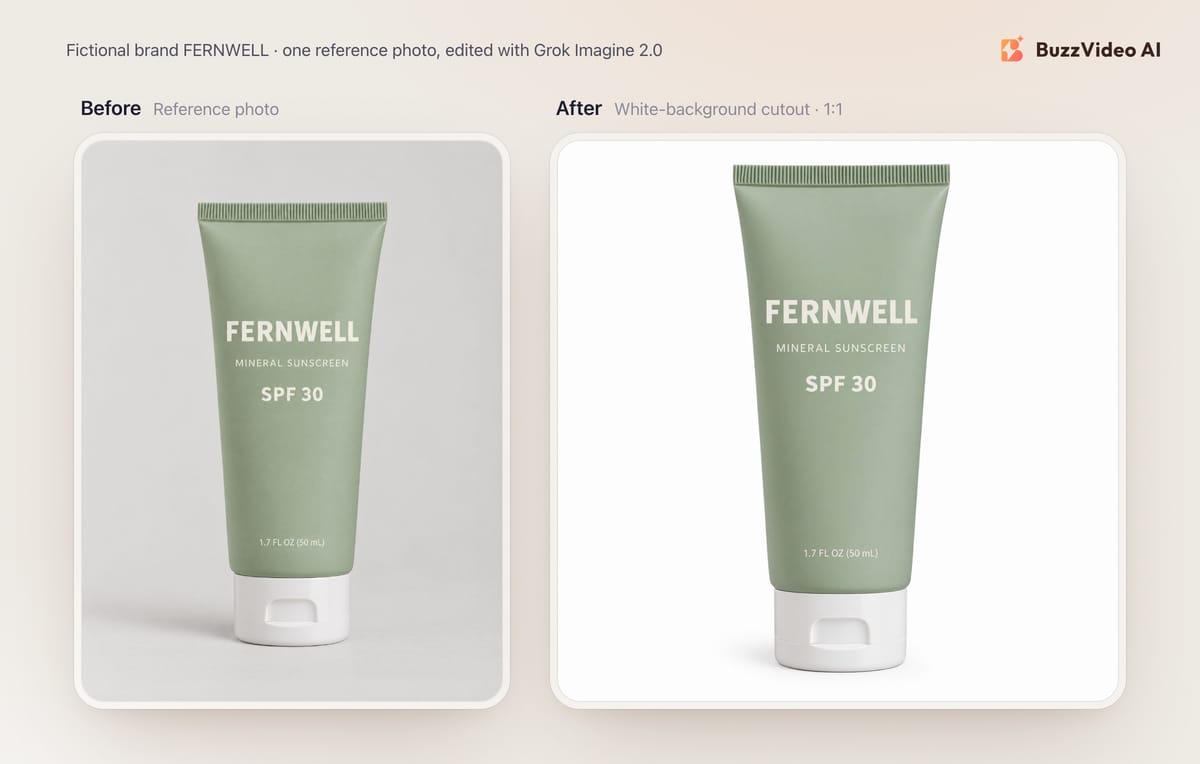
We sampled the corners and the area around the product: they are pure white (RGB 255, 255, 255), with only a soft shadow under the cap. The edges are crisp, the label is identical and the product fills the frame as instructed. Marketplace rules for main images, such as a white background and the product filling most of the frame, are covered in our Amazon listing images guide.
Note that this is a white background, not a transparent file. In BuzzVideo, Grok Imagine 2.0 returns a regular image, so if you need a cutout to drop onto other designs, use GPT Image 2.5 Flare, which supports transparent backgrounds.
4. Trend creative: a 9:16 Story ad with a headline
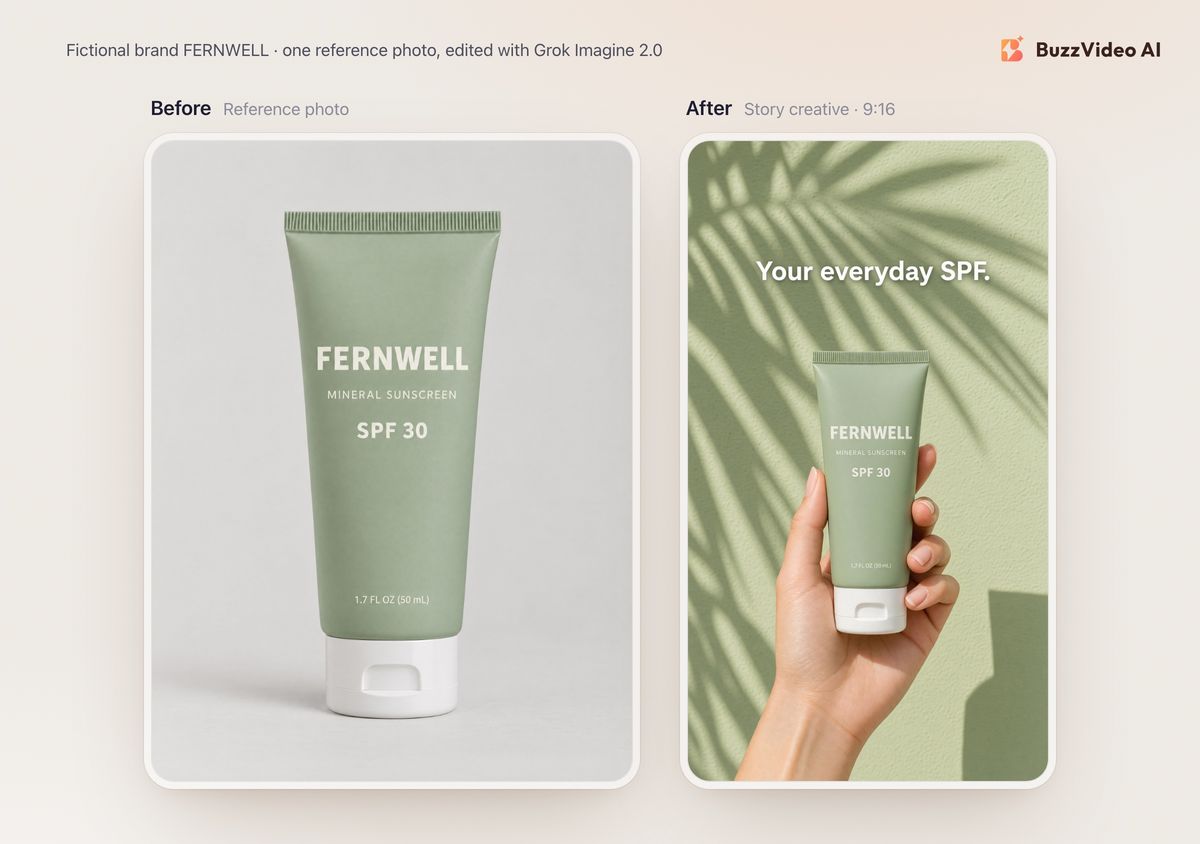
This is the kind of hard-sunlight, hand-held shot that runs well in Stories. The hand has five fingers and a natural grip, the label is exact even at this size, and the headline sits in empty wall space without touching the product. Two flaws: the model added a full stop to the headline ("Your everyday SPF."), and the tube is lit softly while the wall has hard sun and sharp shadows, so the product looks slightly pasted in. If the shot is going into paid media, add the headline yourself in an editor, where you control the exact copy.
5. Resize to a 16:9 banner
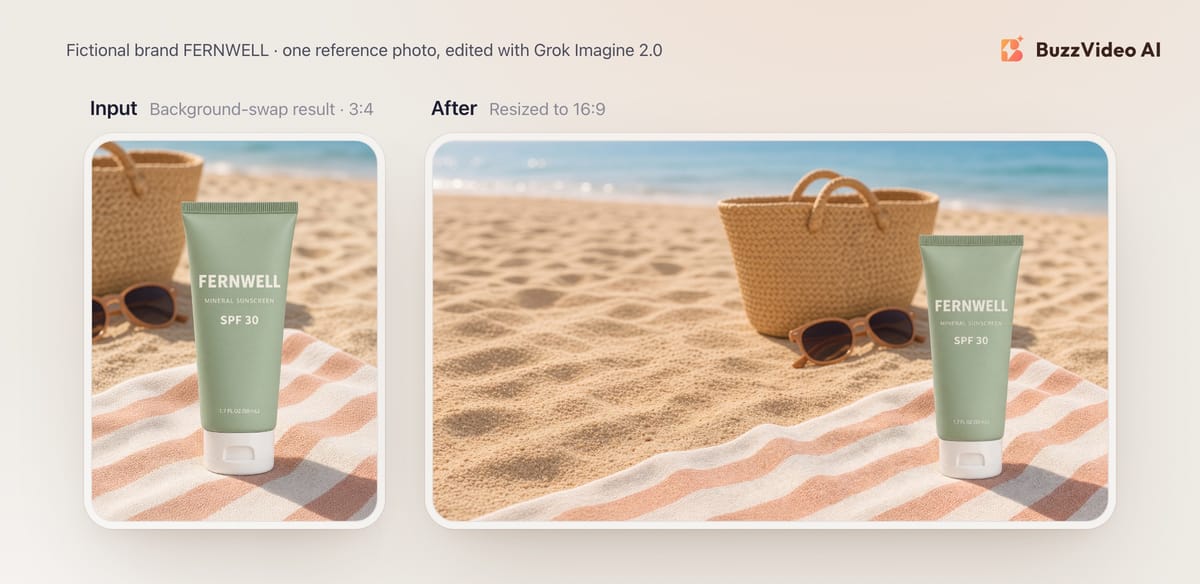
The banner is good: the tube sits in the right third, the label is intact and the left half is calm sand you can put a headline on. But this is not a pixel-for-pixel extension of the original. Grok redrew the whole scene: the tube is smaller, the tote and sunglasses moved, and the towel stripes run differently. If you need the original image to stay untouched, extend the canvas in an editor instead.
How much does Grok Imagine 2.0 cost?
| Quality | 1K | 2K |
|---|---|---|
| Low | 8 | 12 |
| Medium | 12 | 16 |
Credits per image from BuzzVideo's live pricing data on November 10, 2026. Each of our five 2K edits was charged 12 credits, so the full test, including the 8-credit reference photo, came to 68 credits. On the Starter plan's 1,900 monthly credits, that's enough for roughly 120 to 160 Grok edits at 2K, depending on the quality setting. Check the pricing page for current plans, or see what a finished ad costs in credits.
If you use xAI's API directly, xAI lists Grok Imagine Image 2.0 at $0.04 per image and notes in its docs that edits are billed for both the input image and the generated output image.
When is Grok Imagine 2.0 not the right choice?
- You need 4K output. Grok Imagine 2.0 tops out at 2K. Nano Banana 2.1 and Nano Banana Pro render 4K.
- You need a transparent PNG. Grok returns a white or scenic background in BuzzVideo; GPT Image 2.5 Flare supports transparent backgrounds.
- The edit needs more than 5 reference images. xAI documents up to 5 input images per edit. For larger product sets, Nano Banana 2.1 accepts up to 14.
- Exact ink colours or headline copy matter. Our colourway edit tinted the label text and our Story ad gained a full stop. Check packaging colours against the real product and add final copy in an editor.
- You want to keep the original pixels. Resizing redraws the scene rather than extending it.
If you run AI-edited product images in ads, check each platform's disclosure rules. Our guide to AI ad labels on Meta and TikTok covers both.
Have a product photo ready? Open Grok Imagine 2.0 in the Marketing Agent, attach it, and start with a background swap using the template above.
FAQs
When was Grok Imagine 2.0 released?
xAI released Imagine Image 2.0 on August 7, 2026, as the new Quality Mode on grok.com/imagine and in the Grok iOS and Android apps, and as grok-imagine-image-2.0 in its API.
Can Grok Imagine 2.0 edit an existing product photo?
Yes. Attach the photo as a reference and describe the change. In our test it swapped backgrounds, changed the product colour and placed the product on pure white while keeping the label text exact.
Does Grok Imagine 2.0 remove backgrounds?
In xAI's Grok apps there is a background-removal tool that exports a transparent file. In BuzzVideo you remove the background by prompt, and the result is the product on a white (or new) background, not a transparent PNG.
How many reference images can Grok Imagine 2.0 use?
xAI's docs say multi-image editing supports up to 5 source images in a single request.
What resolution does Grok Imagine 2.0 output?
1K or 2K. In our test, a 2K edit came back at 1776 × 2368 pixels for 3:4 and 2048 × 2048 for 1:1.
How much does Grok Imagine 2.0 cost on BuzzVideo?
8 to 16 credits per image: 8 or 12 credits at low quality (1K or 2K) and 12 or 16 credits at medium quality. It's available on Starter, Pro and Ultra, but not on the Free plan.
Is Grok Imagine 2.0 better than Nano Banana for product edits?
It depends on the job. Grok Imagine 2.0 held labels well in our edits and is good for background swaps and white backgrounds at 2K. Nano Banana 2.1 costs 11 credits at 2K, renders up to 4K and accepts more reference images.
Last verified: November 10, 2026, against our live pricing and product pages.
Next reads: Seedream 5.0 Pro vs Lite · AI product photography from one photo · Nano Banana 2.1 vs Pro · GPT Image 2.5 Sunburst vs Flare · AI static ads

About the author
Monica
Product Manager
As a Product Manager at BuzzVideo AI, I work with marketers and growth teams on AI ad workflows—from brief to shippable creatives. I write about practical product workflows, model choices, and how teams turn product pages into ads that feel native on Meta and TikTok.