Seedream 5.0 Pro vs Lite vs 4.5 for Product Ads (2026)
We ran Seedream 5.0 Pro, 5.0 lite and 4.5 on the same product photo and three ad briefs. See which spells ad text right, cost per image and Free plan access.
For product ads with words in the image, use Seedream 5.0 Pro. In our side-by-side test on one product photo and three ad briefs, it was the only one of the three models that rendered every headline, chip and label line correctly, at 18 credits per 2K image. Seedream 5.0 lite costs 7 credits and looked just as polished, but misspelled words in two of the three briefs, so keep it for visuals without text. Seedream 4.5, at 8 credits, spelled all the in-ad text correctly and is the better free pick for text-heavy layouts.
All three ByteDance models are in BuzzVideo AI's Marketing Agent, and two of them, Seedream 5.0 lite and Seedream 4.5, are the image models included on the Free plan. Below: what changed in Seedream 5.0, the specs side by side, the full test with images, cost per image, and copy-paste prompts you can run on your own product.
Try it: Open Generate Image in the Marketing Agent, attach a product photo and run the same prompt on Seedream 5.0 Pro, 5.0 lite and 4.5. Open the Marketing Agent →
What is Seedream 5.0?
Seedream 5.0 is ByteDance's image generation and editing family. It shipped in two steps: Seedream 5.0 Lite on February 13, 2026, then Seedream 5.0 Pro on July 8, 2026. Both are also available to developers through BytePlus ModelArk.
According to ByteDance's launch posts:
- Seedream 5.0 Lite is built around "deeper thinking": multi-step visual reasoning so images follow real-world logic. It was the first Seedream model with optional real-time web search, and ByteDance says its Elo score in blind comparisons exceeds Seedream 4.5. ByteDance also calls it "a relatively small model" with room to improve in structure, realism and aesthetics.
- Seedream 5.0 Pro is the design-focused model. ByteDance highlights better text rendering and image-text alignment, dense infographics and charts, text in more than ten languages (including Arabic and Spanish accents), precision editing, sketch-to-image and multi-image compositing. It notes that fine-grained text and pixel-level editing consistency still have room to improve.
- Seedream 4.5, the previous generation, launched in December 2025 with sharper small text, stronger identity consistency across images and output up to 4K.
Some of these are features of ByteDance's own apps, such as web search and layer separation. In BuzzVideo you get text-to-image and image-to-image with reference photos, plus the ratio and resolution settings below.
Seedream 5.0 Pro vs Lite vs 4.5: what are the differences?
| Seedream 5.0 Pro | Seedream 5.0 lite | Seedream 4.5 | |
|---|---|---|---|
| Released | July 8, 2026 | February 13, 2026 | December 2025 |
| Resolutions | 1K, 2K | 2K, 3K, 4K | 2K, 4K |
| Reference images | Up to 10 | Up to 14 | Up to 14 |
| Aspect ratios | 1:1, 2:3, 3:2, 3:4, 4:3, 9:16, 16:9, 21:9 | Same eight | Same eight |
| Credits per image | 9 at 1K, 18 at 2K | 7 at any resolution | 8 at any resolution |
| BuzzVideo plans | Starter, Pro, Ultra | Free, Starter, Pro, Ultra | Free, Starter, Pro, Ultra |
Specs, credits and plans are from BuzzVideo's live model settings and pricing data on November 10, 2026. Release dates are from ByteDance and BytePlus. None of the three offers 4:5, so we used 3:4 for feed ads.
Note that Seedream 5.0 Pro tops out at 2K in BuzzVideo, while lite and 4.5 go to 4K at their flat price, and Pro costs more than twice as much per 2K image.
How did we test Seedream 5.0 Pro, Lite and 4.5?
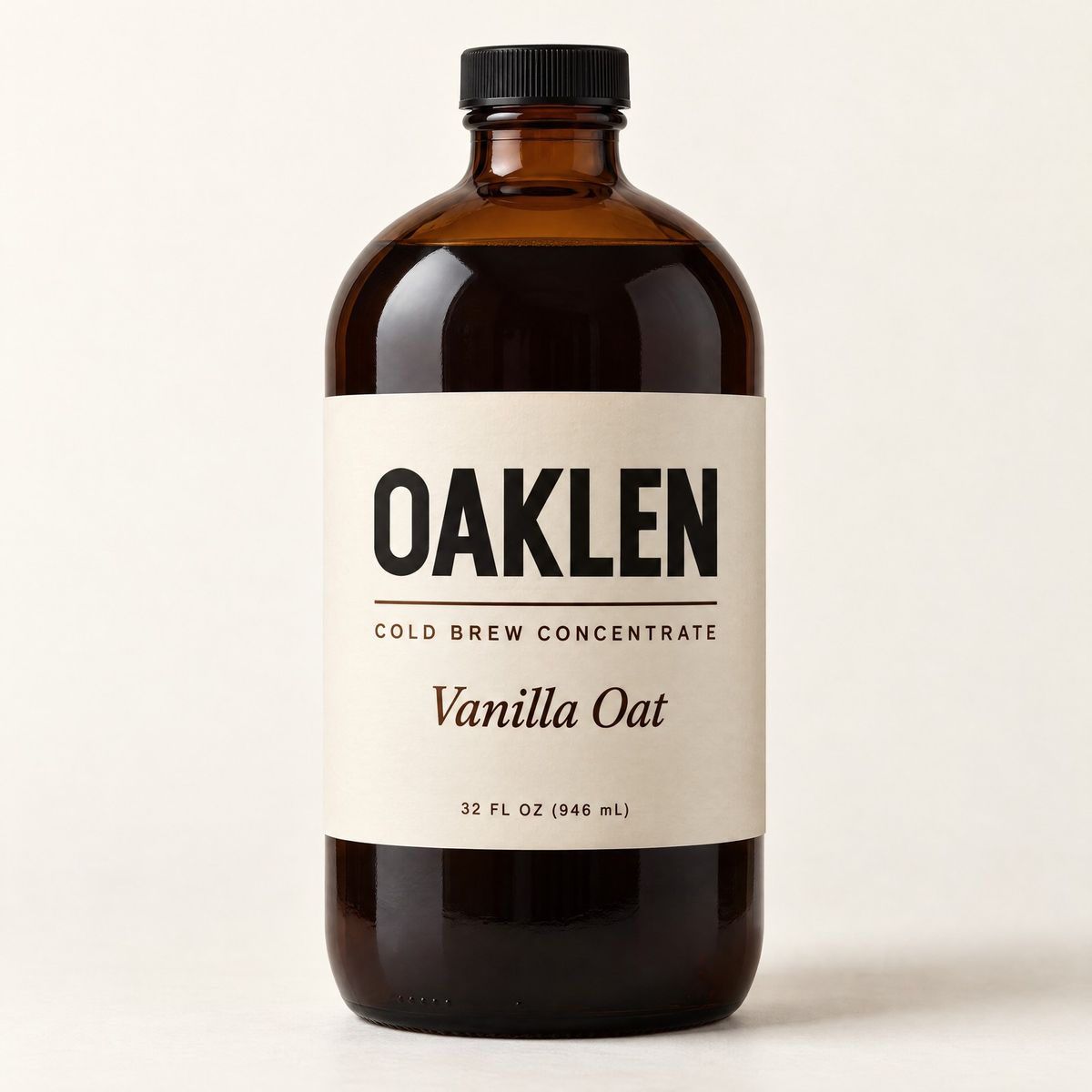
- One reference photo of a fictional product with four lines of label text: OAKLEN, COLD BREW CONCENTRATE, Vanilla Oat and 32 FL OZ (946 mL).
- Three briefs that mirror formats brands run on Meta, TikTok and Pinterest: a static ad with a headline and feature chips, a creator-style pouring shot, and a how-to infographic.
- Identical prompts, 3:4, 2K, one run per model per brief, no cherry-picking and no retouching.
- All nine images were generated in BuzzVideo on November 10, 2026, and checked at full size for spelling, label accuracy, hands and product shape.
Which Seedream model gets text right in a static ad?
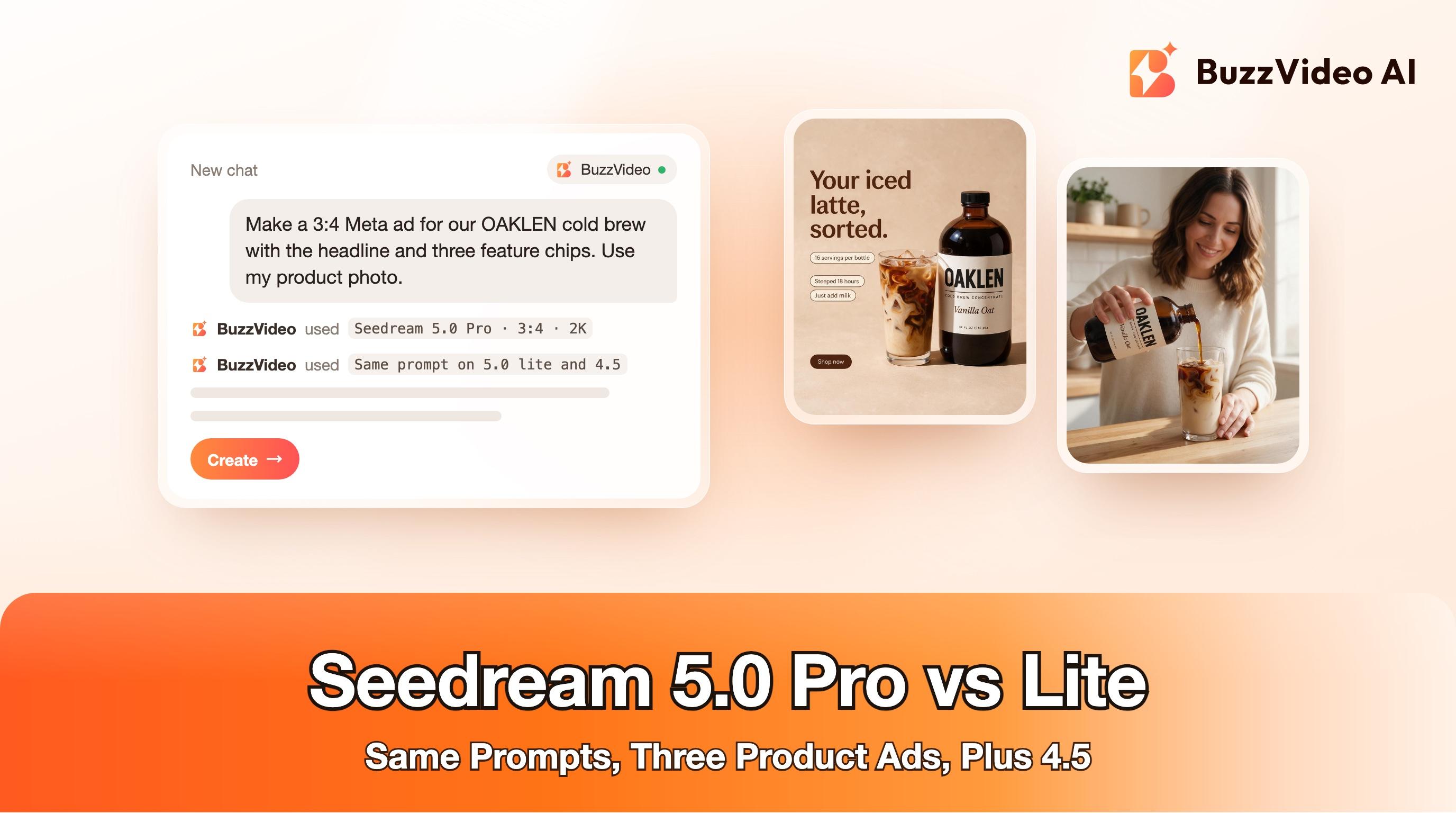
We asked for the headline "Your iced latte, sorted." on two lines, three pill chips reading "16 servings per bottle", "Steeped 18 hours" and "Just add milk", a "Shop now" button, and the bottle on the right third next to an iced latte.
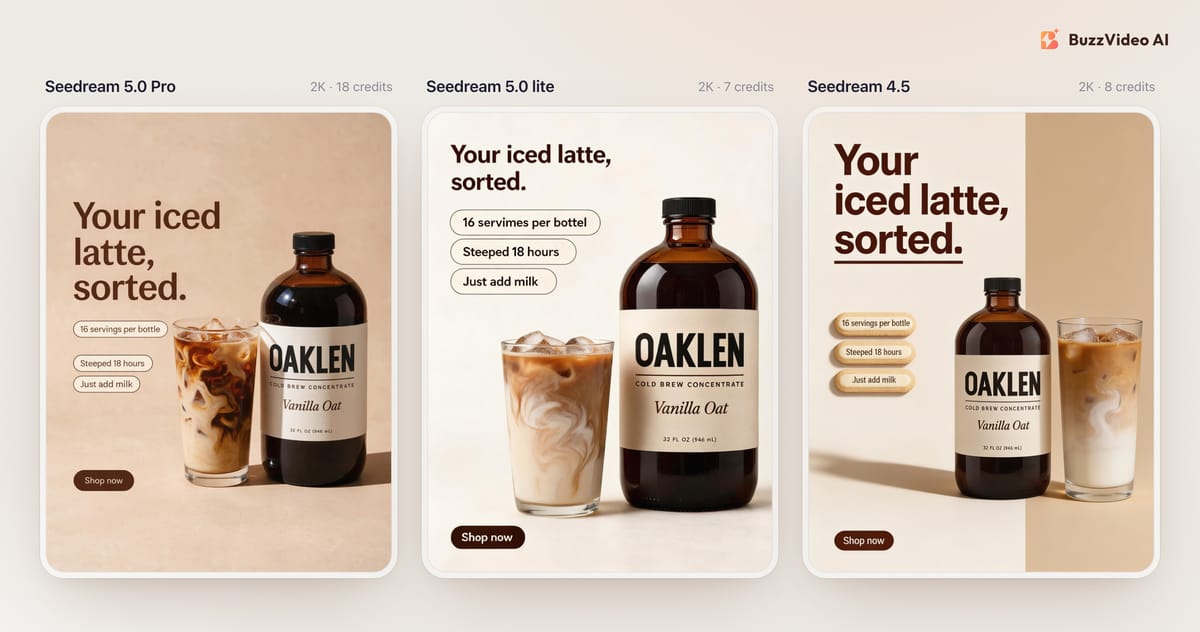
Seedream 5.0 Pro produced the most finished ad: warm hard light, a glass with real depth, and every word spelled right. It set the headline on three lines instead of two, which is easy to live with. Seedream 5.0 lite actually followed the layout most closely, with the two-line headline and clean outlined chips, but the first chip came out as "16 servimes per bottel", which makes the image unusable as is. Seedream 4.5 got every word right too; its chips look like embossed tiles rather than flat pills.
All three copied the label from the reference exactly when the bottle stood upright. The difference was in the new text we asked them to write.
Which model is best for creator-style lifestyle shots?
The brief: a woman in a sunlit kitchen pours cold brew from the bottle into a glass of ice and oat milk, label to camera, one hand on the bottle and the other on the counter.
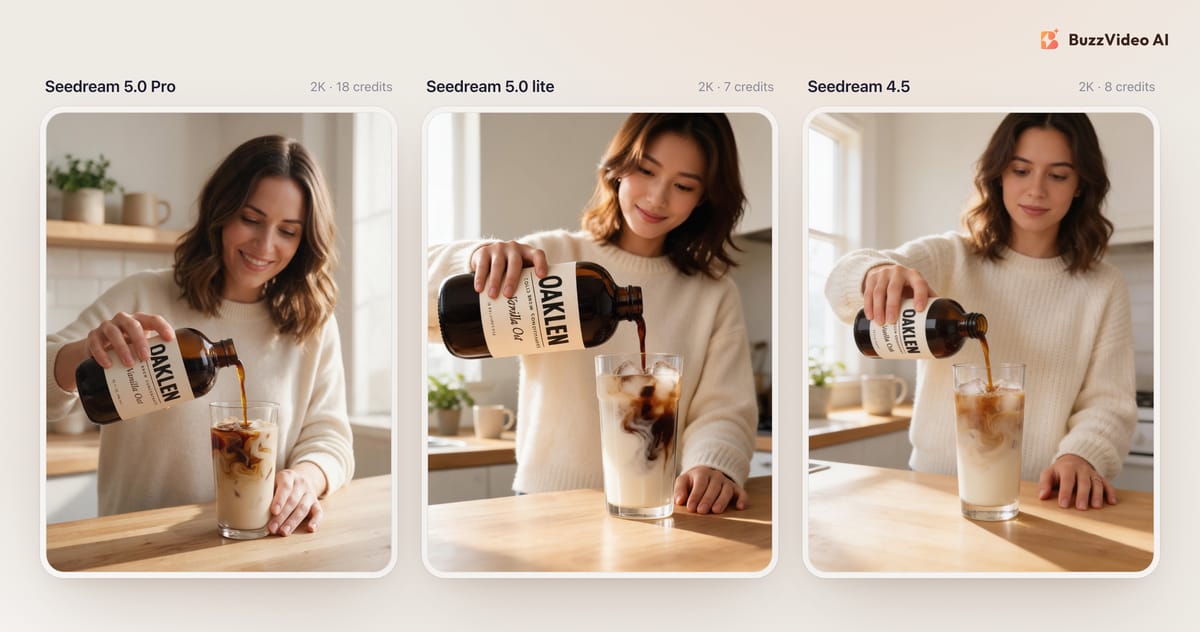
This is the hardest case for label text, because the bottle is tilted and partly covered by fingers. Seedream 5.0 Pro kept "Vanilla Oat" and "32 FL OZ (946 mL)" readable at an angle. Seedream 5.0 lite and 4.5 kept the big OAKLEN wordmark but turned "Cold Brew Concentrate" and "Vanilla Oat" into near-letters that look wrong on a close look. Hands and the pour looked natural in all three.
If the label isn't the point of the shot, lite and 4.5 give you a usable lifestyle image for a fraction of the cost. If a viewer will read the label, use Pro. For more on making AI lifestyle shots feel native to the feed, see AI UGC ads that don't look fake.
Which model makes the best infographic?
The brief: a three-step "How to make an iced latte" guide with icons, a subtitle reading "in 30 seconds", the bottle on the right, and a bottom strip reading "16 lattes per bottle".
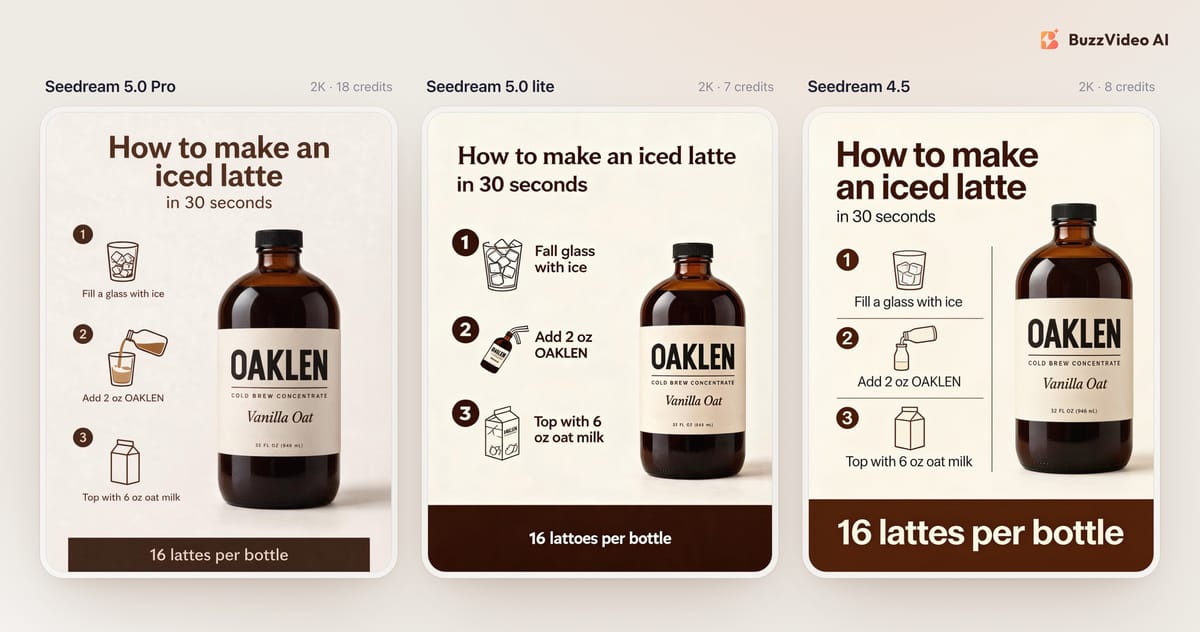
ByteDance positions Seedream 5.0 lite for infographics, but in our run it made three text errors in one image. Seedream 5.0 Pro and Seedream 4.5 both delivered clean, correctly spelled guides; 4.5's version is bolder at thumbnail size. ByteDance's own comparisons rate lite above 4.5 overall, but they cover reasoning, editing and consistency rather than spelling ad copy, and ours is one run per brief.
Seedream 5.0 Pro vs Lite vs 4.5: results at a glance
| Brief | Seedream 5.0 Pro | Seedream 5.0 lite | Seedream 4.5 |
|---|---|---|---|
| Static ad with headline and chips | All text correct; best lighting | Closest layout; 2 spelling errors | All text correct; 3D-style chips |
| Creator-style pouring shot | Label legible and correct | Small label text garbled | Small label text garbled |
| How-to infographic | All text correct | 3 text errors | All text correct; boldest layout |
| Cost per 2K image | 18 credits | 7 credits | 8 credits |
| Our pick | Ads where text must be right | Text-free visuals and drafts | Text layouts on the Free plan |
How much do Seedream 5.0 Pro and Lite cost on BuzzVideo?
Seedream 5.0 Pro costs 9 credits at 1K and 18 at 2K. Seedream 5.0 lite costs 7 credits whether you render at 2K, 3K or 4K, and Seedream 4.5 costs 8 at 2K or 4K. For comparison, Nano Banana 2.1 costs 11 credits at 2K and Nano Banana Pro 27; see our Nano Banana 2.1 vs Pro test.
The Free plan includes 500 one-time credits and covers images only, with Seedream 5.0 lite and Seedream 4.5 as its image models. That's about 71 lite images or 62 Seedream 4.5 images before you pay anything. On Starter ($14 a month billed yearly, 1,900 credits a month), 100 test images cost 1,800 credits with Pro at 2K and 700 with lite. Plans are on the BuzzVideo pricing page, and the Create button shows the exact cost before you generate.
How do you run the same test in BuzzVideo?
- In the Marketing Agent, go to Create, open the Image tab and choose Generate Image.
- Attach a clean, front-on product photo where every label line is readable.
- Choose Seedream 5.0 lite, 3:4 (or 9:16 for Stories and Reels) and 2K, and generate once.
- Keep the prompt, switch to Seedream 4.5 and then 5.0 Pro, and compare all three at full size.
Copy-paste Seedream prompts for product ads
These are the structures behind the static and infographic tests. Replace the bracketed parts, attach your product photo, and put every word you want in the image inside quotes.
“Clean static Meta feed ad, vertical 3:4. The exact [PRODUCT] from the reference image stands on the right third of the frame on a [COLOUR] seamless background, next to [ONE PROP]. Soft daylight from the left with a crisp, natural shadow. On the left side, bold [COLOUR] sans-serif typography: the headline "[HEADLINE]" on two lines. Below it, three small rounded pill-shaped chips reading exactly: "[CHIP 1]", "[CHIP 2]", "[CHIP 3]". At the bottom left, one small rounded button reading exactly "[CTA]". Keep the product shape and label identical to the reference: [LABEL TEXT]. Spell every word exactly as given. Only one product. No other text, no prices, no extra logos, no watermark.”
- Static ad prompt
“Clean ecommerce infographic, vertical 3:4, flat [COLOUR] background with [COLOUR] typography and simple line icons. Title reading exactly "[TITLE]" and a smaller line reading exactly "[SUBTITLE]". Three numbered steps in a vertical column, each with a circular number, a line icon and a label: "[STEP 1]", "[STEP 2]", "[STEP 3]". On the right, the exact [PRODUCT] from the reference image, label identical to the reference. A bottom strip reading exactly "[CLAIM]". Spell every word exactly as given. No other text, no prices, no extra logos.”
- Infographic prompt
Two lessons from our run: write the label text out in the prompt, and still proofread every word at full size. When a model gets one word wrong, it's usually cheaper to rerun on Seedream 4.5 or Pro than to fix it by hand.
When is Seedream 5.0 not the right choice?
- You need 4K from Pro. Seedream 5.0 Pro stops at 2K in BuzzVideo; lite and 4.5 render 4K at their usual flat price.
- Prices, offers and legal copy. Even the best run can slip a letter. Add those in editing so they are always exact.
- Transparent backgrounds. Use GPT Image 2.5 Flare instead; see Sunburst vs Flare.
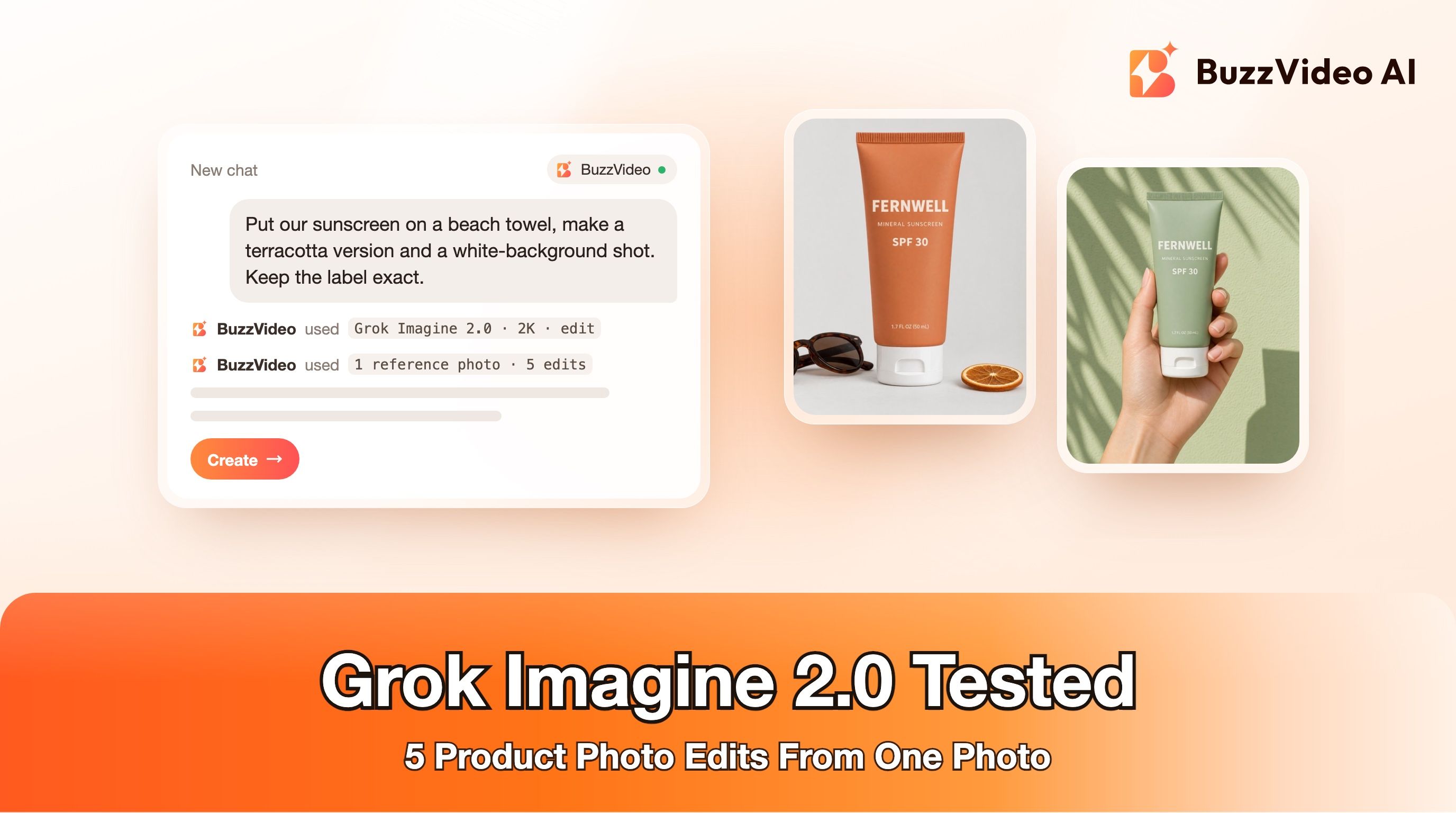
- Precise local edits or background removal on an existing shot. Grok Imagine 2.0 is built for that in BuzzVideo.
- Motion. Seedream makes stills. To turn a still into a video ad, see how to use Seedance.
We build BuzzVideo, so treat this as one team's test with one run per model, not a benchmark. Run your own product through all three and let the full-size images decide.
Ready to compare? Start with the two Seedream models on the Free plan, then try Seedream 5.0 Pro on the ads where every word has to be right.
FAQs
What is the difference between Seedream 5.0 Pro and Seedream 5.0 lite?
Pro is ByteDance's design-focused model with stronger text rendering, infographics and editing; lite is a smaller reasoning model released earlier. On BuzzVideo, Pro costs 18 credits at 2K and tops out at 2K, while lite costs 7 credits at any resolution up to 4K.
Is Seedream 5.0 free?
Seedream 5.0 lite is included on BuzzVideo's Free plan, along with Seedream 4.5, using the plan's 500 one-time credits. Seedream 5.0 Pro needs a paid plan, starting with Starter.
Is Seedream 5.0 better than Seedream 4.5?
ByteDance rates Seedream 5.0 lite above 4.5 in its blind comparisons. In our product ad test, though, 4.5 spelled all the in-ad text correctly where lite made errors, and 5.0 Pro was the most reliable of the three.
Which Seedream model is best for text in images?
Seedream 5.0 Pro. It was the only model in our test that kept every headline, chip and label line correct, including small label text on a tilted bottle.
When was Seedream 5.0 released?
ByteDance released Seedream 5.0 Lite on February 13, 2026 and Seedream 5.0 Pro on July 8, 2026.
How many reference images can Seedream 5.0 use in BuzzVideo?
Up to 10 for Seedream 5.0 Pro and up to 14 for Seedream 5.0 lite and Seedream 4.5.
Last verified: November 10, 2026, against our live pricing and product pages.
Next reads: Grok Imagine 2.0 product photo edits · Nano Banana 2.1 vs Pro for product ads · GPT Image 2.5 Sunburst vs Flare · AI static ads for Meta · Amazon listing images with AI

About the author
Monica
Product Manager
As a Product Manager at BuzzVideo AI, I work with marketers and growth teams on AI ad workflows—from brief to shippable creatives. I write about practical product workflows, model choices, and how teams turn product pages into ads that feel native on Meta and TikTok.