YouTube Shorts Ad Specs (2026): Size, Length, Safe Zone
YouTube Shorts ad specs from Google's own pages: 9:16 size, length by campaign type, the exact safe zone in pixels, text limits and an AI example.
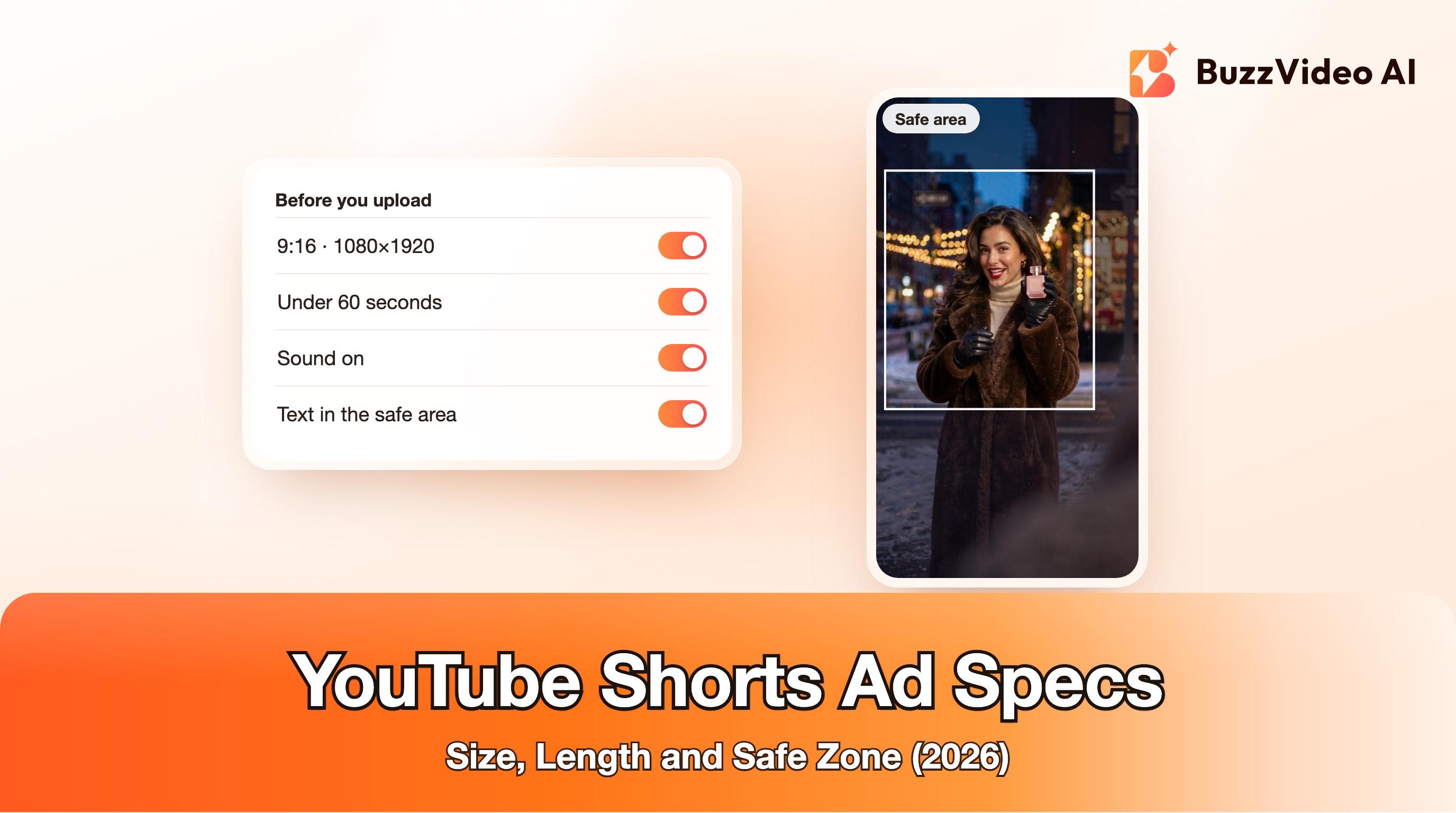
YouTube Shorts ads should be vertical 9:16 videos at 1080×1920, uploaded to YouTube as public or unlisted, with sound. Keep them under 60 seconds, because only the first 60 seconds play in the Shorts feed; Google suggests 10 to 30 seconds for ads that drive action. Keep the face, product, logo and any text inside Google's safe area: 288 px from the top, 48 px from the left, 192 px from the right and 672 px from the bottom of a 1080×1920 frame (Google, Google).
Google's own help pages give different lengths for different campaign types, which is why spec guides online disagree. This guide quotes Google's pages and says which campaign each number belongs to. We build BuzzVideo AI, a tool for making video ads, so the last section shows how we make a Shorts-ready ad; everything before it applies whatever tool you use.
What are the YouTube Shorts ad specs in 2026?
From Google Ads Help, read on November 19, 2026 (Google, Google, Google):
| Spec | Google's requirement or recommendation | What we use |
|---|---|---|
| Aspect ratio | 9:16 vertical recommended for Shorts; horizontal videos get blurred bars top and bottom | 9:16 |
| Resolution | 1080×1920 for 9:16 | 1080×1920 (720×1280 for drafts) |
| Where the video lives | Uploaded to YouTube, public or unlisted | Unlisted |
| Length | Up to 3 minutes, but only the first 60 seconds play in the Shorts feed | 10 to 30 seconds |
| Minimum length | Depends on campaign: 5 s (Demand Gen), 6 s (Video reach), 10 s (Video action) | At least 10 seconds |
| File types | MP4, MOV, MPEG-4 and others; under 256 GB | MP4 (H.264) |
| Sound | Recommended: music, voiceover or both | Always on |
| Safe area | 288 px top, 48 px left, 192 px right, 672 px bottom (1080×1920) | Everything important inside it |
Try it: generate a vertical 9:16 ad with sound from one product photo, then cut it to 15 seconds. Make a Shorts ad in BuzzVideo →
How long should a YouTube Shorts ad be?
Google's Shorts guide says to keep videos under 60 seconds and lists these lengths by campaign type. A Shorts ad can technically run up to 3 minutes, but only the first 60 seconds play in the feed, and at 50 seconds an overlay appears that invites people to keep watching on the YouTube watch page (Google).
| Campaign type | Suggested length for Shorts | Source |
|---|---|---|
| Ads that drive action (vertical) | 10 to 30 seconds | Shorts ads guide |
| Video reach (efficient reach) | 6 to 60 seconds | Shorts ads guide; video specs page |
| Video action, App, Performance Max | 10 to 60 seconds | Shorts ads guide |
| Demand Gen | Minimum 5 seconds; under 10 seconds can't serve in-stream | Demand Gen asset specs |
Our default is 15 seconds: long enough to pass every minimum above, short enough to finish before people swipe. If people drop off early, fix the first two seconds before you cut the length; our guide to hook rate shows how to measure that.
What is the YouTube Shorts safe zone?
The safe zone is the part of the frame that YouTube's interface doesn't cover. Google's vertical video help page publishes a 1080×1920 diagram: leave 288 px at the top, 48 px on the left, 192 px on the right and 672 px at the bottom, and keep your logo, product and on-screen text inside the remaining 840×960 area so they aren't covered on some placements (Google). The right edge is where the like, dislike, comment and share buttons sit, and the bottom carries the channel name, ad text and call-to-action (Google).
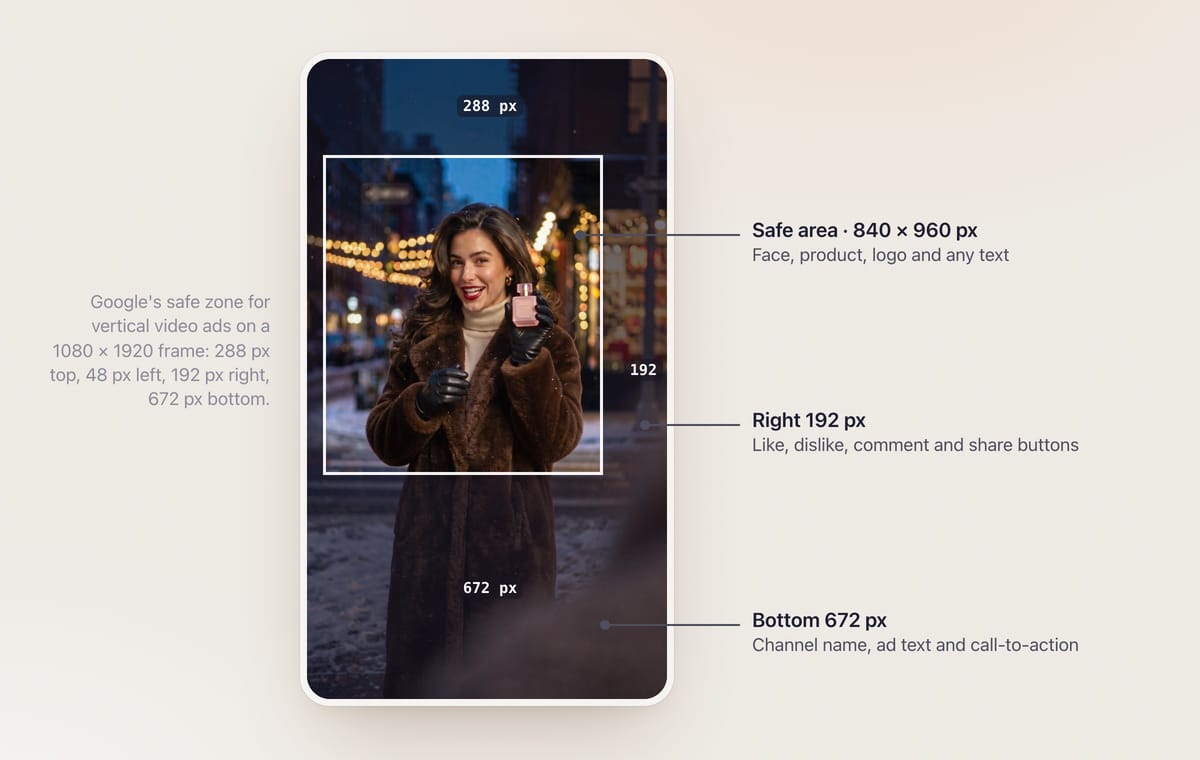
Two more details from the same page matter for framing (Google):
- When a viewer scrolls the content below a vertical ad in some placements, the player can shrink to 1:1 and crop the top and bottom. Another reason to keep the subject in the middle.
- A campaign with only vertical videos may not serve in YouTube in-feed placements, so add a 16:9 or 1:1 version if you want those too. Our guide to resizing an ad for every placement covers that.
Running the same video on TikTok? Its safe zone is different and depends on the caption length; see our TikTok ad specs.
Which Google Ads campaigns can run Shorts ads?
Google lists Demand Gen, Video view, Video reach, Reservation, Performance Max and App campaigns as able to serve ads in Shorts (Google). Two things to know before you plan creative:
- You can't send one video only to Shorts in Video view or Video reach campaigns. Google optimizes delivery across in-stream, in-feed and Shorts. Per-asset format control (Creative Preferences) is only available in Demand Gen.
- Shopping-style formats exist too. Shorts ads can appear in the Shopping feed, and Merchant Center product feeds can show image ads in Shorts for Performance Max and Demand Gen.
What are the text and call-to-action limits for Shorts ads?
Shorts ads show your channel name and a description; Google recommends a description of up to 90 characters, which is cut to one line on mobile. On mobile, a call-to-action overlay card can also show a headline, for which Google recommends 40 characters (Google).
| Element | Limit or behaviour | Source |
|---|---|---|
| Description | Up to 90 characters recommended; 1 line on mobile, 2 on desktop and TV | Shorts ads guide |
| CTA overlay headline | 40 characters recommended | Shorts ads guide |
| CTA button appears | At 3 s for Performance Max, App and Demand Gen; at 10 s for Video view and Video reach | Shorts ads guide |
| Clicks | A click on a Shorts ad counts as a click on the CTA button | Shorts ads guide |
| Video action text fields | Headline 30, long headline 90, description 90, CTA 10 characters | Video ads specs page |
Because the CTA button can appear 3 seconds in, put the product and the offer on screen in the first 3 seconds, not at the end.
What makes a YouTube Shorts ad work?
Google's Shorts guide gives a short list of creative advice (Google):
- Use sound. Music, voiceover or both; Google says sound has been shown to increase conversions by over 20%.
- Make it look like a Short, not a TV spot. Social-first, creator-style footage that blends with organic content; text overlays are encouraged.
- Shoot vertical. Horizontal videos get blurred bars; Google's Video Enhancement can convert them, but native 9:16 looks better.
- Test several creatives instead of betting on one.
- Label AI where required. Google notes that laws in the EU, India, New York, California, South Korea and Vietnam may require labels on ads with certain AI-generated or edited assets, and offers an AI label setting in Google Ads. Our guide to labelling AI ads covers Meta and TikTok as well.
How do you make a YouTube Shorts ad with AI?
Here's the example from the safe-zone figure above, made for this post. The idea: a last-minute holiday gift that comes out of a coat pocket on a ribbon. We composed it for the Shorts safe area from the first frame: her face in the upper-middle, the product held at chest height, the right edge and the bottom third left to coat and street.
How we made it, step by step:
- Design the first frame for the safe area. We generated one 9:16 image with Nano Banana 2.1 (2K, 11 credits) and asked for the face about a third of the way down, the subject slightly left of centre and nothing important in the bottom third or on the right edge.
- Write the action in time blocks. 0–2 s the hook line, 2–5 s the reveal, 5–8 s the product moment, 8–10 s the closing line. One action per block keeps hands and props stable.
- Generate with sound. One 10-second take with Seedance 2.5 Flash at 720p, with audio on (303 credits).
- Check every frame. We looked at the clip every quarter of a second. The ribbon disappeared behind her gloves for a moment, so we cut 0.8 seconds out with a jump cut; the final ad runs 9.3 seconds.
- Add text in the edit, inside the safe area. Prices, dates and offers go on as text layers afterwards, never generated into the footage, so they stay sharp and you can change them without regenerating. For a live campaign, get the offer on screen in the first 3 seconds; our example has no text so the figure stays clean.
- Lengthen for Video action campaigns. At 9.3 seconds this cut is fine for Demand Gen and Video reach, but it's under the 10-second minimum for Video action and the 10 to 60 seconds Google suggests for App and Performance Max, so for those add an end card or a second shot.
- Upload to YouTube as unlisted and add it to your campaign.
At 720p this is a draft resolution; for the final ad, generate at a higher resolution on a model that supports it or use Upscale Video in BuzzVideo. If you're planning Black Friday and Cyber Monday creative, our Black Friday video ads guide has more formats to test.
Prompt template (shortened)
The structure of the prompt behind the example, with styling details trimmed. Replace the product and the lines with yours:
“Use the reference image as the exact first frame; keep the same woman, coat and street. Camera keeps the same framing: her face stays in the upper-middle, she stays slightly left of centre, nothing important moves to the bottom or the right edge. 0–2s: she whispers to camera: "Last-minute gift?" 2–5s: she pulls a red satin ribbon out of her coat pocket and a small pink glass perfume bottle with a gold cap rises out on the end of it. 5–8s: she catches the bottle and sprays one soft mist. 8–10s: she holds it beside her face and says: "It fits in your pocket." One person, one bottle, no label on the bottle, natural hands; no subtitles, no on-screen text, no logos.”
- Seedance 2.5 Flash prompt, BuzzVideo
Make your Shorts ad
Start from one product photo or one first frame, generate a 9:16 clip with sound, keep everything inside the safe area and add your offer in the edit. You can do all of it in BuzzVideo's Marketing Agent; paid plans start at $14 a month billed yearly (BuzzVideo pricing).
FAQs
What size should a YouTube Shorts ad be?
Use 9:16 vertical at 1080×1920. Google also accepts square and horizontal videos, but horizontal ones show with blurred bars in Shorts (Google).
What is the maximum length of a YouTube Shorts ad?
A Shorts ad can be up to 3 minutes long, but only the first 60 seconds play in the Shorts feed, so Google recommends keeping it under 60 seconds.
What is the minimum length of a YouTube Shorts ad?
It depends on the campaign: Google lists a 5-second minimum for Demand Gen and 6 seconds for Video reach, requires at least 10 seconds for Video action, and suggests 10 to 60 seconds for App and Performance Max. Ten seconds or more works everywhere.
What are the YouTube Shorts safe zone dimensions?
On a 1080×1920 frame, Google's diagram leaves 288 px at the top, 48 px on the left, 192 px on the right and 672 px at the bottom, so the safe area is 840×960 px (Google).
Do YouTube Shorts ads need sound?
Sound isn't listed as a hard requirement, but Google recommends music, voiceover or both and says sound has been shown to increase conversions by over 20%.
Can I run a YouTube Shorts ad from an unlisted video?
Yes. Google says the video must be uploaded to YouTube and can be public or unlisted.
Can I run the same video on YouTube Shorts and TikTok?
Usually, yes, as a 9:16 file with sound, but the safe zones differ. Keep text in the area that is safe on both, or export a version per platform.
Last verified: November 19, 2026, against our live pricing and product pages and Google Ads Help.
Next reads: TikTok ad specs · Resize one ad for every placement · Hook rate for Meta ads · Black Friday video ads

About the author
Monica
Product Manager
As a Product Manager at BuzzVideo AI, I work with marketers and growth teams on AI ad workflows—from brief to shippable creatives. I write about practical product workflows, model choices, and how teams turn product pages into ads that feel native on Meta and TikTok.