Faceless UGC Ads: How to Make Them with AI
Faceless UGC ads sell with hands, product and real sound instead of a presenter. The formats running now, a three-shot list, AI prompts and the costs.
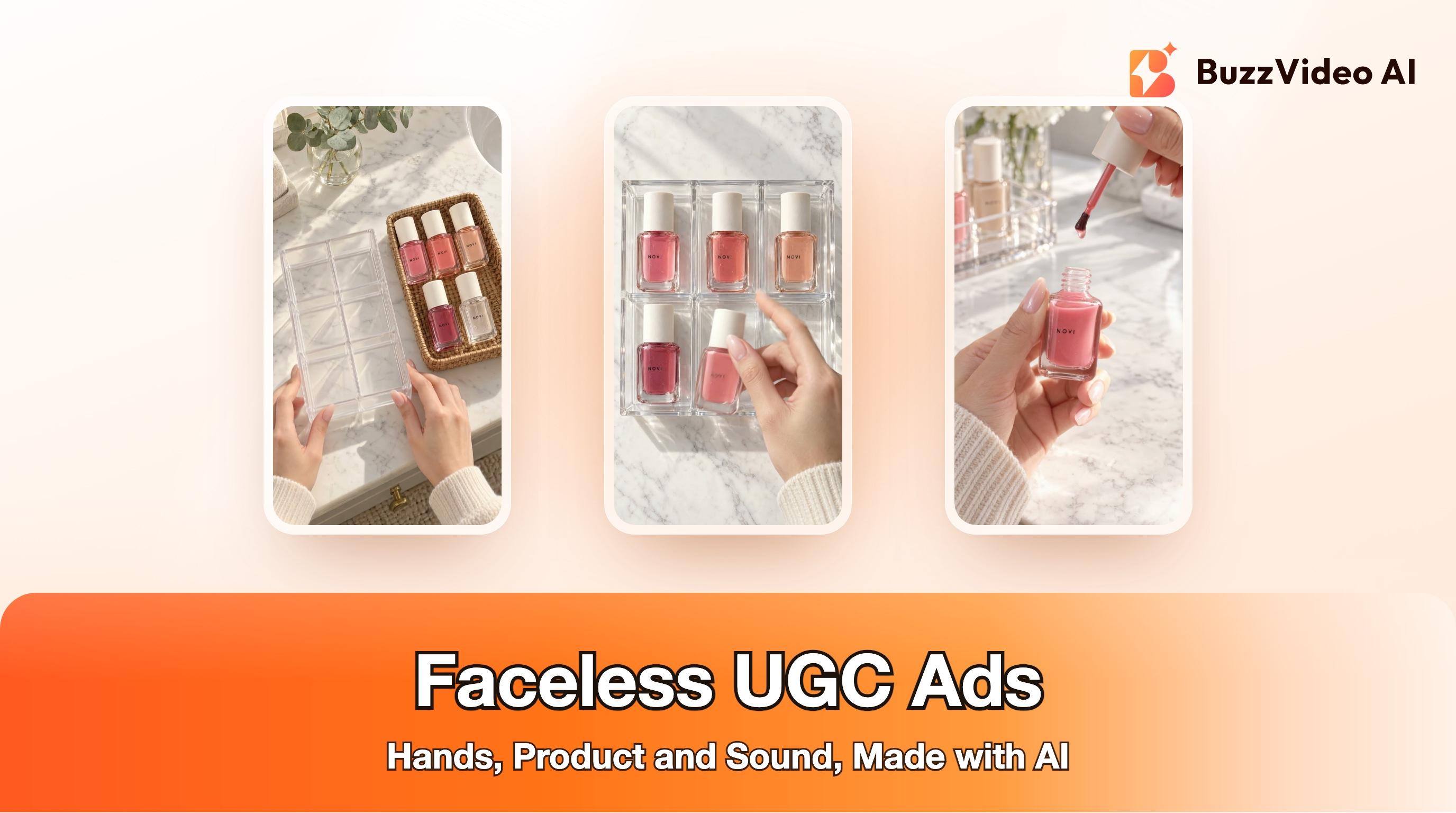
A faceless UGC ad is a creator-style video in which nobody's face appears: the viewer sees hands, the product and hears the sounds of it being used, sometimes with a voiceover or one line of on-screen text. The faceless formats running in paid social right now are POV restocks, hands-only demos, ASMR unboxings and text over product B-roll. With AI, you make one product-accurate start frame per shot, animate each for about five seconds with sound, keep the cleanest part of each, and add the caption in the edit.
This guide breaks down three faceless ads that were live in the Meta Ad Library on November 11, 2026, then rebuilds the same structure for a fictional product in BuzzVideo AI's Marketing Agent, with the prompts we used, what we cut, and what it cost. The Marketing Agent also has ready-made Camera POV and Unboxing ASMR templates if you would rather start from one.
Try it: Upload one product photo, open Generate Image and ask for a 9:16 overhead shot of your hands and product on a vanity or desk. Open the Marketing Agent →
What is a faceless UGC ad, and why do brands run them?
Classic UGC puts a creator on camera talking about the product. Faceless UGC keeps the native, phone-shot feel but removes the face, so the product and the hands do the selling. Brands use it for practical reasons:
- No presenter to cast or license. You do not need a creator's face, so there is no likeness to clear, and no reshoot when a creator is unavailable.
- Easy to localize. With no lip movement to match, a new market needs only new on-screen text or a new voiceover.
- Cheap to vary. Swap the hook line, the product colour or the first shot and you have a new variant for testing.
- The viewer's point of view. Overhead hands read as the viewer's own hands, which suits routines, restocks and setups.
Faceless is not always better. Some products need a person to show fit, skin or a result, and a talking creator can build trust that hands cannot. Test both. Our guide to AI UGC ads that don't look fake covers the on-camera version.
Which faceless ad formats are running right now?
We searched the Meta Ad Library (US, active video ads, sorted by impressions) for restock, ASMR and organizing ads and stepped through the first 16 seconds of each video at half-second intervals. Three faceless examples:
| Ad (Meta Ad Library) | Running since | Length | Structure | On-screen text |
|---|---|---|---|---|
| Everything Envy, "POV: stocking my dream vanity" | June 23, 2026 | 52 s | Wide shot of the vanity, a hand opens a drawer, then overhead hands place products slot by slot; a new shot every 1 to 2 seconds | One lowercase POV line at the top over the opening shots |
| Glamnetic, "Restocking my Glam Icons" | August 22, 2026 | 43 s | A clear organizer is opened, hands hold each pack to the camera, then file it in the tray | Short benefit cards that change every few shots |
| Amazon.com, "Let's pack up my toiletry bag" | September 28, 2026 | 26 s | Bag on the counter, unzip, hands load bottles and brushes; fixed camera at about 45 degrees; one of a series of restock ASMR ads | One line in capitals at the top over the opening shots |
What they have in common:
- No face, ever. Hands and forearms only, often in a plain knit sleeve.
- A fixed camera. Overhead or at about 45 degrees, as if the phone were propped up. That leaves both hands free.
- Container, then fill, then hero. Something empty is filled with the product, which gives the viewer a reason to watch to the end.
- Short shots. A new shot every one to two seconds keeps the eye moving.
- One short line of text. A POV statement at the top, out of the way of the hands.
Other faceless formats work the same way: a hands-only demo of a gadget, an ASMR unboxing, or product B-roll under a voiceover. If you want narration over illustrations instead of product footage, see our faceless explainer guide.
How do you make a faceless UGC ad with AI?
Step 1: Start from a clean product photo
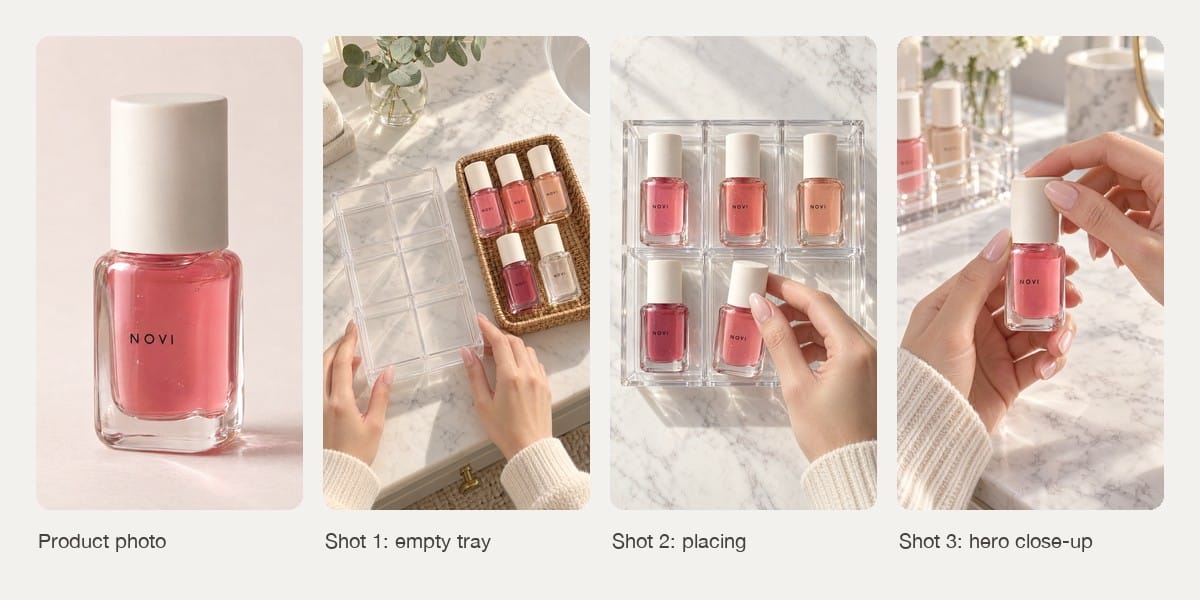
Use a straight, evenly lit photo with the label readable. Every shot inherits the product from it. We generated one for a fictional brand, NOVI, because we had no real product to photograph; with a real product, use your own photo.
Step 2: Write a three-shot list
Copy the container-fill-hero structure: shot 1 shows the empty container next to the products, shot 2 shows hands placing them, shot 3 is a close-up of one product being opened or used. Keep the camera fixed in all three.
Step 3: Generate one start frame per shot
In the Marketing Agent, open Generate Image, attach the product photo, choose 9:16 and describe one shot at a time. Say how many hands are in the frame and that no face appears. We used GPT Image 2.5 Sunburst at X-High quality. Check each still at full size before animating it.
Step 4: Animate each frame with sound
Open Generate Video, attach the start frame, choose 9:16, five seconds and sound on. We used Kling 3.0 at 720p. Describe one action, keep the camera still, and name the sounds you want.
Step 5: Check every clip, then cut
Step through each clip at quarter-second intervals. Keep the part where the hands and the label are clean, and join the shots with hard cuts.
Step 6: Add the caption and the AI label in the edit
Put one POV line at the top, where it covers no hands or product, and a small AI-generated tag. Do not ask the video model to draw the text; generated lettering is often misspelled.
Copy-paste prompts for a faceless restock ad
These are the prompts we used, shortened and with the product details replaced by brackets. Start-frame prompts go to the image model with your product photo attached; motion prompts go to the video model with the start frame attached.
Shot 1: the empty container
“Vertical 9:16 photorealistic smartphone-style POV photo, camera looking down at about 45 degrees onto [surface] in soft morning window light. An empty [container] and, next to it, [number] [products] that are exactly the product in the reference image. A woman's two hands only enter from the bottom edge (two hands, five fingers each, [nail style], [sleeve]), resting on the container. No face, no body beyond the wrists, no phone, no mirror reflections. No other text or logos except the product label. Nothing floating.”
- Start frame
“Use the image as the exact first frame. Fixed camera, no camera movement. The two hands slide the empty [container] a few centimetres toward the camera. The products stay exactly where they are and keep their labels unchanged. Sound: soft slide on [surface], quiet room tone. No music, no voice. No face, no extra hands, no new objects, no added text, no cuts.”
- Motion
Shot 2: hands placing the product
“Vertical 9:16 photorealistic close-up POV photo looking straight down onto [container] on [surface]. Some compartments already hold one [product] each, standing upright, exactly the product in the reference image. A woman's right hand only (one hand, five fingers) enters from the bottom right holding one more [product], about to place it into an empty compartment. Only one hand in the image. No face, no other text or logos. Every product sits on the tray floor.”
- Start frame
“Use the image as the exact first frame. Fixed overhead camera. The right hand lowers the [product] into the empty compartment, lets go and slides out of frame, then returns with one more [product] for the last compartment. The products already placed do not move and keep their labels unchanged. Only one hand ever in frame. Sound: a soft tap each time a product is set down, quiet room tone. No music, no voice, no added text, no cuts.”
- Motion
Shot 3: the hero close-up
“Vertical 9:16 photorealistic close-up POV photo, background softly out of focus. A woman's two hands only: the left hand holds one [product] upright in the centre with the label facing the camera; the right hand's fingertips rest on the cap. No face. One product in focus. No other text or logos. Nothing floating.”
- Start frame
“Use the image as the exact first frame. Fixed camera, very slow push-in. The right hand twists the cap and lifts it straight up, revealing the applicator. The left hand keeps the [product] still and upright, label facing the camera, unchanged. Sound: a soft cap twist, room tone. No music, no voice. No face, no extra hands, no new objects, no added text, no cuts.”
- Motion
Example: a 13-second faceless restock ad
The whole ad came from text prompts and one generated product photo; nothing was filmed. Here is what the frame-by-frame check found:
| Shot | What we saw | What we did |
|---|---|---|
| 1. Empty tray | Clean slide for about three seconds; after that the right arm reaches across the basket at an awkward angle and covers the products | Kept the first 2.8 seconds |
| 2. Placing | Both placements land cleanly, the hand leaves the frame between them, and the labels stay readable | Kept all five seconds |
| 3. Hero | Cap comes off with the applicator attached; label unchanged in every frame | Kept 4.8 seconds |
| All shots | We had asked for a lip oil, but the square bottle and the brush applicator read as nail polish | Captioned it as nail polish instead of fighting the footage |
The last row is the lesson worth keeping: viewers believe the picture, not your prompt. If the start frame looks like a different product, fix the start frame, or describe the product the way it looks.
What goes wrong with AI hands and labels?
- Extra hands. Say how many hands are in the frame in both prompts, and cut any moment where a third appears. A handheld selfie cannot also do a two-hand action; a fixed camera can.
- Labels that drift. Pause on three frames per clip and read the label. Short brand names survive better than long ones.
- Props that change. Containers can gain or lose compartments between shots, and objects can slide on their own. Keep shots short and cut before the change.
- Arms at impossible angles. Reaching across the frame is where models struggle most. Keep each action close to where the hand enters.
- Text in the footage. Prices, offers and captions belong in the edit. Generated text is the first thing to break.
How much does a faceless AI ad cost to make?
These are the credits our workspace was charged for the example above.
| Item | Settings | Credits each | Count | Credits |
|---|---|---|---|---|
| Product photo | GPT Image 2.5 Sunburst, 1:1, X-High | 19 | 1 | 19 |
| Start frame | GPT Image 2.5 Sunburst, 9:16, X-High | 15 | 3 | 45 |
| Five-second clip | Kling 3.0, 9:16, 720p, sound on | 100 | 3 | 300 |
| Total | 364 |
On the Pro plan billed yearly ($35 a month for 4,900 credits), 364 credits is about $2.60. Starter ($14 a month billed yearly, 1,900 credits) includes Kling 3.0 and the image model used here; the Free plan has 500 one-time credits and no video generation. Current numbers are on our pricing page. Each extra variant costs only the shots you change, so a new hook shot is about 115 credits.
Do faceless AI ads need an AI label?
Yes, in most cases. Leaving out the face does not make realistic AI footage exempt. TikTok's ad policy requires disclosure of realistic AI-generated content, and Meta labels ads made or significantly edited with generative AI, including ads it detects were made with third-party tools (Meta Help Center). We added a small AI-generated tag to the example; our guide to labeling AI ads on Meta and TikTok covers the platform settings. And show only what the product really does: hands applying a product are fine, a generated result the product has not delivered is not.
A faceless ad is one of the cheaper formats to test because nobody has to appear on camera. Make one three-shot version from your product photo, check every frame, then spin new hooks from the first shot. For more hook ideas, see ad hook variations with AI.
FAQs
What are faceless UGC ads?
They are creator-style ads in which no face appears. The product, the hands using it, handling sounds and one line of text or a voiceover carry the message.
Do faceless TikTok ads work?
They are a common paid-social format: in the Meta Ad Library, Amazon runs restock ASMR ads as a series and other faceless ads have run for months, which suggests they earn their spend. Whether they beat a talking creator for your product is something to test, not assume.
Can AI make faceless UGC videos of my real product?
Yes, if you start from your own product photo. Generate a start frame for each shot with the photo as the reference, animate each frame, and check the label in every clip.
How long should a faceless video ad be?
The examples we found run 26 to 52 seconds, but a 10 to 15 second cut with three or four shots is enough to test a hook. Change shots every 1 to 3 seconds.
What is the best camera angle for faceless ads?
Overhead or about 45 degrees with the camera fixed, as if the phone were propped up. It frees both hands and makes the hands read as the viewer's own.
Do I need to label faceless AI ads on Meta and TikTok?
Usually, yes. TikTok requires disclosure of realistic AI-generated content and Meta labels ads made or significantly edited with generative AI, with or without a face on screen.
Last verified: November 11, 2026, against our live pricing and product pages.
Next reads: AI UGC ads that don't look fake · AI unboxing videos · AI B-roll generator for ads · Label AI ads on Meta and TikTok

About the author
Monica
Product Manager
As a Product Manager at BuzzVideo AI, I work with marketers and growth teams on AI ad workflows—from brief to shippable creatives. I write about practical product workflows, model choices, and how teams turn product pages into ads that feel native on Meta and TikTok.