How to Make an AI Micro-Drama Series with Consistent Characters in ChatGPT or Claude
Plan, cast and produce an AI micro-drama series inside ChatGPT or Claude with BuzzVideo MCP: outline, cast sheets, storyboards, voices and cliffhangers.
To make an AI micro-drama series, write a short series outline with a cliffhanger for every episode, lock each recurring character in a reference sheet before you generate anything, storyboard one episode at a time, and generate a key frame for every shot before animating it. Then lay the dialogue first, cut the picture to it every 1–2 seconds, and check every face against its sheet.
With BuzzVideo MCP connected, ChatGPT, Claude or another MCP client can run that production for you. The chat loads BuzzVideo's Short drama guide, which has three approval gates (outline, script and storyboard, then the credit quote per episode) and produces one episode at a time unless you approve more.
What is an AI micro-drama?
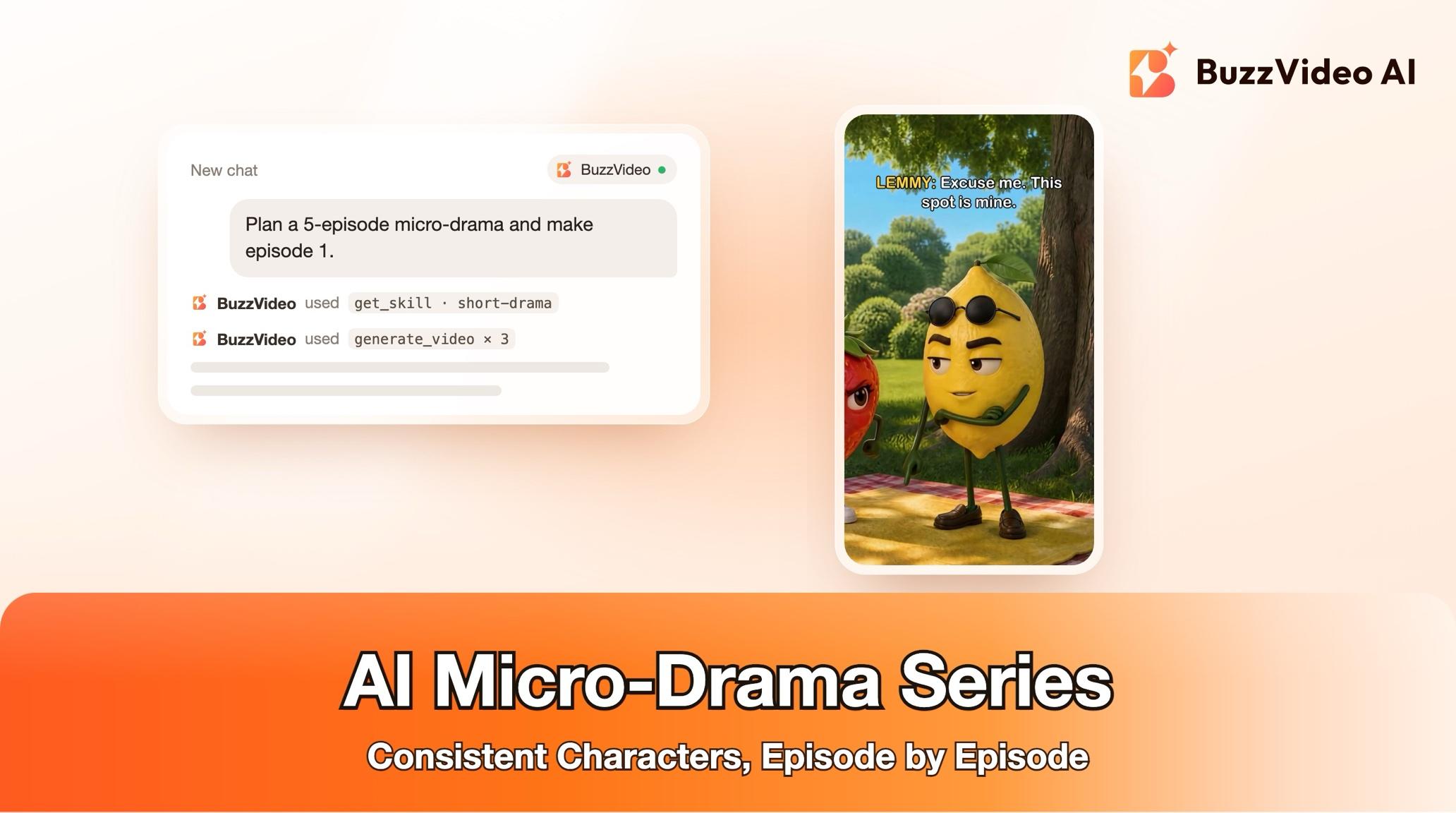
A micro-drama is a vertical mini series of very short episodes, each opening mid-conflict and ending on a cliffhanger so viewers come back for the next one. Romance, revenge, office and family plots are common, and so are "fruit dramas" and pet dramas with animated characters. Brands use them to weave a product into a story people actually follow over several days. The hard part with AI is consistency: the same face, outfit and voice in every shot and every episode.
| Part | Guide default |
|---|---|
| Episodes | 3, produced one at a time |
| Episode length | 45–60 seconds (30–90 s possible) |
| Format | Vertical 9:16 |
| Look | Live-action look for adult drama; 3D animated for fruit and pet dramas |
| Editing style | Fast-cut drama: a cut every 1–2 s, reaction close-ups, sound hits on reveals |
| Ending | A cliffhanger every episode |
Try it: connect BuzzVideo to your AI chat and pitch your series premise in one message. Connect BuzzVideo MCP →
What do you need before you start?
- A BuzzVideo plan with video. Video starts on Starter; Seedance 2.0 and 2.5 need Pro or Ultra (pricing).
- BuzzVideo MCP connected: see how to use BuzzVideo MCP in ChatGPT and Claude.
- A premise: the genre, the hook of the series, and whether a product appears (as a prop, a plot device or a sponsor end card).
- A clean product photo if a product features, plus the claims characters may say about it.
- Music and sound effects you have rights to, or accept labelled placeholders.
No real people's likenesses or copyrighted characters: the guide keeps stories within what mainstream ad platforms allow.
How do you make an AI micro-drama step by step?
Step 1 — Pitch the premise and approve the series outline
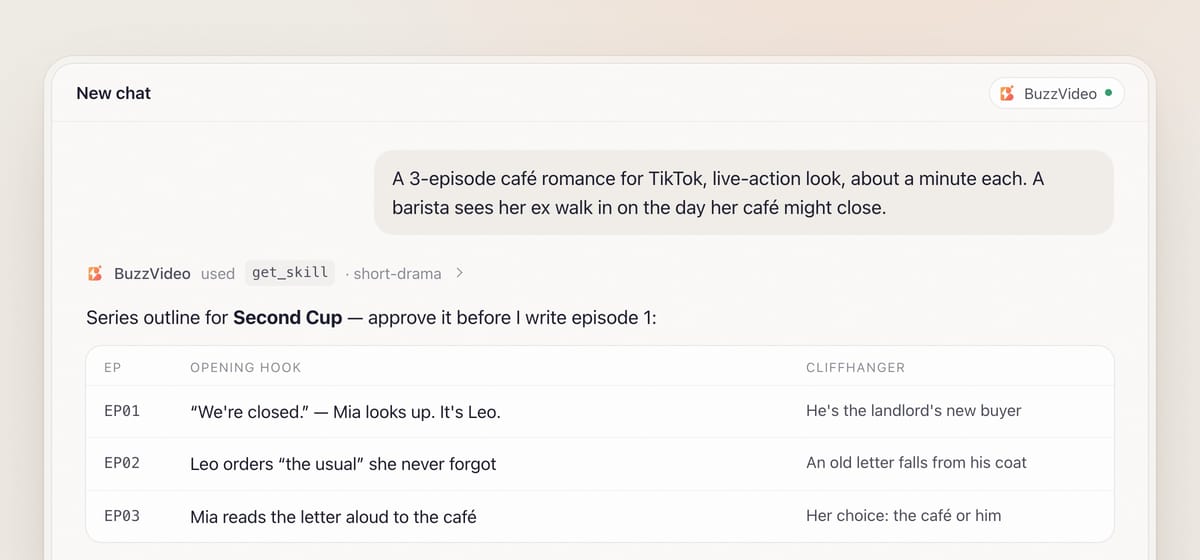
Describe the series in one message. The chat loads the guide (list_skills, then get_skill) and asks one round of questions with defaults: premise and product, cast look, number and length of episodes, language and voices, and editing style. Most preset voices are English, and they can also read other languages such as Spanish; the guide plays you a sample first so you can check the accent, or you can use your own recording.
The first gate is the outline: a one-sentence logline, a cast list (name, role, want, one visual trait each), the world, the arc, and for every episode a summary, an opening hook that starts mid-conflict in the first 2 seconds, the turn, and the cliffhanger: a reveal, a threat, a choice, a betrayal or an arrival. If a product features, the outline says where it appears and why that's natural to the story. It never stops the story.
Step 2 — Approve the episode script and storyboard
For each episode you get a script (scene headings, action, one short line per shot, who speaks) and a storyboard with one row per shot: length, shot size, camera move, characters in frame, action, line, sound cue, and whether it's a talking shot or a reaction. A 60-second episode has 20–35 cut shots, but far fewer generated clips: two or three neighbouring shots of the same set-up are grouped into one 4–5 second clip and cut apart later. That grouping drives the credit quote.
Step 3 — Lock the cast with reference sheets
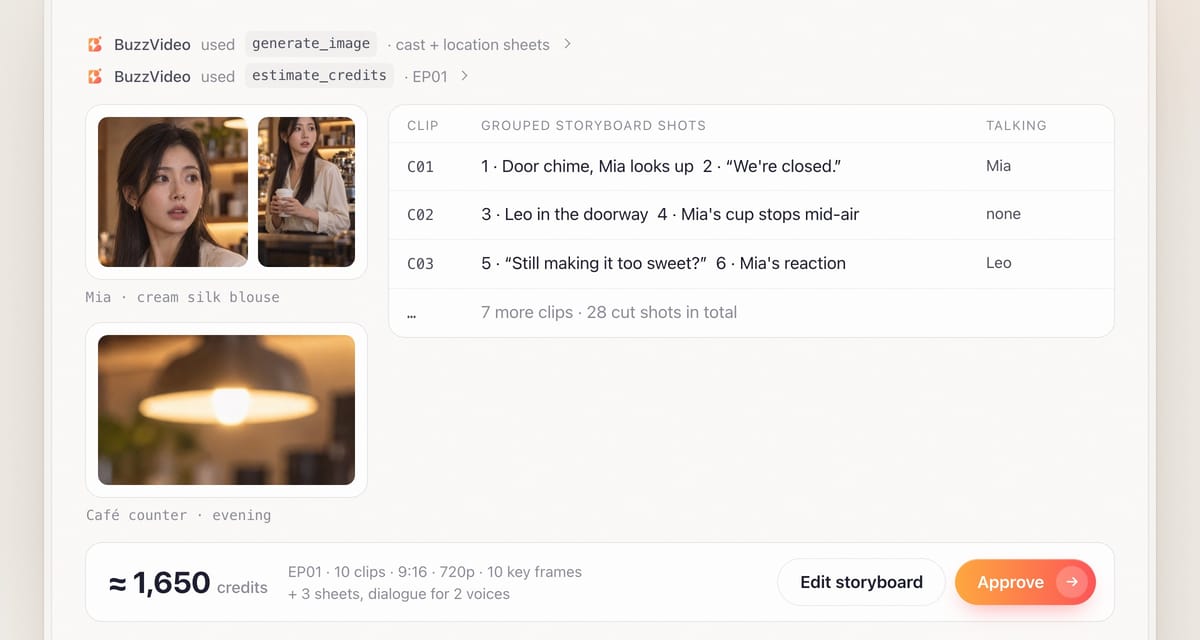
This is the step that keeps your lead from becoming a different person in episode 2. For each recurring character the guide generates one reference sheet (face front and three-quarter, full body, outfit and key colours on a plain background) and writes a fixed description that is pasted unchanged into every prompt. Each recurring set gets a location sheet too. For a live-action look, a BuzzVideo avatar is another way to keep a face constant. An outfit change between episodes needs its own approved sheet.
Step 4 — Key frames first, then animation
After you approve the quote, every shot gets a key frame from the character, location and product references, and the key frames are reviewed (including glasses, jewellery and patterns) before anything is animated. Each clip then animates its approved key frame, one clear action per beat, naming who talks and keeping the other character's mouth closed. A character who walks in mid-clip gets their sheet as a second reference so the model doesn't invent them.
Sound is handled shot by shot: clips with moving mouths are muted, because models fill them with gibberish speech, while clips where nobody talks can keep generated ambience and foley. Failed tasks are refunded, with one retry offered.
Step 5 — Give every character one voice
Each character keeps one voice for the whole series, chosen with list_voices after you hear a short line from each. Dialogue is generated per character with word timestamps for captions, and short punchy lines are re-spaced in the edit because they come back with long pauses. A narrator, if any, gets a clearly different voice.
Step 6 — Edit and review the episode
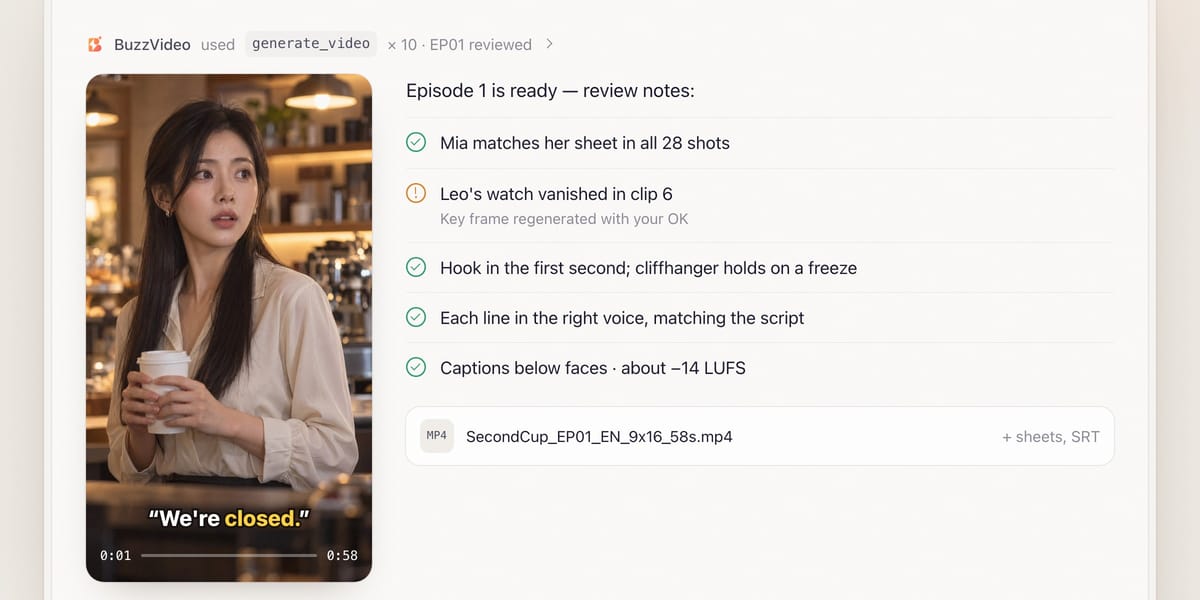
The edit lays the dialogue first and cuts picture to it, splitting grouped clips back into storyboard shots and adding punch-ins of about 1.5× toward whoever speaks, so there's a cut every 1–2 seconds. Reveals get reaction close-ups, the cliffhanger holds a beat and ends on a hard cut or freeze with a sound hit, and every line is captioned away from faces. Then a mandatory review puts every shot next to the character sheets, checks the dialogue and captions, and confirms the hook and cliffhanger land. You get files like SecondCup_EP01_EN_9x16_58s.mp4 plus sheets, storyboards, shots, voices and SRTs.
Copy-paste prompt
“Make a [3]-episode micro-drama for [TikTok], 9:16, about [45–60] seconds each, in [English]. Premise: [a barista sees her ex walk into her café on the day it might close]. Genre: [romance]. Look: [live-action]. Product: [our cold brew as a prop in episode 2, end card in episode 3]. Show me the outline with cliffhangers first, then the episode 1 script, storyboard, cast sheets and credit quote before generating.”
How should a 60-second micro-drama episode be structured?
| Beat | Time | What happens | Edit note |
|---|---|---|---|
| Cold open | 0–2 s | Mid-conflict: a line or a reveal | No set-up; caption on screen |
| Set-up | 2–15 s | Who wants what, in two or three lines | Reaction close-ups between lines |
| Escalation | 15–40 s | The obstacle grows; product moment if planned | Cut every 1–2 s, punch-ins |
| Turn | 40–52 s | Something changes the situation | Sound hit on the reveal |
| Cliffhanger | 52–60 s | Reveal, threat, choice, betrayal or arrival | Hold a beat, hard cut or freeze |
An optional "Episode N" title card and a "Part N+1 tomorrow" end card help a series feel planned; keep the same grade, title font and sound design across episodes.
What usually goes wrong, and how does the guide prevent it?
| Problem | What viewers notice | What the guide does |
|---|---|---|
| Face drift | "Is that the same girl?" | Character sheets and a fixed description in every prompt; every shot compared |
| Accessory drift | Glasses or a ring come and go | Key frames checked against the sheet before animating |
| Invented extras | A character enters looking different | Their sheet passed as a second reference |
| Gibberish voices | Mumbled speech under the dialogue | Talking clips muted; dialogue from each character's voice |
| Slow pacing | 5-second takes in a fast drama | Grouped clips cut back into shots with punch-ins |
| Forced product | The story stops for an ad | Placement agreed in the outline; claims confirmed |
How much does an AI micro-drama cost?
The guide quotes images, video and voices per episode before generating. As a rough example, a 60-second episode with two character sheets and a location sheet (about 75 credits on Nano Banana Pro), ten key frames (about 250), ten grouped 5-second Seedance 2.0 clips at 720p (about 1,300) and around 45 seconds of dialogue on Seed Audio 1.0 comes to roughly 1,650 credits, about $11.50 on Pro billed yearly. Later episodes reuse the sheets. See our pricing page and BuzzVideo pricing and cost per ad.
Which BuzzVideo guide should you use instead?
| You want… | Use this guide |
|---|---|
| An acted story with recurring characters and cliffhangers | Short drama (this one) |
| A narrated explanation over illustrations | Faceless explainer |
| One product talking about its selling points | Talking product |
| A single customer-style testimonial | UGC product review |
Step-by-step guides: Faceless explainer · Talking product · UGC product review
For one-off ads that need the same consistency tricks, read storyboard to video: consistent ads.
Do AI micro-dramas need an AI label?
If you run them as ads, plan on it: the actors and voices are AI-generated. TikTok allows AI-generated ad content only when it is disclosed, with its AIGC label or your own clear disclaimer (TikTok ad policy), and Meta shows an "AI info" label on ads made or significantly edited with generative AI, including some made with third-party AI tools (Meta).
Ready to start your series? Connect BuzzVideo to your AI chat and pitch the premise.
FAQs
How do you keep AI characters consistent across episodes?
Approve one reference sheet per character before generating, paste the same written description into every prompt, generate a key frame for every shot from the sheets, and review every shot next to the sheet. The sheets are saved and reused for every episode.
Can the characters be fruit, food or pets?
Yes. Fruit, food, pet and object worlds are supported, usually in a 3D animated look. Their sheets fix size, colours, face design and accessories.
Can my product appear in the story?
Yes, as a prop, a plot device or a sponsor end card, agreed in the outline. Characters only say claims you've approved, and the product is checked against its photo in every shot.
Do I have to make all episodes at once?
No. The guide produces one episode at a time and asks for approval before the next, so you can post episode 1 and see how it does first.
What do I get with each episode?
The finished episode, the outline, script, storyboard, character and location sheets, every shot, voice files and SRTs, a link to the assets in BuzzVideo, and a suggested posting order with a caption per episode.
Last verified: November 2, 2026, against our live pricing and product pages.
Next reads: How to use BuzzVideo MCP in ChatGPT and Claude · Storyboard to video: consistent ads · How to use Seedance

About the author
Monica
Product Manager
As a Product Manager at BuzzVideo AI, I work with marketers and growth teams on AI ad workflows—from brief to shippable creatives. I write about practical product workflows, model choices, and how teams turn product pages into ads that feel native on Meta and TikTok.