AI B-Roll Generator for Ads: Shot List and Prompts
Make product B-roll with AI from one photo: a four-shot list, copy-paste prompts, a frame-by-frame check, and what the example cost in credits.
An AI B-roll generator makes the short supporting shots in an ad, such as product close-ups, hands, textures and lifestyle scenes, from a text prompt or a product photo instead of a shoot. For ads, the reliable method is image-to-video: create one still per shot with your real product in it, animate each still for about five seconds, and keep only the cleanest two to three seconds.
BuzzVideo AI does not have a button called B-roll. You make it with the image and video tools inside the Marketing Agent, which is how we produced the four-shot example in this post from a single product photo. Below are the shot list, the prompts, what we had to cut, and what it cost.
Try it: Upload one product photo and ask for a 9:16 macro start frame, then animate it for five seconds. Open the Marketing Agent →
What is AI B-roll, and what is it for in an ad?
B-roll is everything that is not the main talking or selling shot. In a 15-second product ad it does three jobs: it stops the scroll with something physical in the first second, it gives the eye a new picture every two to three seconds, and it covers cuts in a voiceover or a creator clip.
Tools sold as AI B-roll generators fall into two groups, and they solve different problems:
| Type | What it does | Best for | Weak spot for product ads |
|---|---|---|---|
| Generate new footage | Creates a clip from a prompt, or animates a still you supply | Product shots that do not exist yet | You must check every frame for label and hand errors |
| Match footage to a script | Reads a transcript and inserts stock or generated cutaways over a talking video | Podcasts, explainers, talking-head content | Generic cutaways will not show your actual product |
Kapwing's B-roll generator is an example of the second group and HeyGen's B-roll tool of the first, going by their own product pages. If your video is a long talking-head piece, a transcript-matching tool will be faster than what we describe here. If the ad has to show your product, generate from your own photo.
Which B-roll shots does a product ad need?
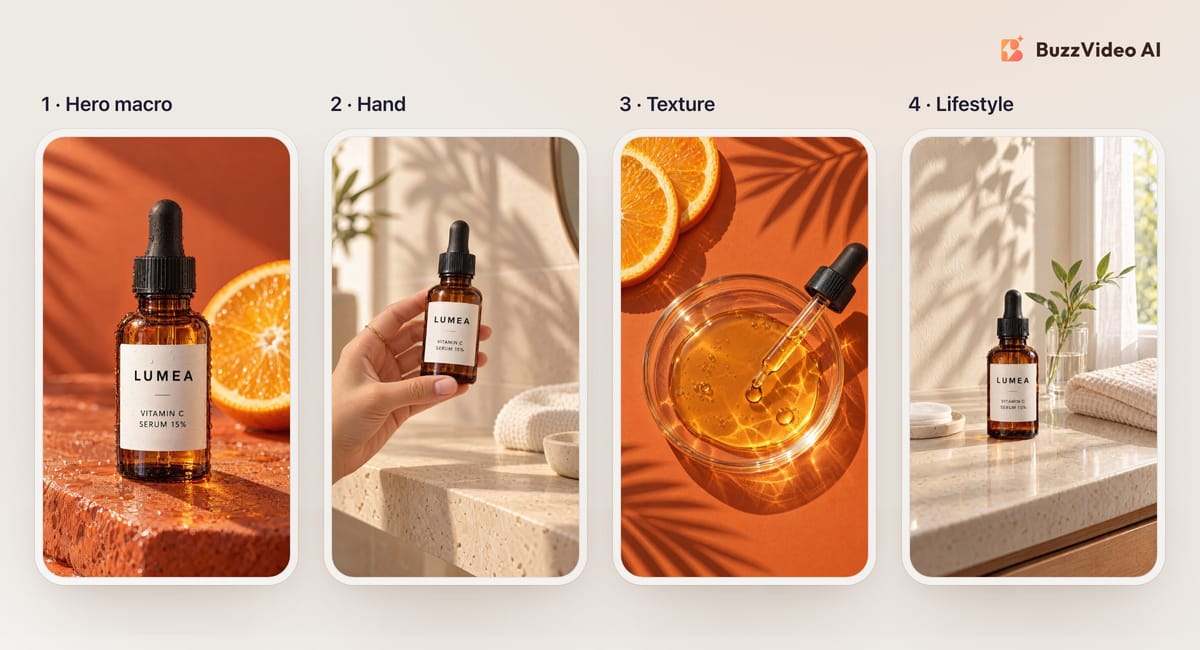
Four shots cover most short ads. Each has one job, one subject and one movement.
| Shot | Job in the ad | What moves | Seconds to keep |
|---|---|---|---|
| 1. Hero macro | Hook: the product, close and sharp | Slow push-in, light sweeping across | 2 to 3 |
| 2. Hand | Scale: how big it is in a hand | One hand sets the product down and leaves | 2 to 3 |
| 3. Texture | The sensory moment: pour, drop, swatch, steam | One drop or pour; camera locked | 2 to 3 |
| 4. Lifestyle | Where it lives; room for your offer text | Small sideways move; curtain or shadows | 2 to 3 |
That gives you 8 to 12 seconds of footage, enough for one ad or for the middle of a creator video.
How do you make AI B-roll from one product photo?
Step 1: Start from a photo where the label is readable
Use a straight, well-lit product photo. Every later shot inherits the label from this image, so a blurry or angled label will only get worse.
Step 2: Generate one start frame per shot
In the Marketing Agent, open Generate Image, attach the product photo as the reference, choose 9:16 and describe one shot at a time. We used GPT Image 2.5 Sunburst. Check each still at full size before animating it: label spelling, one product only, the right number of fingers.
Step 3: Animate each start frame for five seconds
Open Generate Video, attach the start frame, choose 9:16 and five seconds, and turn sound off if the model allows it. We used Kling 3.0 at 720p. Describe one camera move and one thing that changes, and say what must stay still.
Step 4: Inspect, trim, and cut together
Step through every clip at half-second intervals, keep the cleanest two to three seconds of each, and join them with hard cuts.
Copy-paste prompts for the four shots
These are our prompts with the product details replaced by brackets. The start-frame prompts go to the image model with your product photo attached; the motion prompts go to the video model with the start frame attached.
Shot 1: hero macro
“Vertical 9:16 photorealistic macro product photo. The exact [product] from the reference image, same shape and label text, stands upright in the centre on [surface]. Warm low sunlight from the left, solid [colour] background, shallow depth of field. One product only. No hands, no people, no extra text, no logos.”
- Start frame
“Use the image as the exact first frame. Very slow, smooth push-in. Warm sunlight sweeps across the product from left to right. The product does not move; the label stays sharp and unchanged. No hands, no people, no new objects, no added text, no cuts.”
- Motion
Shot 2: hand
“Vertical 9:16 photorealistic lifestyle photo. A woman's left hand only (one hand, five fingers) enters from the left edge and holds the exact [product] from the reference image upright just above [shelf or table], label facing the camera. Soft-focus [room] behind. Only one hand in the image, no face, no body. One product only. No extra text, no logos.”
- Start frame
“Use the image as the exact first frame. Locked-off camera. The hand slowly sets the product down upright, label facing the camera, lets go and withdraws out of frame to the left. The product then stands still. Only one hand ever appears; the label stays unchanged. No face, no new objects, no added text, no cuts.”
- Motion
Shot 3: texture
“Vertical 9:16 photorealistic top-down macro. A clear glass dish on [surface] holds a shallow pool of [the product's texture and colour]. A [dropper, spoon or spatula] lies across the lower right with one drop hanging from its tip. Hard warm sunlight. No label, no text, no hands, no people.”
- Start frame
“Use the image as the exact first frame. Top-down, camera locked off. The single drop falls into the pool and sends one slow ripple across the surface. Nothing else moves. No hands, no people, no new objects, no text, no cuts.”
- Motion
Shot 4: lifestyle
“Vertical 9:16 photorealistic still life. The exact [product] from the reference image stands upright on [vanity, desk or counter], label facing the camera, beside [two or three simple props]. Soft morning window light, sheer curtain, leaf shadows on the wall. No mirror or other reflective surface that could show a person. One product only. No people, no hands, no extra text, no logos.”
- Start frame
“Use the image as the exact first frame. Slow sideways dolly of a few centimetres, product in focus. The curtain moves gently and the leaf shadows sway. The product and props do not move; the label stays unchanged. No people, no hands, no mirrors, no new objects, no added text, no cuts.”
- Motion
Example: a four-shot B-roll reel from one photo
Nothing here was filmed; the only input was one flat-lay photo of the bottle and its carton. The reel is deliberately bare so you can judge the footage. In a real ad you would add voiceover or creator audio, and put the offer as a text card on the lifestyle shot, where there is empty wall.
What went wrong, and what did we cut?
Five generations gave us four usable shots. Here is what the frame-by-frame check found.
| Shot | What we saw | What we did |
|---|---|---|
| Hero macro | We had asked for water droplets on the bottle; from about 3.2 seconds a large one rolled across the paper label and over the brand name | Kept the first 2.7 seconds |
| Hand | The label smeared slightly while the bottle was moving in the first second; clean once it slowed | Kept the set-down and release, from 1.6 seconds |
| Texture | Clean throughout | Kept the drop and the ripple |
| Lifestyle, first try | A person's face appeared in the round mirror after one second, although the prompt said no people | Rejected; removed the mirror from the start frame and generated again |
| Lifestyle, second try | No person, but the edge of what looks like a wall mirror drifted into the top-left corner after about two seconds | Kept the first 2.6 seconds and cropped in by 7 percent |
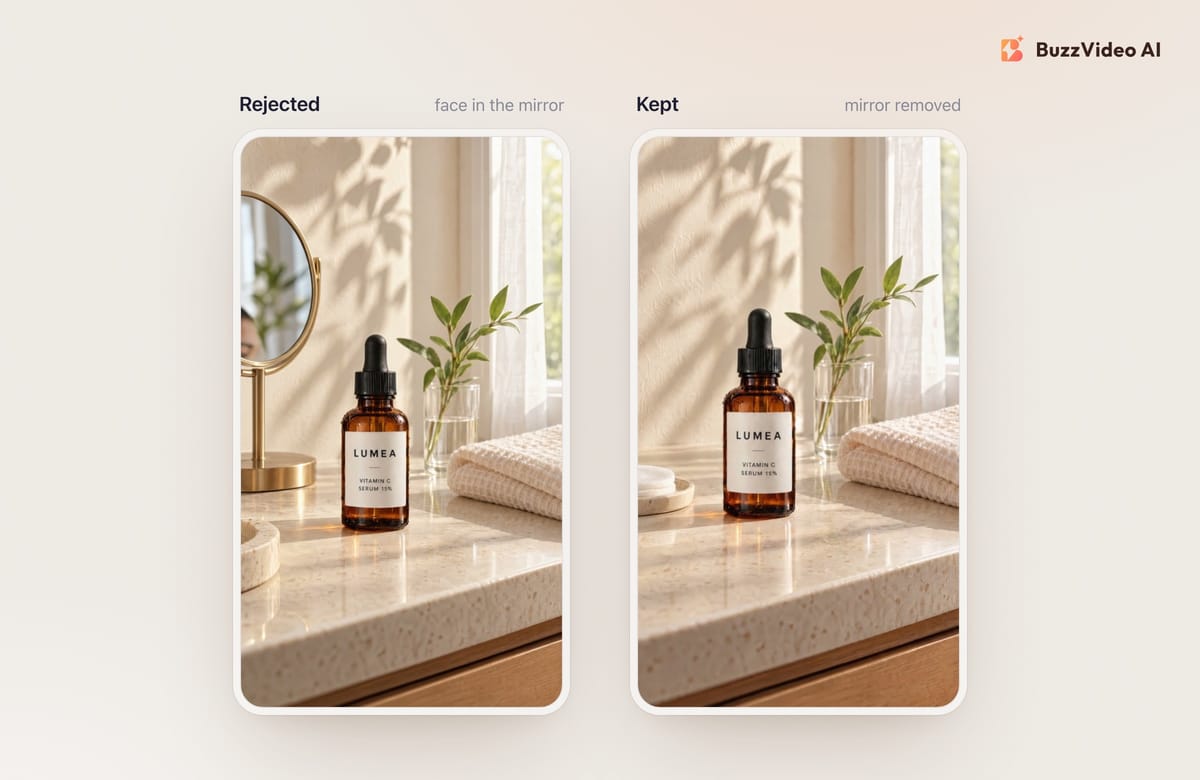
The lesson from the mirror is general: a video model will try to fill any reflective surface. Take mirrors, windows facing the camera and glossy screens out of the start frame instead of asking the motion prompt to keep them empty. Even after that, the second try slid what looks like the edge of a new mirror into one corner, which we trimmed and cropped out. That is why the lifestyle prompt above now rules reflective surfaces out, and why you still check every clip.
- Label: pause on three frames per clip and read every word.
- Hands: count fingers at the start, in the middle and at the release.
- Uninvited people: check mirrors, windows and the edges of the frame.
How much does AI B-roll cost?
These are the credits our workspace was charged today for this example. Per-model costs change, so check the pricing page before you plan a batch.
| Item | Settings | Credits each | Count | Credits |
|---|---|---|---|---|
| Start frame | GPT Image 2.5 Sunburst, 9:16, X-High | 15 | 5 | 75 |
| Five-second clip | Kling 3.0, 9:16, 720p, sound off | 70 | 5 | 350 |
| Total, including the rejected lifestyle shot | 425 |
On the Pro plan billed yearly ($35 a month for 4,900 credits), 425 credits is about $3. Starter ($14 a month billed yearly, 1,900 credits) includes Kling 3.0 and the image models used here; the Free plan has 500 one-time credits and no video generation. See pricing for current numbers, and our cheapest AI video generators comparison if cost per clip is your main constraint.
Do you have to label AI B-roll in ads?
Often, yes. TikTok's ad policy requires clear disclosure when AI-generated content shows realistic scenes or people, and Meta says it labels ads made or significantly edited with generative AI, including ads it detects were made with third-party tools (Meta Help Center; Meta's announcement). Product B-roll like this is realistic by design, so plan for the label instead of trying to avoid it. Our guide to labeling AI ads on Meta and TikTok covers both platforms.
Two rules of our own: do not use generated B-roll to show a result the product has not delivered, and keep prices, dates and claims out of the generated footage; add them as text in the edit.
If you have one good product photo, you can have a first set of B-roll today. Open the Marketing Agent, generate the four start frames, animate each one, and keep only what survives a frame-by-frame check. For full ads built the same way, see product demo videos from photos.
FAQs
What is an AI B-roll generator?
It is a tool that creates supporting footage, such as close-ups, hands, textures and lifestyle scenes, with AI. Some generate new clips from a prompt or a photo; others match stock or generated cutaways to the transcript of a talking video.
Can AI make B-roll of my actual product?
Yes, if you start from your own product photo. Generate a still for each shot with the photo as the reference, then animate the still with an image-to-video model. Text-only prompts will invent a product that only resembles yours.
How long should AI B-roll clips be for ads?
Generate about five seconds and keep two to three. Short clips hide small artifacts, keep the edit moving, and let you cut before liquids, hands or labels start to drift.
Is there a free AI B-roll generator?
Some tools offer free tiers with limits or watermarks. BuzzVideo AI's Free plan includes 500 one-time credits for images, so you can make and check start frames for free, but video generation needs a paid plan.
Can I use AI B-roll in Meta and TikTok ads?
Yes. Expect it to be labeled as AI-generated: TikTok requires disclosure of realistic AI-generated content, and Meta applies an AI label to ads it identifies as made with generative AI.
Why do faces or extra objects appear in my AI B-roll?
Video models tend to fill reflective surfaces and empty edges with something plausible. Remove mirrors, screens and windows facing the camera from the start frame, state what must not appear, and cut the clip before the problem frame.
Last verified: November 10, 2026, against our live pricing and product pages.
Next reads: Product demo videos from photos · AI product commercial from photos · Kling 4.0 for ads · Edit a video with ChatGPT or Claude

About the author
Monica
Product Manager
As a Product Manager at BuzzVideo AI, I work with marketers and growth teams on AI ad workflows—from brief to shippable creatives. I write about practical product workflows, model choices, and how teams turn product pages into ads that feel native on Meta and TikTok.